- 13 -
FAQ1
FAQ2
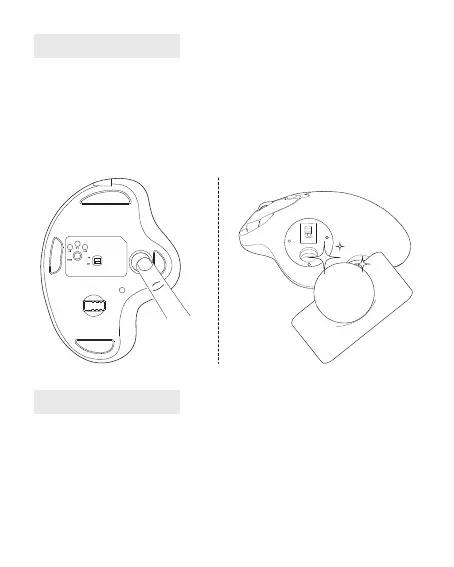
1. How to Clean Your Trackball Mouse?
If your trackball mouse cursor is sticking or jumping around on your screen, or it's
just not moving smoothly, you can clean it for better performance.
(1) Push the trackball from the bottom of the mouse.
(2) Use a humid cloth to clean the trackball, the surface of the inner trackball
housing and the sensor. Then use a cotton swab to clean the dust on three white
rollers.
2. How to Reprogram Mouse Buttons?
(1) All keys are not programmable.
(2) Forward/Backward buttons are not compatible with MAC OS.


 To Next Page