- 18 -
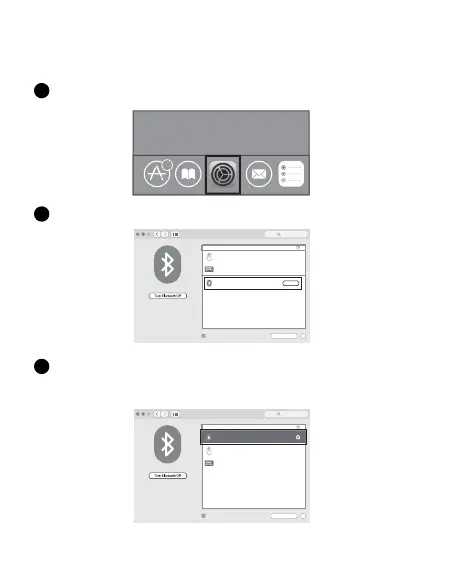
Klicken Sie auf dem Mac auf die Schaltache “Systemeinstellungen”.
1
Klicken Sie im Systemeinstellungsordner auf die Schaltache Bluetooth.
2
Mac OS-System
Bitte fuhren Sie die Bluetooth-Installationsschritte (1~ 3) vor dem Pairing durch.
6
Suchen Sie die Bluetooth-"BT5.0-Maus”/"BT3.0 Mouse" und klicken Sie
aufdie Schaltfache Pairing. Bei vollstandiger lnstallation kann die Maus
normalverwendet werden.
3
Bluetooth
Show Bluetooth in menu bar
Bluetooth: On
Now discoverable as
”forter
的
iMac”
Devices
Advanced...
?
Search
connected
Not Connected
Not Connected
”foete
r”
IK6650
forter’s iMac
Bluetooth
Not Connected
Not Connected
Show Bluetooth in menu bar
”foete
r”
Pair
IK6650
Bluetooth: On
Now discoverable as
”forter
的
iMac”
Devices
Advanced...
?
Search
forter’s iMac
BT5.0 Mouse
BT5.0 Mouse


 To Next Page