- 38 -
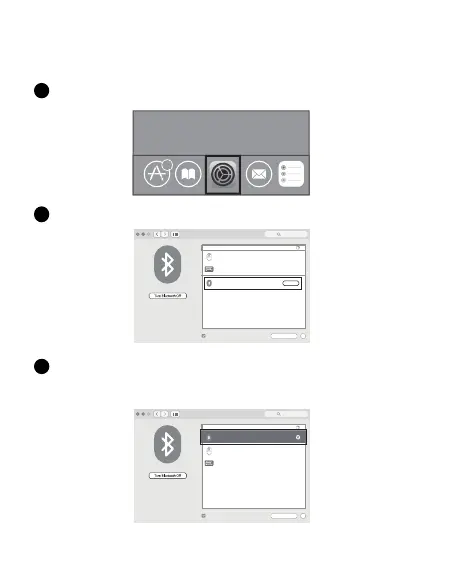
Haga clic en el botón "Preferencias del sistema" en la Mac.
1
Haga clic en el botón Bluetooth en la carpeta de preferencias del sistema.
2
Sistema Mac OS
Siga los pasos de instalacion de Bluetooth (1~ 3) antes de realizar el emparejamiento.
6
Bluetooth
Not Connected
Not Connected
Show Bluetooth in menu bar
”foete
r”
Pair
IK6650
Bluetooth: On
Now discoverable as
”forter
的
iMac”
Devices
Advanced...
?
Search
forter’s iMac
Busque el“Ratón BT5.0”/“Ratón BT3.0” de Bluetooth y haga clic en el botón
Emparejamiento. Si se instala completamente, el mouse se podria usar normalmente.
3
Bluetooth
Show Bluetooth in menu bar
Bluetooth: On
Now discoverable as
”forter
的
iMac”
Devices
Advanced...
?
Search
connected
Not Connected
Not Connected
”foete
r”
IK6650
forter’s iMac
BT5.0 Mouse
BT5.0 Mouse


 To Next Page