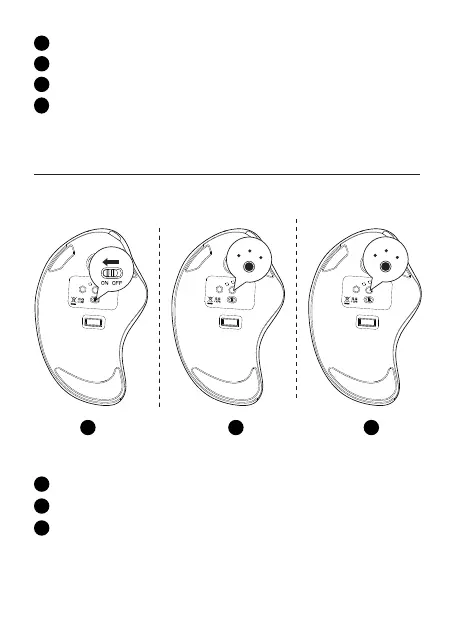
Turn on the mouse.
1
Take out the 2.4G receiver.
2
Insert it into the computer USB port.
3
Press the channel switch button, switch to 2.4G mode. The LED lights up for
5 seconds and then goes out, the pairing is successful.
4
Turn on the mouse.
1
Press the channel switch button to switch to Bluetooth mode.
2
Long press the switch button for 3-5 seconds, the LED light ashes
rapidly and the mouse enters Bluetooth pairing mode.
3
1 2 3
Bluetooth Connection
Windows System(Take Windows 10 as an example)
ON OFF
USB BT2
BT1
DPI
Mode
Model Name: M505
S/N:B0801
MADE IN CHINA
support@nulea.com
MADE IN CHINA
Model Name: M505
S/N:B0801
Model Name: M505
S/N:B0801
MADE IN CHINA
ON OFF
USB BT2
BT1
Mode
DPI
ON OFF
USB BT2
BT1
DPI
Mode
support@nulea.com
support@nulea.com
USB
BT2
BT1
USB
BT2
BT1


 To Next Page