EasyManua.ls Logo

NUOVA ELETTRONICA DSP LASER - User Manual

Default Icon
66 pages
Print Icon
To Next Page IconTo Next Page
Loading...
DSPLSR01EN
Rev. 1.7 Ed. 29/01/2020
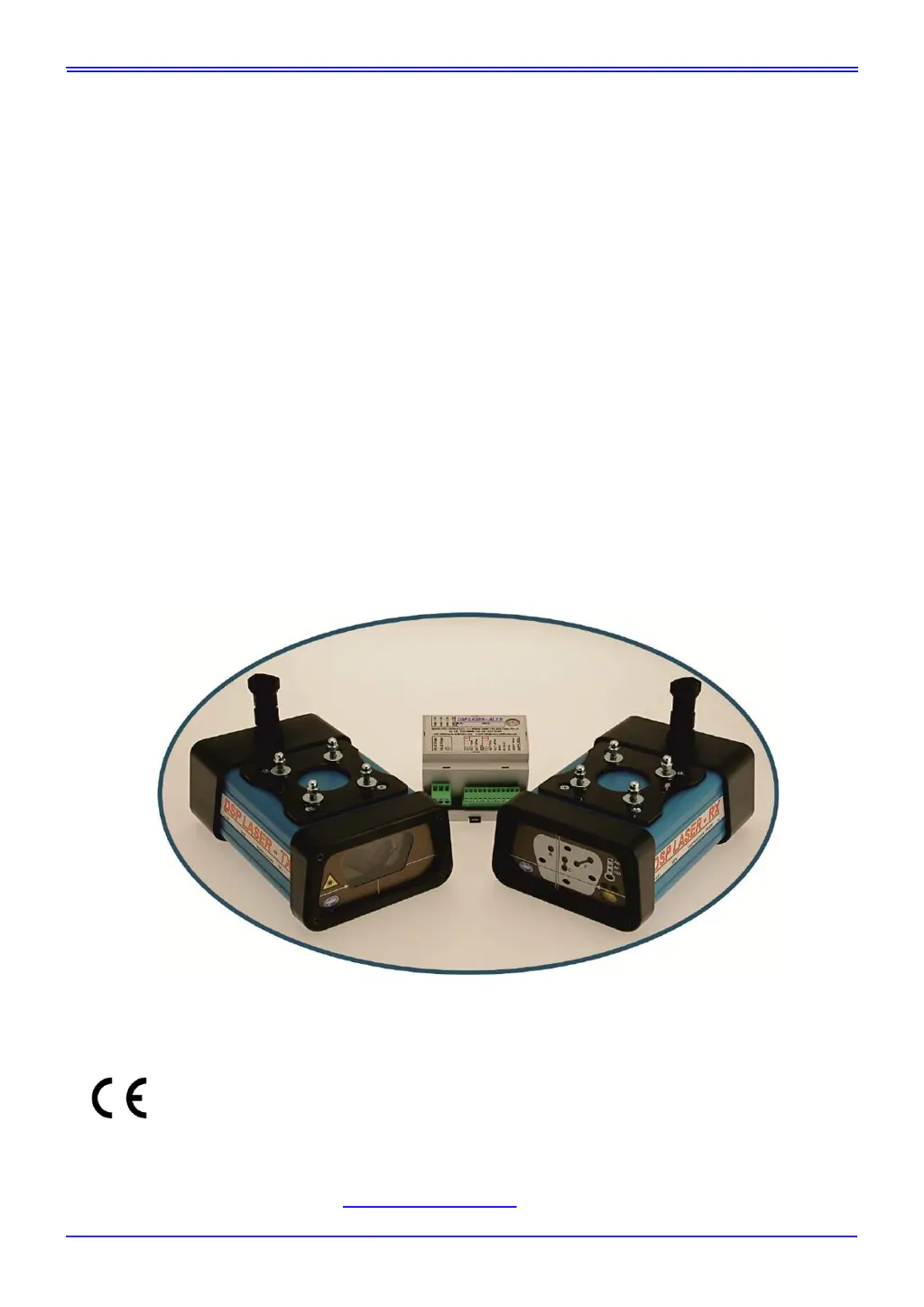
DSP LASER
INSTRUCTION MANUAL
TRANSLATION OF THE ORIGINAL INSTRUCTIONS
TYPE 4 SAFETY DEVICE
WITH
VISIBLE LASER EMISSION
Revision 1.7 of 29.01.2020
NUOVA ELETTRONICA s.n.c. di Pasqui F. & C.
Via Parri ZI Moiano - 06062 Città Della Pieve - PG - ITALIA - UE
Tel. : +39 (0)578 298066 Fax: +39 (0)578 297007
web: www.nuova-elettronica.com e-mail: info@nuova-elettronica.com

Table of Contents

Questions and Answers

  • P
    Pamela HardyAug 5, 2025
    Why is the LED AV blinking RED and the RED LED steady on in NUOVA ELETTRONICA Safety Equipment?
    • K
      Kurt StephensAug 5, 2025
      If the RED LED is steady on and the AV LED blinks red on your NUOVA ELETTRONICA Safety Equipment, it signifies an error due to HIGH SPEED. In this case, check if the stop space failed.
  • M
    Michael MillerAug 11, 2025
    What to do if LED PMSM blinks RED and LED is steady on in NUOVA ELETTRONICA DSP LASER?
    • R
      Regina RaymondAug 11, 2025
      If the RED LED is steady and the PMSM LED blinks red on your NUOVA ELETTRONICA Safety Equipment, this indicates an error with the limitswitch PMSM. Verify if the stop space check failed.
  • L
    Lisa JohnsonAug 17, 2025
    Why is LED VSA blinking RED and LED steady on in NUOVA ELETTRONICA Safety Equipment?
    • J
      johnkingAug 17, 2025
      If the VSA LED blinks red and the RED LED is steady on the NUOVA ELETTRONICA Safety Equipment, this indicates an error with the limitswitch VSA, specifically that S.A. has become greater. Check if the stop space verification failed.
  • M
    Michael RhodesAug 22, 2025
    Why does NUOVA ELETTRONICA DSP LASER turn on LEDs in sequence: RED, GREEN and YELLO/BLUE?
    • G
      gwilliamsAug 22, 2025
      If the NUOVA ELETTRONICA Safety Equipment turns on LEDs in the sequence RED, GREEN, and YELLOW/BLUE, it is because the device has been operating for more than 30 consecutive hours. This results in the DSP LASER with OSSD outputs remaining in the OFF state permanently.
  • R
    Rhonda MahoneyAug 29, 2025
    What causes the turn-on sequence of BLUE LEDs with RED and YELLOW LEDs on in NUOVA ELETTRONICA Safety Equipment?
    • B
      Bethany CohenAug 29, 2025
      If the NUOVA ELETTRONICA Safety Equipment turns on BLUE LEDs in sequence with RED and YELLOW LEDs on, it indicates a malfunction on the inputs of the operating modes.

Summary

Foreword

General Information

States the manual's origin and its role as an integral part of the equipment.

Symbols used in the manual

Warranty

Technical Service

Safety precautions

Signals of residual risks

Identifies and explains signals that indicate residual risks to the user.

Precautions

Lists essential precautions for installation, test, and maintenance by qualified personnel.

Dangers of electrical kind

Warns about electrical hazards and proper cable management.

Prohibitions

Lists actions that are forbidden, such as connecting other equipment or opening devices.

Checks

Details checks to perform before using the device, like voltage verification.

Spare parts

States that spare parts are exclusively available from Nuova Elettronica.

Decommissioning

Provides instructions for safely decommissioning the device when no longer in use.

Key

Planning safety measures

Introduction

Operating cycle of a bending press-brake

Describes the operational cycle of a hydraulic bending press-brake.

Foreseen use of the DSP LASER device

Explains the intended purpose and limitations of the DSP LASER system.

Operating principle

Details how the DSP LASER forms a detection area using laser beams.

Requirements necessary for the correct use of DSP LASER

Command circuit of the press-brake

Explains how the command circuit of the press-brake should be configured.

Residual risks

Risks due to the Laser

Discusses potential dangers arising from the laser beam itself.

Risks due to mechanical dangers

Highlights risks associated with mechanical aspects of the press-brake operation.

Signals and plate data

Light indicators: scheme and functions

Explains the various LEDs and their functions for status indication.

Installation

Standard supply

Lists the components included in the standard supply of the DSP LASER.

Transport and unpackaging

Gives guidelines for safe transport and unpacking of the device.

Mechanical installation

Details the mechanical installation steps for the device components.

Electrical connection

Provides instructions for connecting the DSP LASER system electrically.

Commissioning

Power supply of the device

Details how to power up the DSP LASER device and check initial LED status.

Adjustment after the installation

Guides on adjusting the device after mechanical installation using a test instrument.

Use

Setting of PCV

Describes how to set the PCV (Speed Change Point) based on sheet flatness.

Check of the stop space

Details the mandatory stop space check procedure at startup and periodically.

Adjustment after the change of the upper tool

Explains the need for re-alignment after changing the upper tool.

Check of the correct positioning

Describes how to check the correct positioning of TX and RX using a test instrument.

Check of the Receiver LEDs

Explains how to check receiver LEDs for correct alignment and operation.

Maintenance

Troubleshooting guide

Removal of the device and re-installation after repair

Technical characteristics

CE Declarations of conformity

NUOVA ELETTRONICA DSP LASER Specifications

General IconGeneral
BrandNUOVA ELETTRONICA
ModelDSP LASER
CategorySafety Equipment
LanguageEnglish

Related product manuals