device will enumerate as a USB Audio device on your PC.
3. Install the latest driver just download via NuPrime website.
4. In Control Panel->Sound, select “NuPrime DAC-9” as your Default Device.
To run the NuPrime DAC-9 on Windows – DSD
Install playback software on Windows
1. Install the Foobar media player
http://www.foobar2000.org/download
2. Download the ‘SACD’ plugin http://sourceforge.net/projects/sacddecoder/files/latest/download
a. To install, in Foobar goto File->Preferences and select Components
b. Click the Install… button
c. Select the zip file
d. Click Apply (foobar will restart)
3. Download the ASIO plugin from http://www.foobar2000.org/components/view/foo_out_asio
a. Install the plugin
b. Click Apply (foobar will restart)
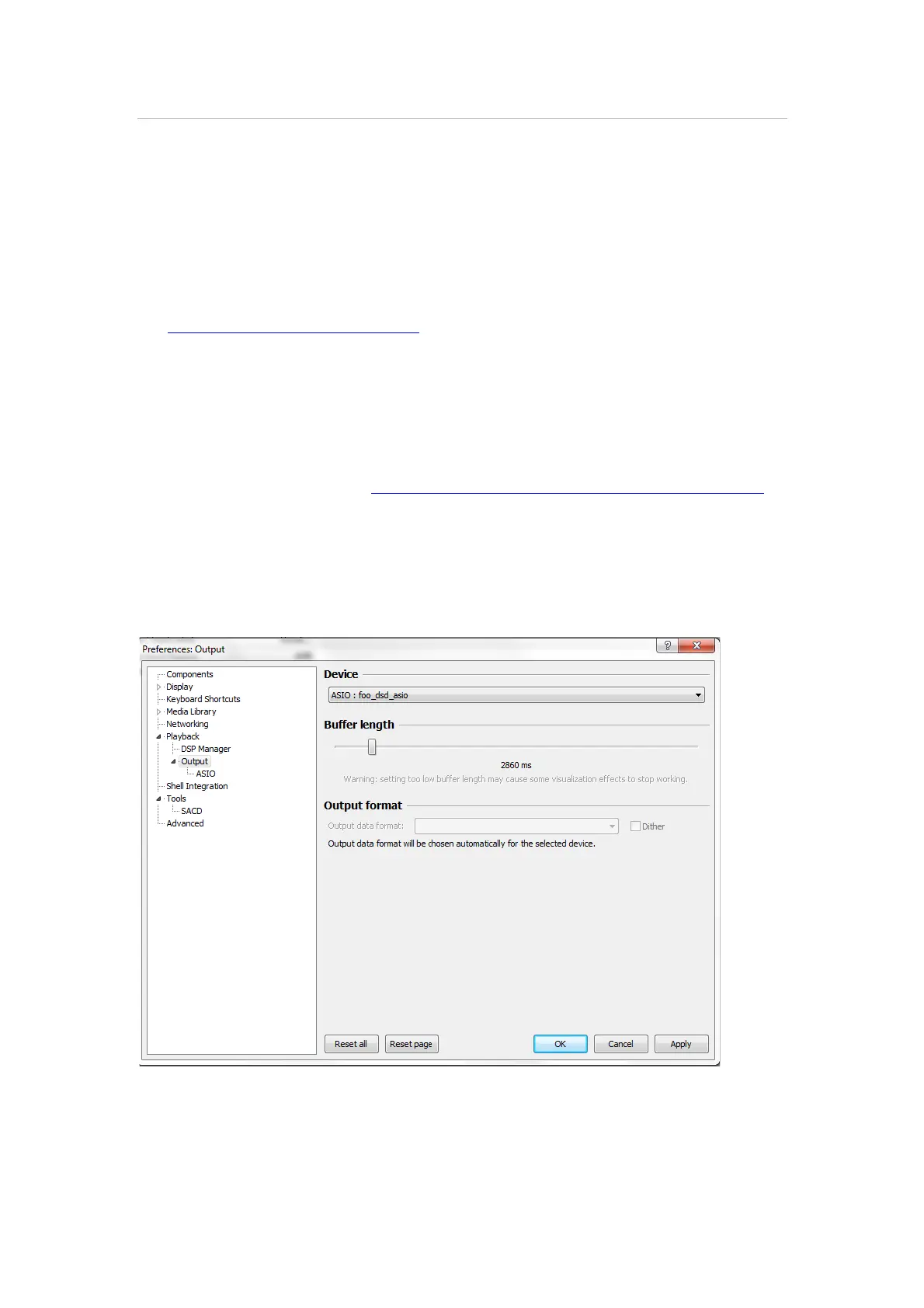
4. Configure the Output Device
a. Go to Playback->Output
b. Select the Device: ASIO foo_dsd_asio
5. Configure the ASIO output
a. Go to Playback->Output->ASIO, double-click on foo_dsd_asio
b. Select the NuPrime ASIO Driver
c. Select ASIO Native
d. Select PCM to DSD Method: None
e. Select Fs: DSD128


 To Next Page