EZ80N
n
Installation Guide
Page 4
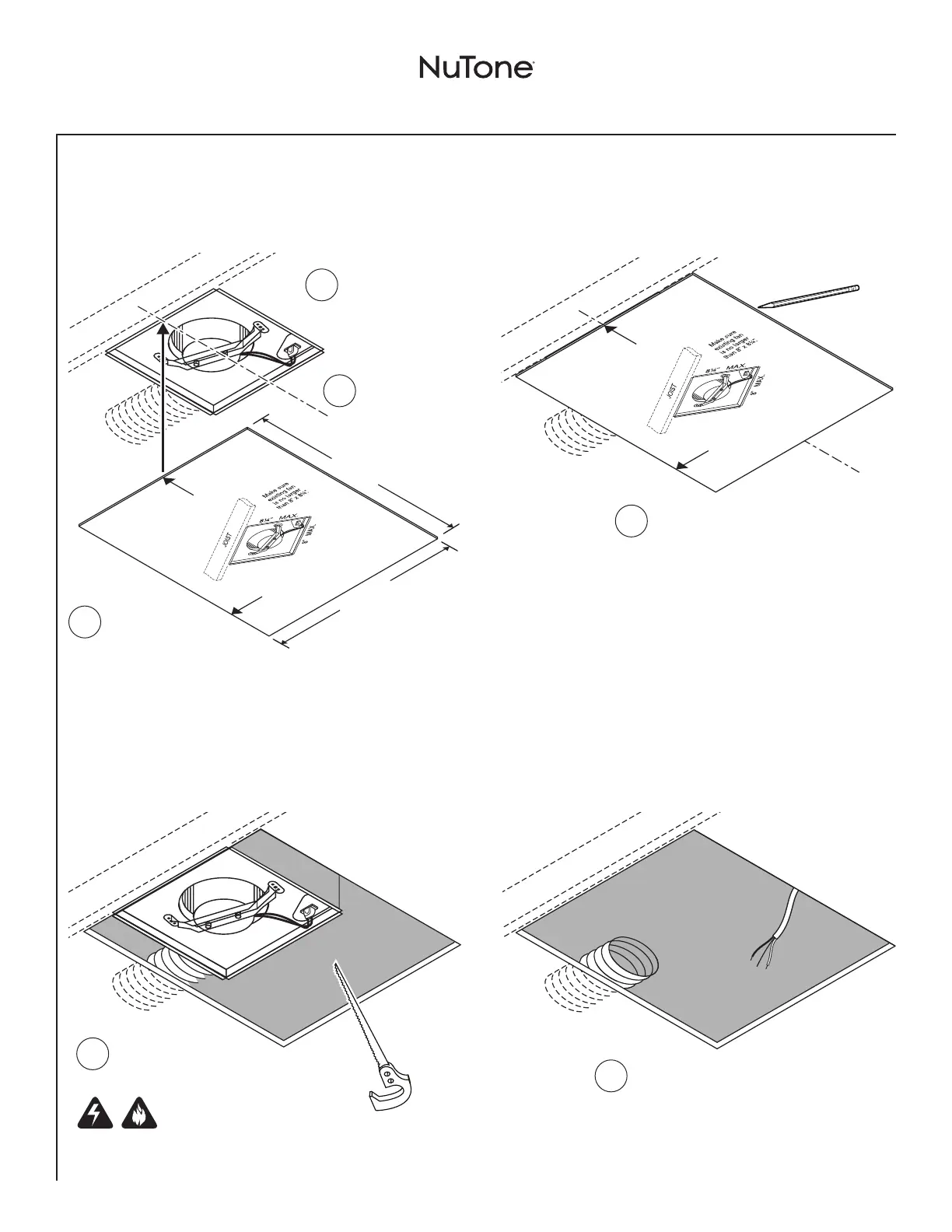
Installation - Replace an Existing Fan
3
Mark Ceiling Using Template
C
L
8” MAX.
8¼” MAX.
10¾”
12¼”
JOIST
CENTER LINE
OF INSTALLATION
LOCATION OF
NEW FAN’S
DUCT CONNECTOR
For retrofit installations: Place this edge against ceiling framing.
(See installation instructions.)
C
L
JOIST
CENTER LINE
OF INSTALLATION
LOCATION OF
NEW FAN’S
DUCT CONNECTOR
For retrofit installations: Place this edge against ceiling framing.
(See installation instructions.)
Mark center line
of existing fan
on ceiling.
2
Position
template over
existing fan with
arrow on center line.
3
4
Trace around outside
of template with a
pencil.
1
Use a drywall saw to
cut out ceiling material
where marked.
WARNING
Be careful to avoid cutting through
electrical wiring or ductwork.
2
Disconnect electrical
wiring and ductwork -
then remove existing fan.
4
Cut Ceiling Opening & Remove Old Fan
JOIST
JOIST
Make sure existing
fan is no larger
than 8” x 8¼”.
1


 To Next Page