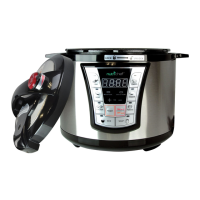
HOW TO USE.
Operation
Be sure of the steamer valve is in the right side to avoid losing air pressure while cooking.
FISH MODE (Time Range is 00:03-00:15)
1. Prepare food for “FISH” function
2. Place the removable cooking pot in its place and close the Lid
3. Press “FISH” button with one beep sound, indicator light of “FISH” button is On, LED display will show the
default pressure keeping time 00:05.
Adjust the keep pressure time if desired by pressing “+” and “-” buttons.
Use “+”button to increase the time and “-“ button to decrease the time in 1 min increment .
4. Press “on/off warm” button with a beep sound, the “add pressure” indicator light will turn on, and the LED will
display _0:05 (“_” if the LED is moving up and down and ":"is blinking at same time, this means the inside air
pressure is increasing). Until the Pressure inside is stable, the LED will change to P:05 and will start counting down
from P:05, P:04 ~ to 00:00 and end with a triple beep sound, and then enter “keep warm” automatically. At that point
the “add pressure” indicator light will turn off, and the “Warm” indicator light will start blinking. LED will start at
00:00 and count up. Until you press “on/off warm” button, the cooker will continue to keep warm for 24 hours.
5. You can cancel the keep warm by pressing the“on/off warm” button,all the indicator lights will turn off, the LED
will display“00:00”and the cooker will be in standby mode.
6. Open the lid until the pressure valve is down, (you can’t open the lid if the pressure valve is up). Pressure valve will
move down when internal pressure is released. You can adjust the steamer valve handle direction to release the pressure
or just wait approximately 5 to 8 minutes until the pressure is released automatically.)
MEAT MODE (Time Range is 00:12-00:30)
1. Prepare food for “MEAT” function
2. Place the removable cooking pot in its place and close the Lid
3. Press “MEAT” button with one beep sound, indicator light of “MEAT” button is On, LED display will show the
default pressure keeping time 00:20
Adjust the keep pressure time if desired by pressing “+” and “-“ buttons.
Use “+”button to increase the time and “-“ button to decrease the time in 1 min increment .
4. Press “on/off warm” button with a beep sound, the “add pressure” indicator light will turn on, and the LED will
display _0:20 (“_” if the LED is moving up and down and ":"is blinking at same time, this means the inside air
pressure is increasing). Until the Pressure inside is stable, the LED will change to P:20 and will start counting down
from P:20, P:19 ~ to 00:00 and end with a triple beep sound, and then enter “keep warm” automatically. At that point
the “add pressure” indicator light will turn off, and the “Warm” indicator light will start blinking. LED will start at
00:00 and count up. Until you press “on/off warm” button, the cooker will continue to keep warm for 24 hours.
5. You can cancel the keep warm by pressing the“on/off warm” button,all the indicator lights will turn off, the LED
will display“00:00”, and the cooker will be in standby mode.
6. Open the lid until the pressure valve is down, (you can’t open the lid if the pressure valve is up). Pressure valve will


 To Next Page
 Loading...