ﺎ
ً
ﺌﻓاد ﻆﻔﺤﻳ
OATMEALRICE
SOUP
CANCEL
PRESSURE
COOK
HOUR | MIN
SLOW COOKSAUTE
BEAN MEAT
YOGURTSTEAM
STARTDELAY
ﺎﻴﻟﻮﺻﺎﻓ
ءﺎﺴﺣ
ﻢﺤﻟ
ﻎﻳﺮﻔﺘﺑ ﻮﻬﻄﻣ
ءاﻮﻬﻟا
SOUS
VIDE
زرأ
نﺎﻓﻮﺸﻟا
ﺮﺨﺒﻣ يدﺎﺑز
ءﺪﺑ
ﺮﻴﺧﺄﺗ
ﻪﻴﺗﻮﺳ
ﻂﻐﻀﻟا ﻲﻬﻃ
ءﻲﻄﺑ ﻲﻬﻃ
ءﺎﻐﻟإ
Smart Pot
KEEP
WARM
ﺔﻘﻴﻗد | ﺔﻋﺎﺳ
1
2
3
4
7
5
8
9
10
11
12
6
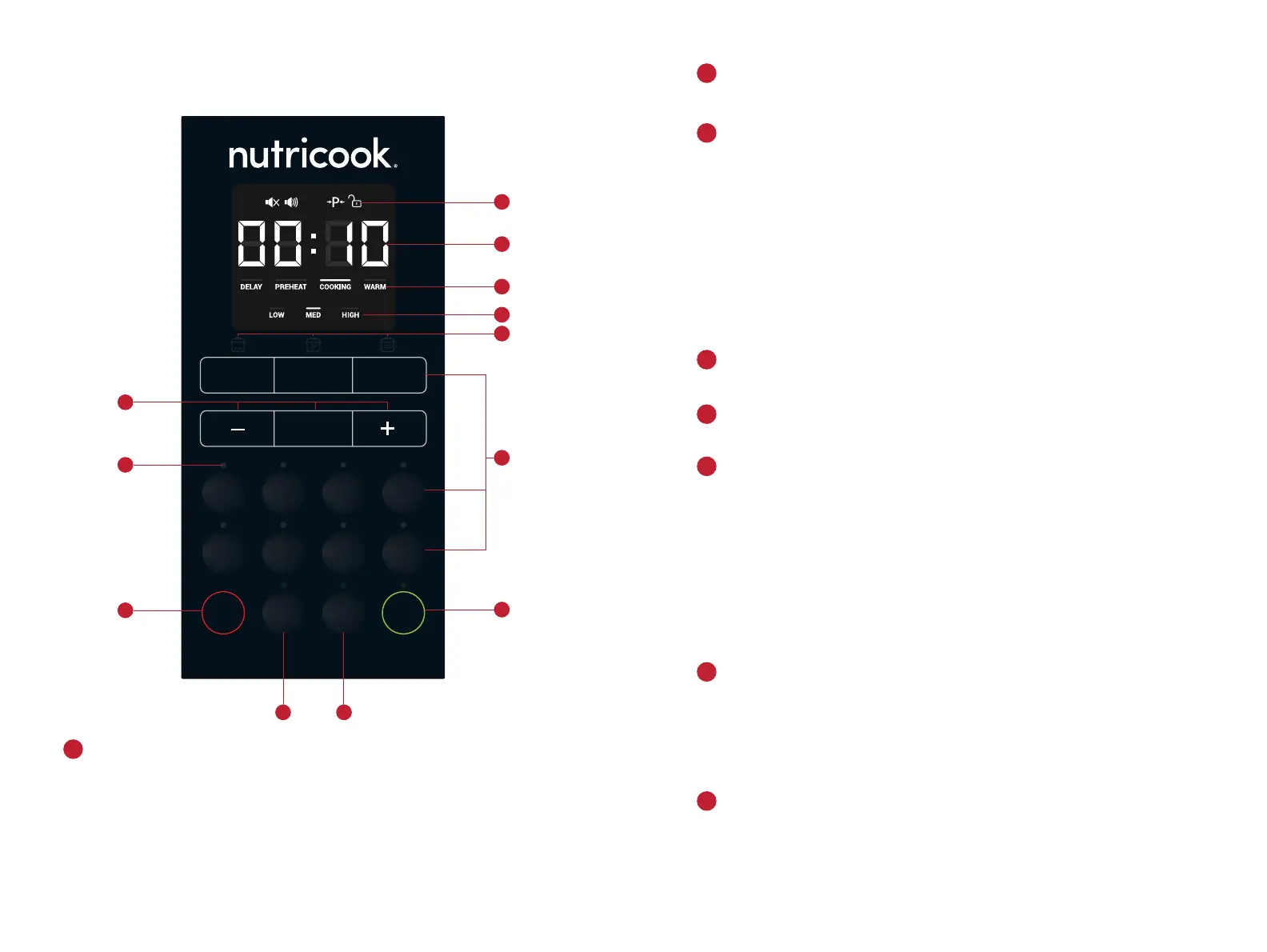
Control panel details.
Time and status display.
Cooking status indicators.
Displays cooking, delay and Keep Warm time in HH:MM format including
temperature for Sous Vide. The first two digits refer to the Hour field while
the last two digits refer to the Minute field.
Displays status messages of the cooker. See Display Messages section of
this User Guide for additional details.
Illuminates to indicate cooking progress.
1
2
Cooking mode indicators.
Saute, Pressure Cook and Slow Cook indicator.
CANCEL button.
When running any of the Preset Pressure Cooking Programs except
Pressure Cook – Low, Med, High refer to the preset time options. When
cooking using Pressure Cook, adjustable cooking modes are only Low and
High which refer to Low and High Pressure levels.
For Non-pressure cooking programs which include Saute, Slow Cook and
Yogurt - Low, Med, High refer to temperature levels.
For Keep Warm program – Low, Med, High refer to temperature levels.
Note: Not available for Sous Vide.
Illuminates when the button is selected.
Illuminates when a program is selected to indicate that it is active.
Use to CANCEL any operation during program selection or during the
cooking cycle. Pressing this button will return the cooker to the standby
mode.
3
4
8
Indicator light.
Time Controls.
Smart cooking programs.
Pressure Cooking Programs
Rice Soup
Oatmeal Steam
Bean Pressure Cook
Meat
Non-pressure Cooking Programs
Sauté
Slow Cook
Yogurt
Sous Vide
Use + to increase cooking time
Use – to decrease cooking time
Use Hour/Min to select between Hour and Minute field depending on
the time that needs to be adjusted. The selected field blinks. When unit
is on standby mode, press and hold the Hour/Min button to display
temperature unit and switch between C and F using + button. The selected
temperature unit will be displayed during Sous Vide.
Note: Hour/Min is not applicable for Sauté.
5
6
7
3130


 To Next Page