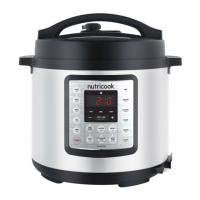
Initial test run.
In order to familiarize yourself with the Smart Pot and start cooking
with your favourite recipe, it is highly recommended for first time users
to do a test run. This optional but recommended test run will complete
in about 15 minutes.
1. Open and remove lid.
2. Remove the inner pot from the cooker base.
3. Add 3 cups (750 ml) water to the inner pot.
4. Place the inner pot into the cooker base.
WARNING: Ensure that the outside surface especially the
bottom part of the inner pot is completely dry before placing in
the cooker base.
5. Place the pressure cooking lid in the cooker base rim and lock in
properly.
6. Ensure pressure release button is in up (Sealing) position.
7. Plug in cooker to a power outlet.
8. Select Pressure Cook.
9. Adjust the time to 00:05 minutes using the - button. Optionally,
press Keep Warm to turn off Auto Keep Warm function.
10. Press START to begin initial test run.
Note:
• If START is not pressed after program settings, the cooker
automatically starts after 10 seconds.
• Once cooker starts, time adjustments made will be
automatically saved to the Pressure Cook program.
11. Once cooker starts, the screen displays On.
12. When maximum pressure level is reached, float valve pops out
and screen displays the countdown time.
13. When the time has been completed and Keep Warm function is
turned off, screen displays End.
Note:
• If Auto Keep Warm is activated, the cooker goes to Keep
Warm mode immediately after the cycle and counts up from
00:00.
*See Auto Keep Warm section of this User Guide for more details.
14. Use Quick Release Venting method to depressurize the pressure
cooker.
CAUTION: Always follow safety measures while venting
pressure to avoid serious physical injury and property damage.
15. Once all pressure from the inner pot has been completely
released, open lid.
16. Discard water and dry inner pot.
You’re all set. Start cooking!
4140


 To Next Page