8
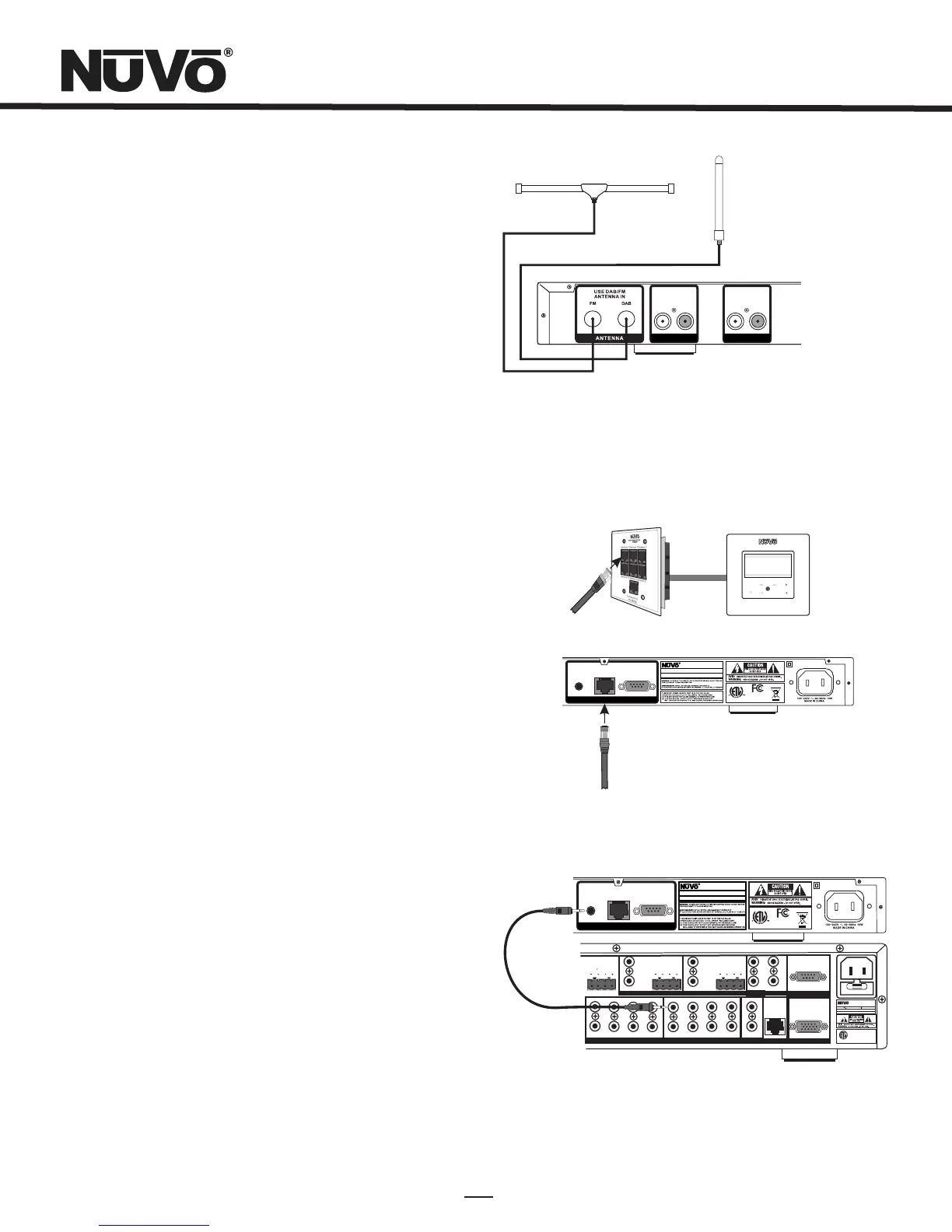
FM and DAB Antenna Installation (Fig. 4)
The T2DAB is not shipped with an FM or DAB antenna. Any
after-market FM or DAB antenna will supply a signal. The
connection for both antennas is done with standard 75 ohm
RG6 coaxial cable. A separate “F” connector for both signal
inputs are provided on the T2DAB back panel.
Note, that signal quality is greatly affected by the location and
quality of the attached antennas. Often, best reception is
achieved by placing the antennas as high as possible.
Connecting for NuVoNet Use (Fig. 5)
Once audio outputs A and B are set for NuVoNet, the T2DAB is
ready to communicate in real time with the Grand Concerto or
Essentia E6G audio distribution systems. To complete the
connection, all that is necessary is a single CAT5 cable from the
NuVoNet output on the T2DAB's back panel to one of the Device
inputs on either the Grand Concerto EZ Port or the Essentia E6G
Allport. Since the outputs of the Tuner must be set as a specific
source number input for NuVoNet communication, the number
of the Device connection used is irrelevant to the system's
operation. Once the connection is complete, the tuner is ready
to fully communicate with NuVoNet.
IR Control of the T2DAB (Fig. 6)
The T2DAB can be used without NuVoNet as a standalone dual
tuner. The IR receiver is always active, however control through
IR is typically done in Standalone mode,(see section I. Setting
the Audio Outputs for NuVoNet or Standalone use, pg. 7).
Once the audio outputs are set at Standalone, the T2DAB offers
three methods for IR control. One is to take the IR output of
your control device using a mono 3.5mm patch cable into the
Direct IR input on the back panel of the T2DAB. Tuners A and B
feature discrete commands, allowing both tuners to be
controlled independently from one input. The second method
for IR control is to attach an IR emitter over the IR receiver on
the front panel, and the third method is to aim the remote
control at the IR receiver located on the front panel.
Fig. 4
Fig. 5
MENU
OK
Jozef Kossovit
SIR
SR 86 (P101)
SIRIUS Pops
3:09 PM
Hungaria
0728
3033 118
E
R
T
E
T
K
N
I
CM
Mod el NV-T2 DAB
Dual A M/FM Tune r
www. nuvote chno logies .com
NuVo Tec hnolog ies LL C Hebr on, KY U SA •
CONF ORMS TO UL
STD. 60065 CE RTIF IED
TO CAN/C SA STD.
C22. 2 No.600 65:0 6
RS 23 2
SYSTEM
NuVoN et
IR IN PUT
RoHS
SYS ON
EXT. MUTE
SYSTEM
ZONE TRI GGER OUTP UTS
NETWOR K
SUM1
EMITTE R OUTPUTS
303311 8
C
US
R
CONF ORMS TO
UL STD .6500
CERT IFIED TO
CAN/ CSA STD. E6006 5
NuVo Tech nolog ies Cin cinna ti Ohio US A
FUSE :T5 A
120V 6 0Hz 500 W
MODEL N V-I8M
SIX SOU RCE EIG HT ZONE
AUDIO D ISTRI BUTIO N SYSTE M
www.n uvote chnol ogies .com
DIGITAL LINK
VARI ABLE
OUT PUT
FIX ED
OUT PUT
TIP =L
RIN G=R
VARI ABLE
OUT PUT
FIX ED
OUT PUT
TIP =L
RIN G=R
VAR.
OUT
FIX .
OUT
PROGRA M
1 2 3
4
1 2 3
CON NECT TO
NV-I 8X
USE N V-SLC1
CAB LE
CON NECT TO
NV-I 8EZP1
USE N V-NC1
CAB LE
USE CNLY WITH 250V FUSE
4
5
6
SUM2
5 6 7
8
ZONE 5
ZONE 6
ZONE 7
ZONE 8
RS 23 2
SPE AKER
40W /6 OHMS X 2
LEF T RIGHT
SPE AKER
40W /6 OHMS X 2
LEF T RIGHT
SPE AKER
40W /6 OHMS X 2
LEF T RIGHT
0728
303 3118
R
T
E
E
T
K
N
I
CM
Model NV -T2 DAB
Dual SIRI US Ready AM/FM Tuner
www.nuvot echno logi es. com
NuVo Techno log ies LLC Hebr on, KY USA •
CONFORMS TO UL
STD.60 065 CERTIFIED
TO CAN/CSA STD.
C22.2 No.60 065:0 6
RS 232
SYS TEM
NuVoNet
IR INPUT
RoHS
Fig. 6
L
AUDIO
R
TUNER A
L
AUDIO
R
TUNER B


 To Next Page