2
T2DAB Quick Setup Guide for Use With NuVoNet
The T2DAB Dual Tuner is the perfect broadcast music solution for whole-home audio. The internal NuVoNet capability of the T2DAB
allows it to easily communicate in real time with the NuVo Grand Concerto and Essentia E6G Control Pads. The following is a step-
by-step guide for setting up and installing the T2DAB for use with the Grand Concerto and Essentia NuVoNet Suites.
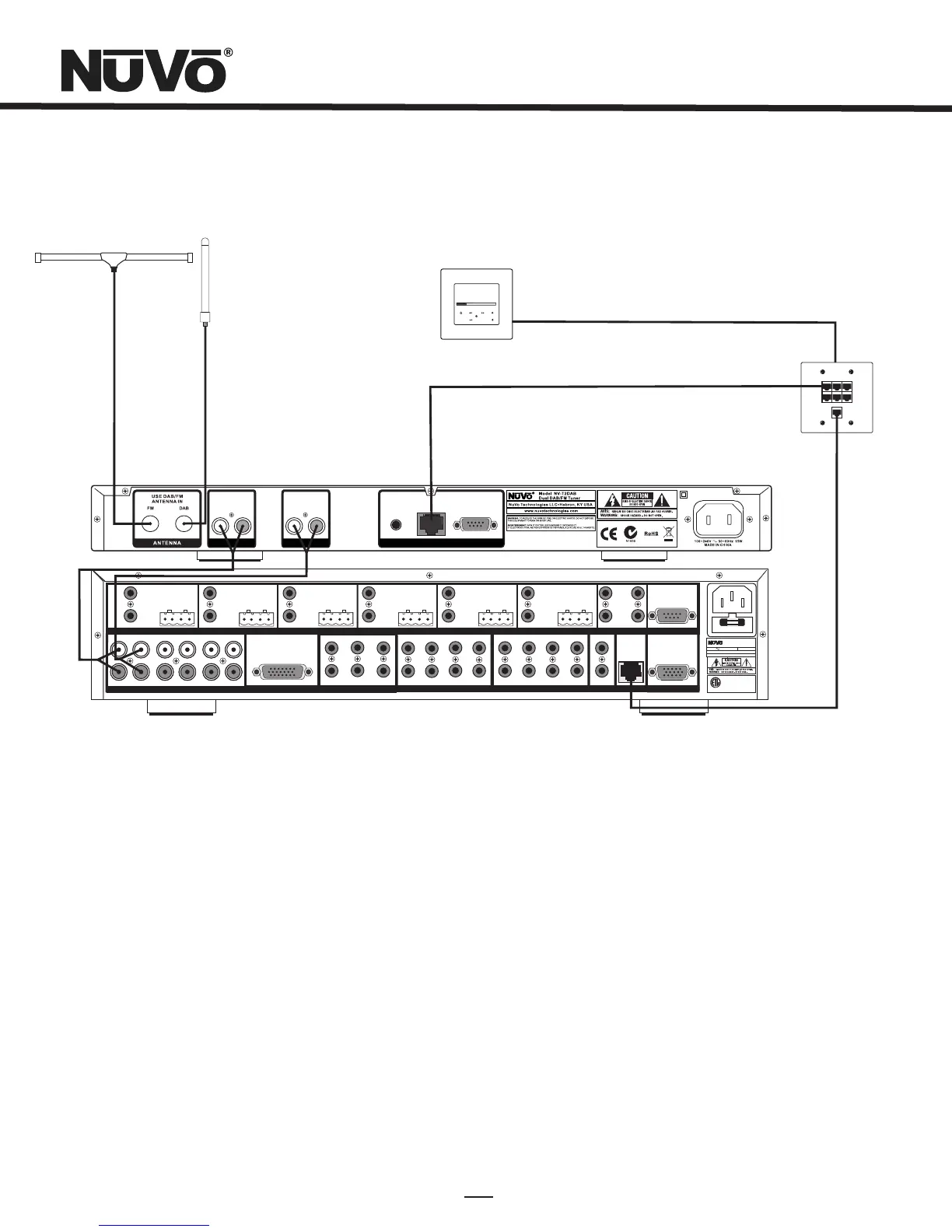
Step 1: Upon unpacking your T2DAB Tuner, establish what audio inputs, 1-6, the T2's A and B audio outputs will represent. Plug the
T2 into an AC power source.
Step 2: Attach the audio outputs A and B of the Tuner to the appropriate numbered inputs on the Grand Concerto or Essentia
System.
Step 3: Connect the CAT5 from the NuVoNet output on the rear panel of the Tuner to one of the Device inputs on the Grand Concerto
EZ Port or the Essentia Allport. This will enable communication to the System's Control Pads. Note that a single CAT5 connection
provides information from both tuners A and B. A final CAT5 Connection should then be made to the NuVoNet CAT5 input on the
back panel of the Grand Concerto or Essenita main amplifier for the NuVoNet RJ45 on the Grand Concerto EZ Port or the Essentia
Allport. This completes the necessary connection for the NuVoNet communication.
T2DAB Wiring Diagram
072 8
RS 232
SYSTEM
NuVoNet
IR INPUT
L
AUDIO
R
TUNER A
L
AUDIO
R
TUNER B
R
OUTPUT POWER
OUTPUT POWER
20W/6OHM X2
20W/6OHM X2
SYS ON
EXT. MUTE
L
R
L
R
L
R
VARI ABLE
OUT PUT
FIX ED
OUT PUT
SUM1
3033 118
C
US
CON FORMS TO
UL STD .6500
CER TIFIE D TO
CAN /CSA STD .E600 65
NuVo Tech nolog ies Cin cinna ti Ohio U SA
FUS E:T5 A
120 V 60Hz 50 0W
MODE L NV-I8D M
SIX SO URCE EI GHT ZON E
AUDI O DISTR IBUTI ON SYST EM
www. nuvot echno logie s.com
OUTPUT POWER
OUTPUT POWER
OUTPUT POWER
20W/6OHM X2
20W/6OHM X2
20W/6OHM X2
TIP =L
RIN G=R
VARI ABLE
OUT PUT
FIX ED
OUT PUT
TIP =L
RIN G=R
VARI ABLE
OUT PUT
FIX ED
OUT PUT
TIP =L
RIN G=R
VARI ABLE
OUT PUT
FIX ED
OUT PUT
TIP =L
RIN G=R
VARI ABLE
OUT PUT
FIX ED
OUT PUT
TIP =L
RIN G=R
VARI ABLE
OUT PUT
VARI ABLE
OUT PUT
FIX ED
OUT PUT
FIX ED
OUT PUT
TIP =L
RIN G=R
TIP =L
RIN G=R
1 2 3 4 5
6
1 2 3 4 5
6
2 3
4
1 2 3
RS-232
CON NECT TO
NV-I 8X
USE N V-SLC1
CAB LE
CON NECT TO
NV-I 8X
USE N V-SLC1
CAB LE
CON NECT TO
NV-I 8EZP1
USE N V-NC1
CAB LE
USE CNLY WITH 250V FUSE
4
5
6
SUM2
5 6 7
8
OUTPUT POWER
20W/6OHM X2
ZONE 6ZONE 6
ZONE 7&8
SYSTEM
ZONE TRIGG ER OUTPUTS
SOURCE LINK
SOURCE INP UTS
ZONE 1
NETWORK
EMITTER OU TPUTS DIGITAL LINK
ZONE 3
ZONE 4
ZONE 5
ZONE 2
PROGRAM
6
4
5
3
1
2
SOURCE STATUS INPU TS
1
MENU
OK
Modern Rock
Drift-Follow Th
Living For
AM/FM
3:09 pm
Diagram shown using the Grand Concerto System
DAB antenna represented is not
included.
FM antenna represented is not
included.
Conc erto EZ Po rt
Mode l NV-I8GE ZP
Device 2 Device 3
Device 4 Device 5 Device 6
Conn ect to
NV-I8 GM
www.nuvo techno log ies.co m
NuVo Techno logies LLC Hebro n, Ken tucky U SA
Device 1


 To Next Page