nuwavenow.com | 7
Air Filter Assembly
The OxyPure
®
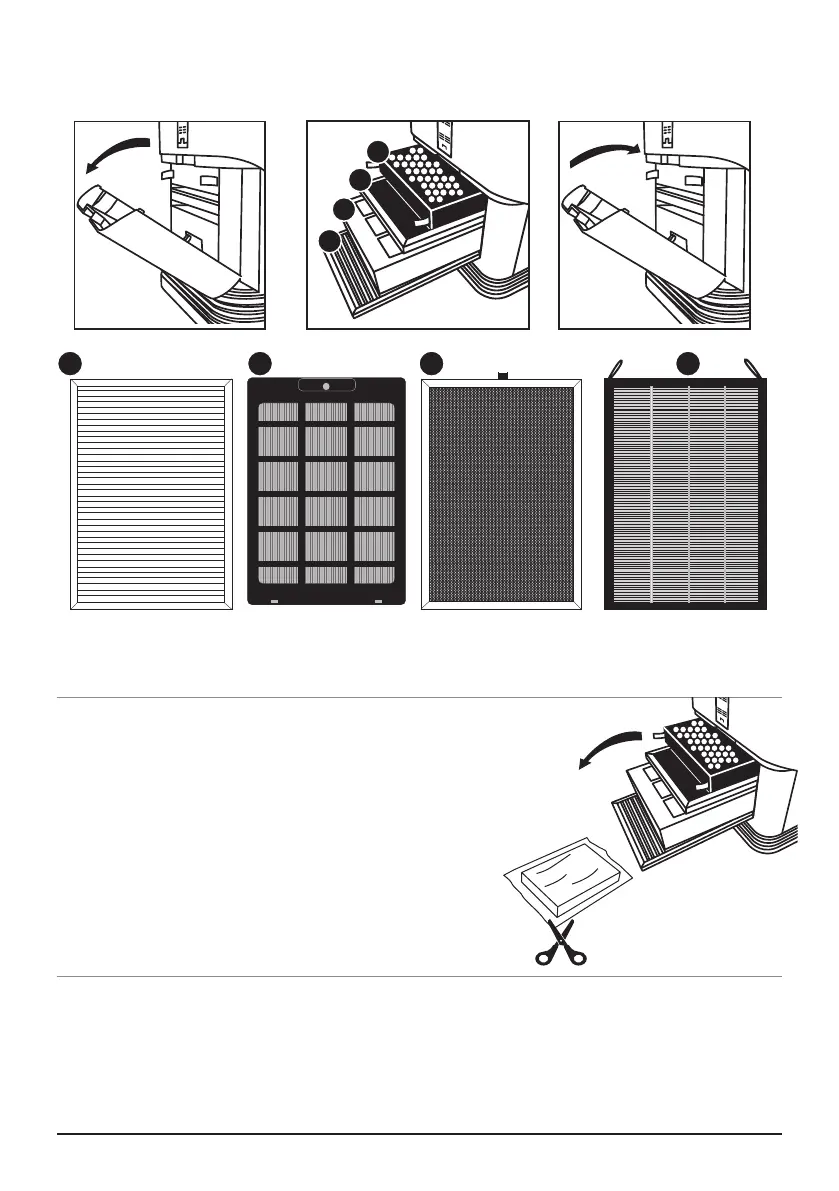
comes with four different preassembled filters inside the unit (see diagram
on the right). Each filter is labeled with a number. Match these with the slot numbers
when installing the filters. When the filters require cleaning, please refer to Cleaning &
Maintenance.
ASSEMBLY
Open Close
Access to Filters
Stainless Steel
Pre-Filter
Bio-Guard
™
Filter Ozone Emission
Removal Filter
HEPA/Carbon
Filter
Before Use:
1. Make sure the OxyPure
®
is unplugged. Open the
panel on the back to expose the lters.
2. Pull the lters from their slots.
3. Remove the plastic wrapping from the lters.
4. Fully reinsert the lters into the Oxypure and close
the panel.
5. Remove the sticker from the control panel.
4
3
2
1
4321










 To Next Page