6 | nuwavenow.com
PARTS & ACCESSORIES
PART & ORDER INFORMATION • ASSEMBLY
Ordering Parts
To order new Bio-Guard Filters and other replaceable parts, nd the part number then
order online at www.nuwavenow.com.
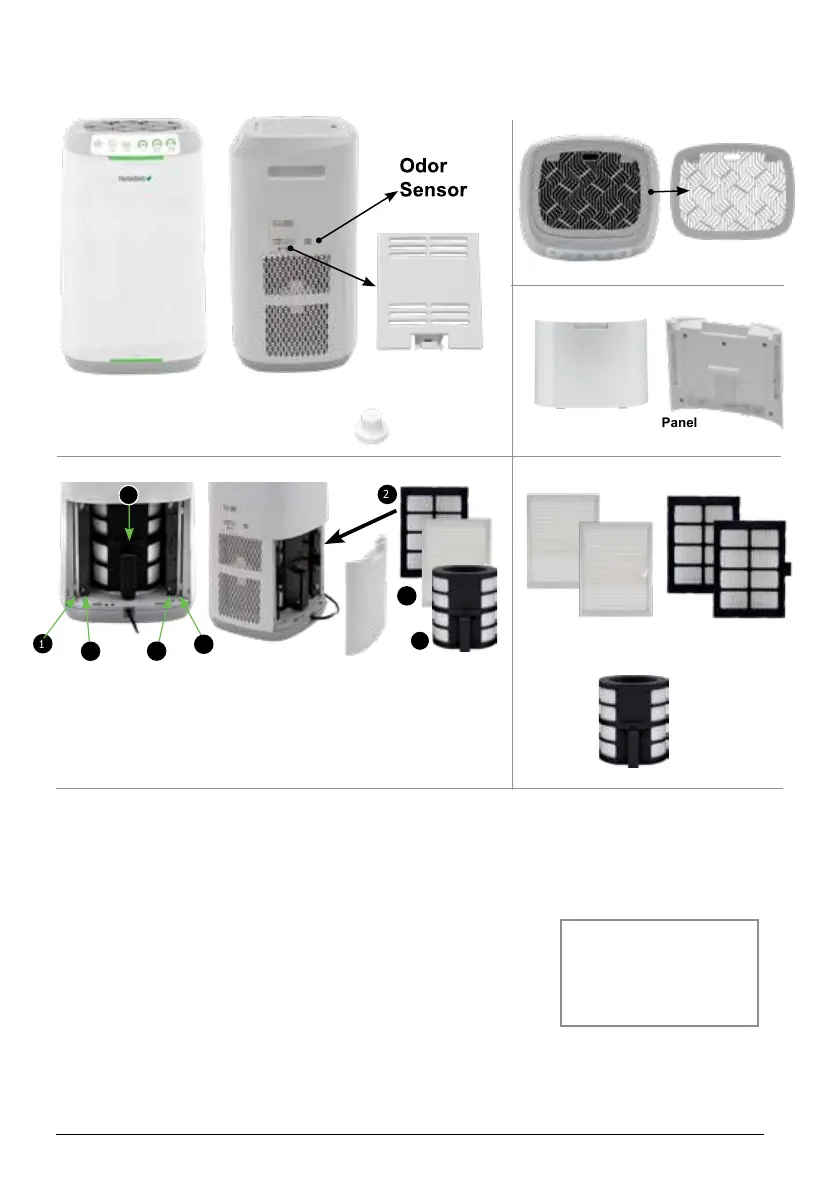
Filter Access Panel
Part #: OFP3
FRONT
OxyPure ZERO E500 Air Purier
Model #: 47351
Grid
Part #: OFP1
Rubber Feet
Part #: OFP4
Left: Filter Chamber with all 5
lters and their locations. From
the outside in, they are the
Stainless-Steel Prelters (1), the
Bio-Guard Filters (2) and the
Cylindrical Bio-Guard Filter (3).
Right: The Filter Access
Panel was removed revealing the
Stainless-Steel Prelters (1) and
the Bio-Guard Filters (2) on each
side with the cylindrical
Bio-Guard Filter (3) at the center.
Stainless-Steel
Prelter (2)
Part #: OFA3
Bio-Guard
Filter (2)
Part #: OFA2
Cylindrical
Bio-Guard Filter
Part #: OBA1
Note
Each lter is numbered. Match
the lter number with the slot
number when installing the
lters.
1. Open the Filter Access Panel on
the back of the OxyPure.
2. Remove the wrapped lters from their slots.
3. Remove the plastic wrapping from the lters.*
4. Fully insert the unwrapped lters into their slots.
5. Replace the Filter Access Panel, making sure that it is secure.
6. Remove the sticker from the control panel.*
*When using the OxyPure for the rst time.
Assembling the OxyPure
Before using your OxyPure, you need to make sure that the lters
are properly installed. With the OxyPure unplugged:
FILTERS
1
1
1
2
2
2
3
3
SIDE
Left Left
Right
Center
Right
TOP
BACK
Air Quality Sensor Cover
Part #: OFP2










 To Next Page