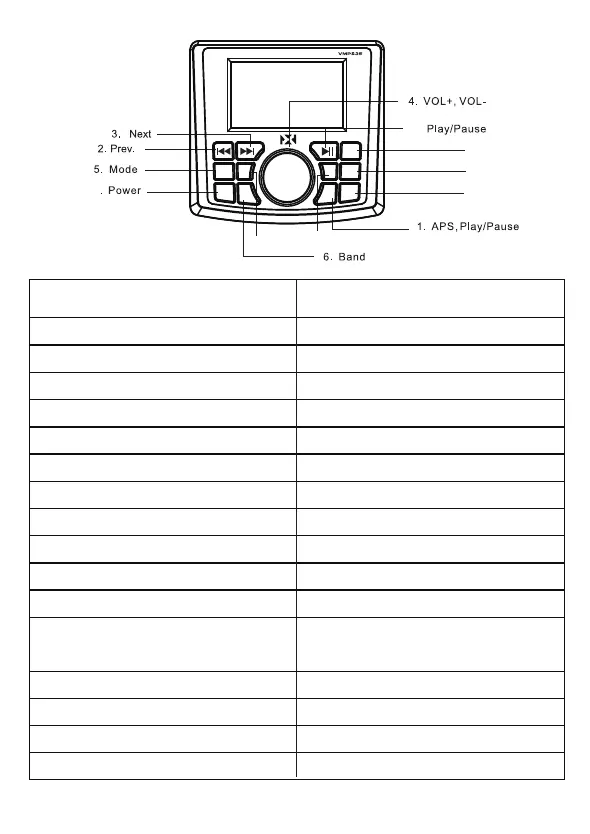
EQ
MODE
POW BAND APS
RPT LOUD
MONO
MEN
7
8. Repeat
12. MENU
9. EQ
12.
10. LOUD
11. MONO
OPERATION
FUNCTION BUTTON
Power On
Power Off
Volume Up
Volume Down
Seek Next Station
Tune Next/Skip Song
Tune Prev./Previous Song
Play/Pause
Toggle Through Audio Settings
Band Switching: FM1/FM2/FM3/AM1/AM2
Mute On/Off
Switch Between Modes:
Equalizer
Loud On/Off (Increase Highs & Lows)
Mono On/Off
Repeat Song While Using BT/USB
AM/FM/Bluetooth/USB/AUX
Press Power Button (7) Once
Hold Power Button (7) for Two Seconds
Rotate the Volume Knob (4) Clockwise
Rotate the Volume Knob (4) Counterclockwise
Press Automatic Preset Scan Button (1)
Hold Down/Press Next Button (3)
Hold Down/Press Previous Button (2)
Press Play/Pause Button (12)
Tap Middle Button (4) One by One
Press Band Button (6)
Tap Mute Button (12) for On/Off
Press Mode Button (5)
Press EQ Button (9)
Short Press Loud Button (10)
Short Press Mono Button (11)
Short Press Repeat Button (8)
3


 To Next Page