08
SETTING UP THE KEYBOARD
CONFIGURACIÓN DEL TECLADO
CONFIGURATION DU CLAVIER
EINRICHTUNG DER TASTATUR
IMPOSTAZIONE DELLA TASTIERA
CONFIGURAÇÃO DO TECLADO
키보드 설치/설정
キーボードの設定
设置键盘
鍵盤啟用設定
STEP 1
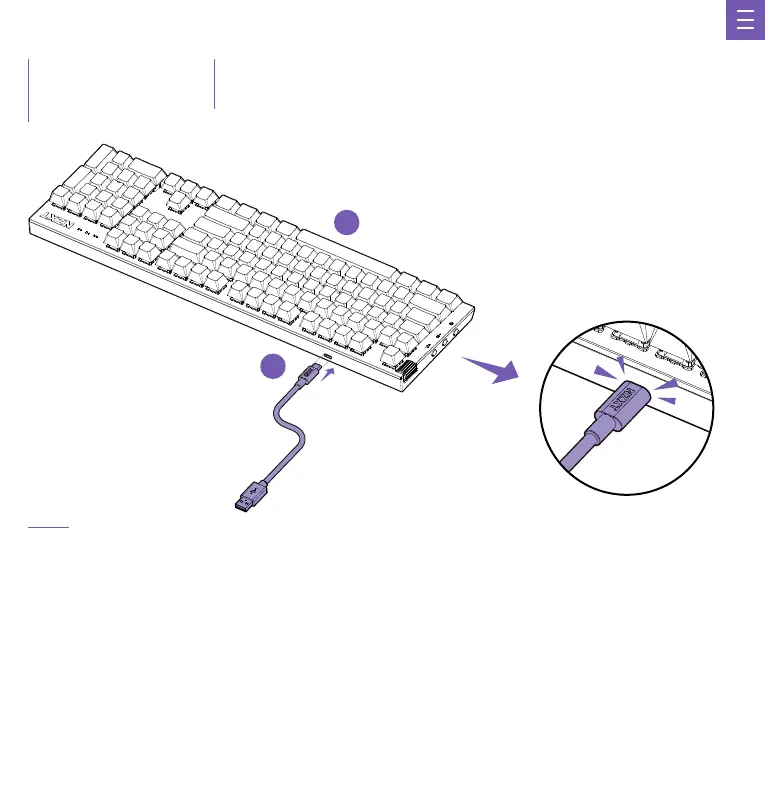
Connect the USB-C Cable to the port on the rear of the keyboard, and the other end to any available USB 2.0 (or faster) port on your PC.
Conecta el cable USB tipo C al puerto de la parte posterior del teclado y el otro extremo a cualquier puerto USB 2.0 (o más rápido) disponible en tu PC.
Branchez le câble USB-C sur le port situé à l’arrière du clavier, puis branchez l’autre extrémité sur n’importe quel port USB 2.0 (ou plus
rapide) disponible sur votre PC.
Verbinde das USB-C-Kabel mit dem Anschluss auf der Rückseite der Tastatur und am anderen Ende mit einem beliebigen freien USB-2.0-
Anschluss (oder schneller) an deinem PC.
Collegare il cavo USB-C alla porta sul retro della tastiera e l’altra estremità a qualsiasi porta USB 2.0 (o più veloce) disponibile sul PC.
Ligue o cabo USB-C à porta na parte de trás do teclado e a outra extremidade a qualquer porta USB 2.0 (ou mais rápida) disponível no seu PC.
USB-C 케이블을 키보드 후면의 포트에 연결하고 다른 쪽 끝을 사용자 PC의 사용 가능한 USB 2.0(또는 그 이상) 포트에 연결합니다.
USB-C
ケーブルをキーボード背面のポートに接続し、もう一方をPCのUSB 2.0(またはそれ以上)ポートに接続します。
将 USB-C 线连接到键盘后方的端口,另一端连接到你的电脑上任何可用的 USB 2.0 (或更快)端口
將 USB-C 傳輸線插入鍵盤後方的插槽,另一端則插入電腦上任何一個可以使用的 USB 2.0(或以上)插槽。
A
B


 To Next Page