31
ANTENNA
ANTENA
ANTENNE
ANTENNE
ANTENA
안테나
アンテナ
天線
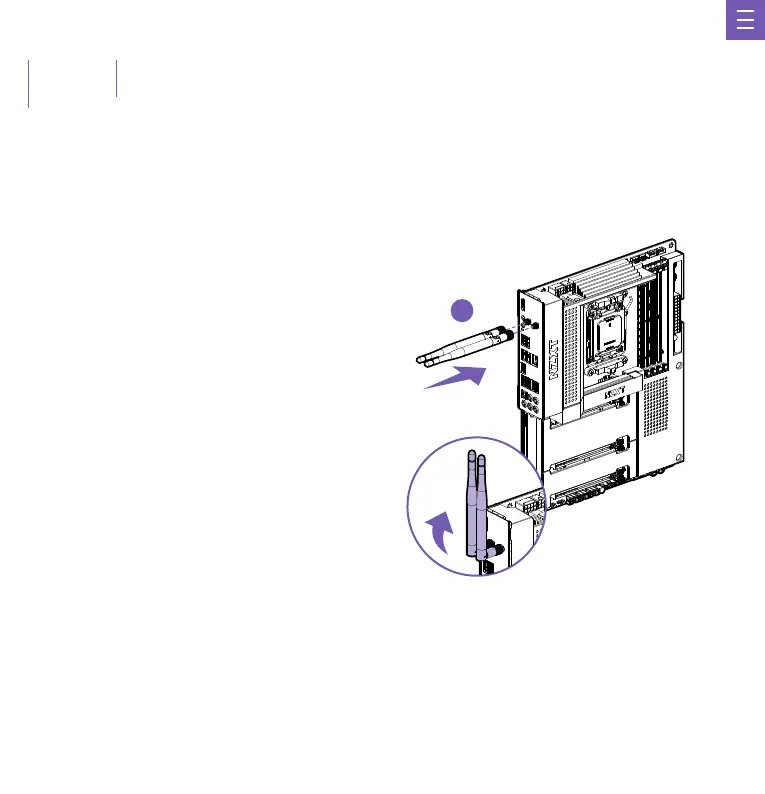
Wireless antennas are included to boost the wireless and Bluetooth signals.
Incluye antenas inalámbricas para potenciar las señales inalámbricas y de Bluetooth.
Des antennes sans fil sont fournies pour renforcer les signaux sans fil et Bluetooth.
Drahtlose Antenne zur Verstärkung der WLAN- und Bluetooth-Signale enthalten.
Antenas sem fio inclusas para impulsionar os sinais sem fio e Bluetooth.
무선 및 블루투스 신호를 강화하기 위해 무선 안테나가 포함되어 있습니다.
ワイヤレス電波およびBluetooth電波発信用のワイヤレスアンテナが含まれています。
隨附無線天線,可提升無線及藍牙訊號的強度。
1.
2.
D
Installation: Attach the antenna onto the rear I/O by securing them directly to the SMA ports labelled “Wi-Fi”.
Instalación: Conecta la antena a la interfaz de E/S trasera asegurándola directamente a los puertos SMA denominados "Wi-Fi".
Installation: Fixez l'antenne à l'E/S arrière, directement aux ports SMA étiquetés « Wi-Fi ».
Installation: Bringen Sie die Antennen am rückwärtigen E/A an, indem Sie sie direkt mit den SMA-Anschlüssen mit der Beschriftung „Wi-Fi“ verbinden.
Instalação: Conecte a antena na E/S traseira fixando-a diretamente às portas SMA rotuladas como "Wi-Fi".
설치: “Wi-Fi”라고 표시된 SMA 포트에 안테나를 바로 연결하여 후면 I/O에 부착하십시오.
取り付け
: アンテナを、「Wi-Fi」というラベルのついた SMA ポートに直接固定して、背面 I/O に 取り付けます。
安裝︰將天線裝在背面 I/O 上,方法是將天線直接固定至具有「Wi-Fi」標記的 SMA 連接埠。


 To Next Page