Contents [ hide
1 Thank you
2 Sentry LX Specifications
2.1 Features
3 Setting up the Sentry LX
4 Installing the Sentry LX
5 Setting up the fans and probes
6 Auto/Manual Fan Speed Settings
7 Temperature Alarm Settings
8 Date, Time, Mode and Alarm Off Setting
9 Changing between Fahrenheit and
Celsius
10 Sound Alarm
11 Reset to Default settings
12 Support and Service
13 File Downloads
14 References
15 Related Manuals
Thank you
Dear valued customers,
Thank you for purchasing our product. We are thankful to all our fans for the continuing support, after just four years
since entering the computer chassis market with the Guardian in 2003, NZXT is now an established gaming brand
and manufacturer of quality hardware in the market today. Since then, we have stayed true to our goal, which was to
continuously provide innovative next generation products. With every product, we are still breaking more boundaries
and limits. Once again, thank you and all NZXT fans for the support and we hope to bring more amazing products in
the coming years.
After you complete your installation, please come by our community forums
at www.nzxt.com/forum and voice your opinions with thousands of NZXT fans from around the world
Sentry LX Specifications
Features
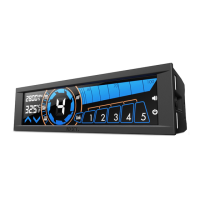
Dual 5.25” Meter display
Auto and manual: Leave it up to the automated system to monitor the fans and your temperatures of set the
parameters yourself
5 Fan control: Control and change the speeds of the fans on the fly, including the ability to turn the fans off
5 Temperature probe detection: Constantly watch over the temperatures of your system



 To Next Page