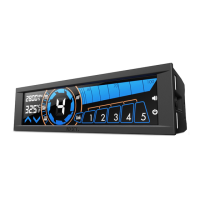
1. Push the “SET” button to begin this mode.
2. Continue to push the set button to scroll through the options
3. Use the “Up and Down Arrow” to adjust the settings.
4. The Sentry LX will exit the temperature alarm setting mode at after idling or at the end of the “SET” button scroll
Changing between Fahrenheit and Celsius
Hold the “Up Arrow” Button in order to chance between F and C.
Sound Alarm
The sound alarm will go off under the following conditions
1. when a fan is detached during operation
2. when temperature goes over the maximum temperature set during “Temperature Alarm Settings”
Pushing any button during the alarm sound process will disable the sound early.
Reset to Default settings
Simply pressing the “RESET” key will return the meter to factory settings. NOTE: All previous settings will be deleted.
Support and Service
If you have any more questions or have problems with the NZXT product you purchased, please don’t hesitate to
contact service@nzxt.com along with a detailed explanation of your problem and your proof of purchase. You may
inquire about replacement parts at rma@nzxt.com.
Thank you again for purchasing an NZXT case. If you have any more comments or questions. Please visit our
website or send us an email.
NZXT Website: www.nzxt.com
Email our design team: designer@nzxt.com
File Downloads
User Manual
Sentry LX
Download [optimized]
Download
References
Home | NZXT
Home | NZXT
Home | NZXT
Related Manuals



 To Next Page