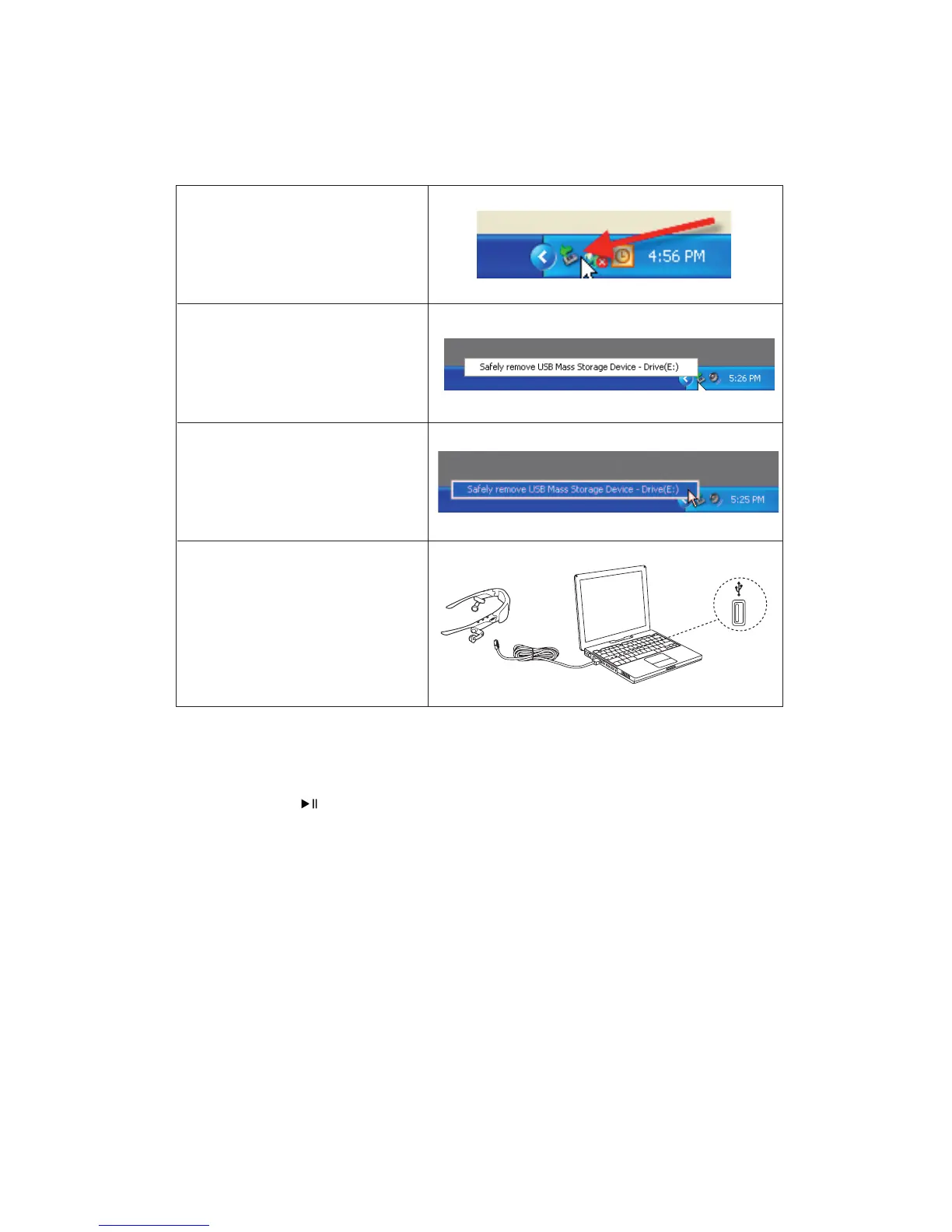
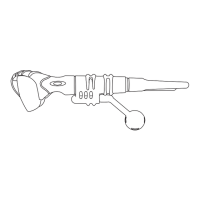
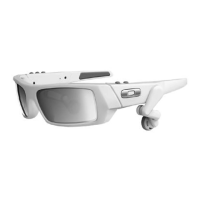
3. FOLLOW THIS PROCEDURE TO SAFELY DISCONNECT THUMP PRO
After THUMP Pro is fully charged, disconnect it from your computer by doing the following:
4. EXPERIENCE ABSOLUTE MUSIC FREEDOM
Press and hold the
Play / Pause
button until the power-up tone is heard. Now get out and enjoy music virtually anywhere.
There are no wires or cords to tangle you, and with 6 hours of continuous music, you can power through a marathon session
or just experience the world at your own beat. (See the Quick Reference guide for information on THUMP Pro controls.)
For Mac, see “HOW TO SAFELY ‘EJECT’ FROM THE MAC OPERATING SYSTEM” on page 5.
THUMP PRO USER GUIDE 3
At the bottom right of your desktop
screen, locate the icon with the green
arrow.
Click it once with your left mouse button.
A small window will pop up.
Click on the words “Safely Remove USB
Mass Storage Device.”
Disconnect the USB cable from THUMP Pro.


 To Next Page