EasyManua.ls Logo

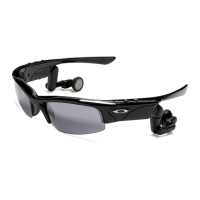
Oakley THUMP PRO - User Manual

Oakley THUMP PRO
30 pages
Print Icon
To Next Page IconTo Next Page
Loading...
USER GUIDE
2007.03.27
ThumpPro_Manual_ENG 3_07 3/29/07 12:23 PM Page 1
Question and Answer IconNeed help?

Do you have a question about the Oakley THUMP PRO and is the answer not in the manual?

Summary

GETTING STARTED

CHARGE THE BATTERY

Connect USB cable to charge the device for at least 3 hours.

TRANSFER MUSIC TO THUMP PRO

Drag and drop music files from your computer to the THUMP Pro drive.

SAFELY DISCONNECT THUMP PRO

Follow on-screen prompts to safely remove the device from your computer.

USING THUMP PRO WITH A MAC

TRANSFER MUSIC FILES FROM A MAC

Drag and drop music files from your Mac's music folder to the THUMP Pro drive.

CHARGING THE BATTERY

TROUBLESHOOTING

RESETTING THUMP PRO

Hold Play/Pause and Previous buttons simultaneously to reset the device.

THUMP PRO WONT TURN ON

Steps to diagnose and resolve issues when the device does not power on.

MUSIC PLAYBACK PROBLEMS

Troubleshoot issues preventing music from playing on the device.

WINDOWS MEDIA PLAYER MUSIC ISSUES

DEVICE NOT DETECTED ON WINDOWS

SAFETY AND HANDLING

HEARING DAMAGE PREVENTION

Avoid permanent hearing loss by using safe volume levels.

MOISTURE EXPOSURE WARNING

THUMP Pro is water-resistant but not waterproof; avoid excess moisture.

SPECIFICATIONS

SERVICE AND SUPPORT

OBTAINING WARRANTY SERVICE

Summary

GETTING STARTED

CHARGE THE BATTERY

Connect USB cable to charge the device for at least 3 hours.

TRANSFER MUSIC TO THUMP PRO

Drag and drop music files from your computer to the THUMP Pro drive.

SAFELY DISCONNECT THUMP PRO

Follow on-screen prompts to safely remove the device from your computer.

USING THUMP PRO WITH A MAC

TRANSFER MUSIC FILES FROM A MAC

Drag and drop music files from your Mac's music folder to the THUMP Pro drive.

CHARGING THE BATTERY

TROUBLESHOOTING

RESETTING THUMP PRO

Hold Play/Pause and Previous buttons simultaneously to reset the device.

THUMP PRO WONT TURN ON

Steps to diagnose and resolve issues when the device does not power on.

MUSIC PLAYBACK PROBLEMS

Troubleshoot issues preventing music from playing on the device.

WINDOWS MEDIA PLAYER MUSIC ISSUES

DEVICE NOT DETECTED ON WINDOWS

SAFETY AND HANDLING

HEARING DAMAGE PREVENTION

Avoid permanent hearing loss by using safe volume levels.

MOISTURE EXPOSURE WARNING

THUMP Pro is water-resistant but not waterproof; avoid excess moisture.

SPECIFICATIONS

SERVICE AND SUPPORT

OBTAINING WARRANTY SERVICE

Oakley THUMP PRO Specifications

General IconGeneral
Battery LifeUp to 6 hours
ManufacturerOakley
ModelTHUMP PRO
CategoryHeadsets
Storage Capacity256MB
Headphone TypeEarbuds
Supported Audio FormatsMP3

Related product manuals