18
4.Use and Operation Instruction
17
4.Use and Operation Instruction
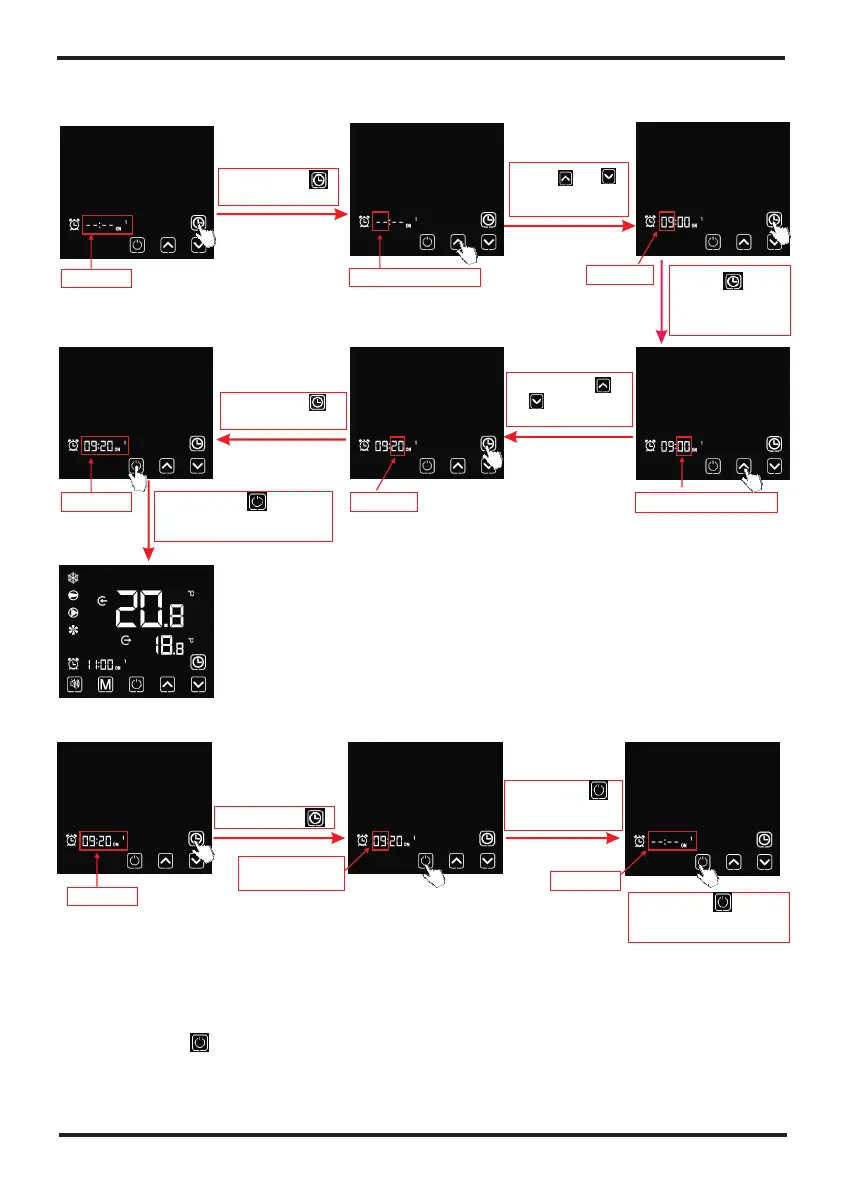
6.2.2 Setting the Timer ON/OFF function
Short press " "
to set hour digit
Flashing
Press " "or " "
to adjust hour
digit
Press " " to
save the settings
and skip to the
minute digit setting
Hour digit flashing
Short press " "
or " " to adjustt
minute digit
Minute digit flashing
Short press " "
to save the settings
Flashing
Flashing
Flashing
Short press " " to save
the settings and return to
the main interface
Notes:
1). Under the Timer ON/OFF setting interface, if there is no operation for 20 s, the system will
automatically memorize user's settings, and return to the main interface;
2). Under the Timer ON/OFF setting interface, If the timing symbol and entire time digits flash at the
same time, click " " to return to the main interface;
3). Timer ON1/ OFF1/ ON2/ OFF2 setting steps refer to the above operation.
6.2.3 Cancelling the Timer ON/OFF function
Flashing
Short press " "
Flashing(hour
or minute digit)
Short press " "
to cancel the timer
settings
Flashing
Short press " " to save
the change and return to
the main interface
4.7. Silent setting
7.1 One-click silent function
short press " "
Notes:
1). If one-click silent and timming silentaare stared at the same time, short press " " for
canceling one-click silent and quitting the timing silent for this time.
2). At night or the rest time, user can start one-click silent or timing silent function to reduce
the noise.
7.2 Setting and cancelling the silent function
Keep long press
of " " for 2 s
Short press"
or " "
"
Short press" " for entering
the hour digit setting of
timing-on silent
Short press" "
or " "
Short press" " for confirming
the timing-on silent, and turn to
the setting of timing-off silent
Short press " " for
entering the hour digit
setting of timing-off silent
Short press" "
or " "
Short press" " for confirming
timing-off silent, saving the changes
and returning to the main interface
Short press " for
cancelling the timing silent
"
Flashing
Flashing
Flashing
Flashing
Short press" " for
cancelling the timing
silent
Flashing
Flashing
Short press " to
save the changes and
turn to the main interface
"
Flashing



 To Next Page