P1PVKY / P1PVCDKY
Installation & Service Instructions
030099-347 pg 6 of 14 © Copyright 2007 OASIS Corporation
8. Replace the carton over the top of the cooler
9. The cooler is now ready for transportation to the customer’s premises
NOTE: Whenever you transport the cooler to or from your premises, you should ensure that a
shipping bag is placed over the cooler. This will prevent damage to the cabinet caused by coolers
rubbing against one another in the back of the van or lorry
Draining the Water Cooler:
• Isolate the water cooler from the mains water supply – this may be done by closing any shut-off
valve fitted to the installation or temporarily disconnecting the cooler from the mains
• Disconnect the cooler from the power supply
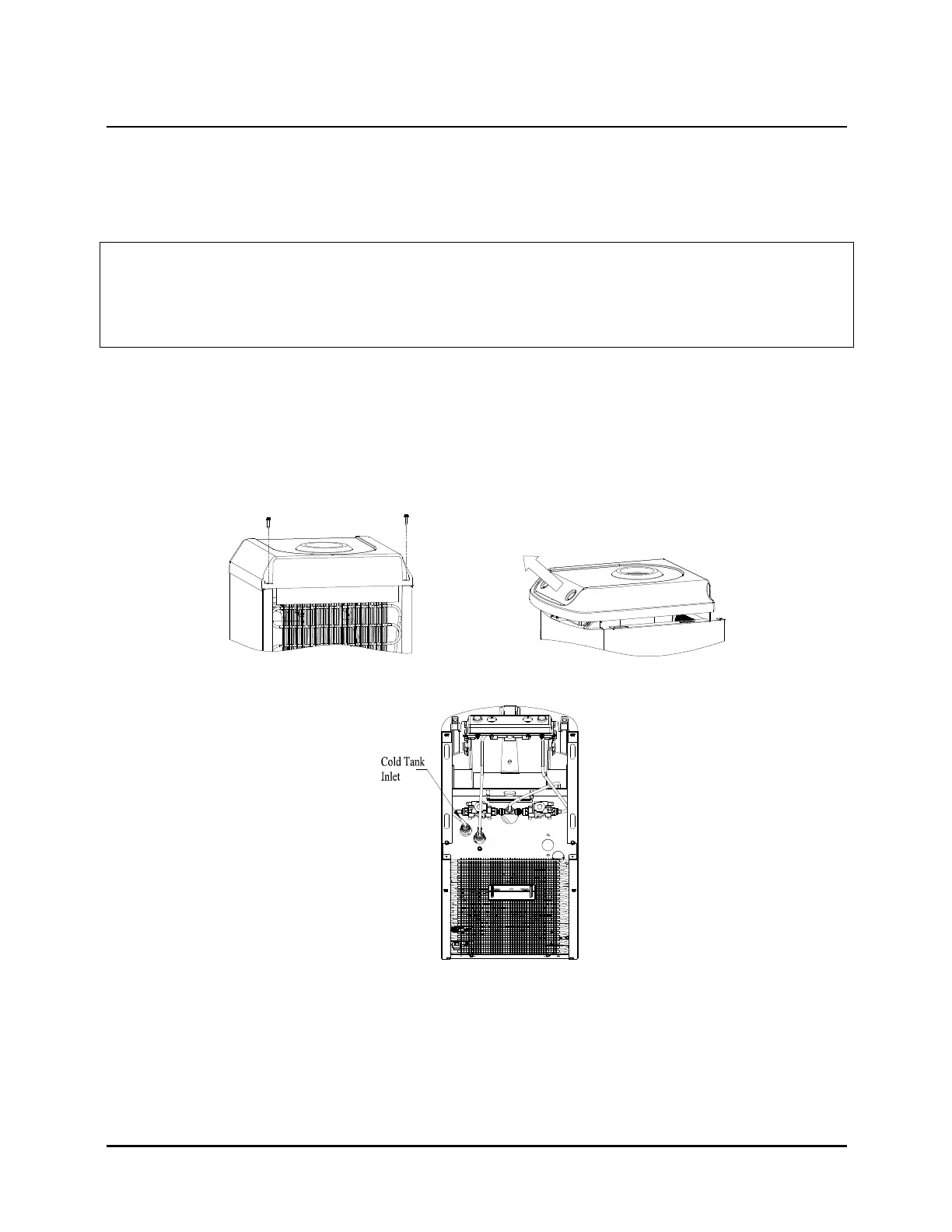
• Remove the top from the unit – remove the two screws at the rear of the top, and lift off the lid
assembly
• Looking down on the unit, disconnect the cold water inlet as shown in the diagram below
• Open the drain valve at the rear of the unit
• Remove the screw holding the plug in position
• Rotate the plug anti-clockwise and pull from the drain body
• Allow water to drain from the valve
• The drain is located 280mm from the floor – ensure that you place a container under the valve
prior to opening it. The container needs to have a minimum capacity of 2 litres
• Re-assemble the cooler by following the above instructions in the reverse order



 To Next Page