P1PVKY / P1PVCDKY
Installation & Service Instructions
030099-347 pg 7 of 14 © Copyright 2007 OASIS Corporation
Filter Installation:
The P1PVKY and P1PVCDKY coolers contain a large filter compartment that can be directly accessed
from the front of the unit.
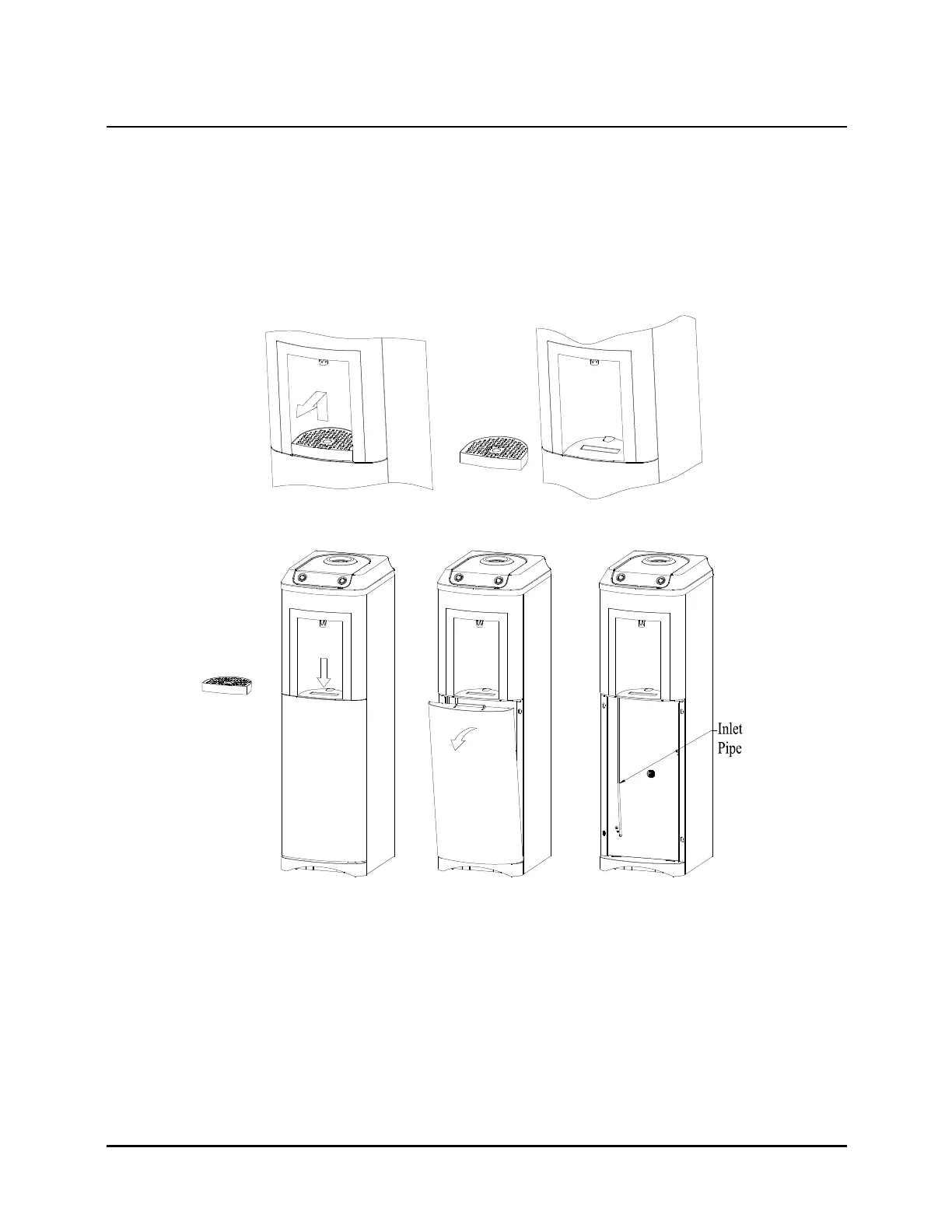
Accessing Filter Compartment:
• Lift out and remove the drip tray
• Depress the clip visible through the slot in the alcove and swivel the door forward
• Remove the door from the cooler
• The inlet pipe is now visible on the left hand side of the filter compartment
Installing the filter system:
• It is recommended that you use a filter system with ¼” push-fit connections for both inlet and
outlet
• Refer to the instructions provided with the filter system prior to commencing installation
• Attach the filter system to the metal column support – you can drill holes as required for
mounting screws
• Cut the inlet pipe and connect the lower portion to the inlet side of the filter system and the
upper portion to the outlet side of the filter system



 To Next Page