NIRSIT EYE PC Introduction
16
2.6.2 PC1 to PC2
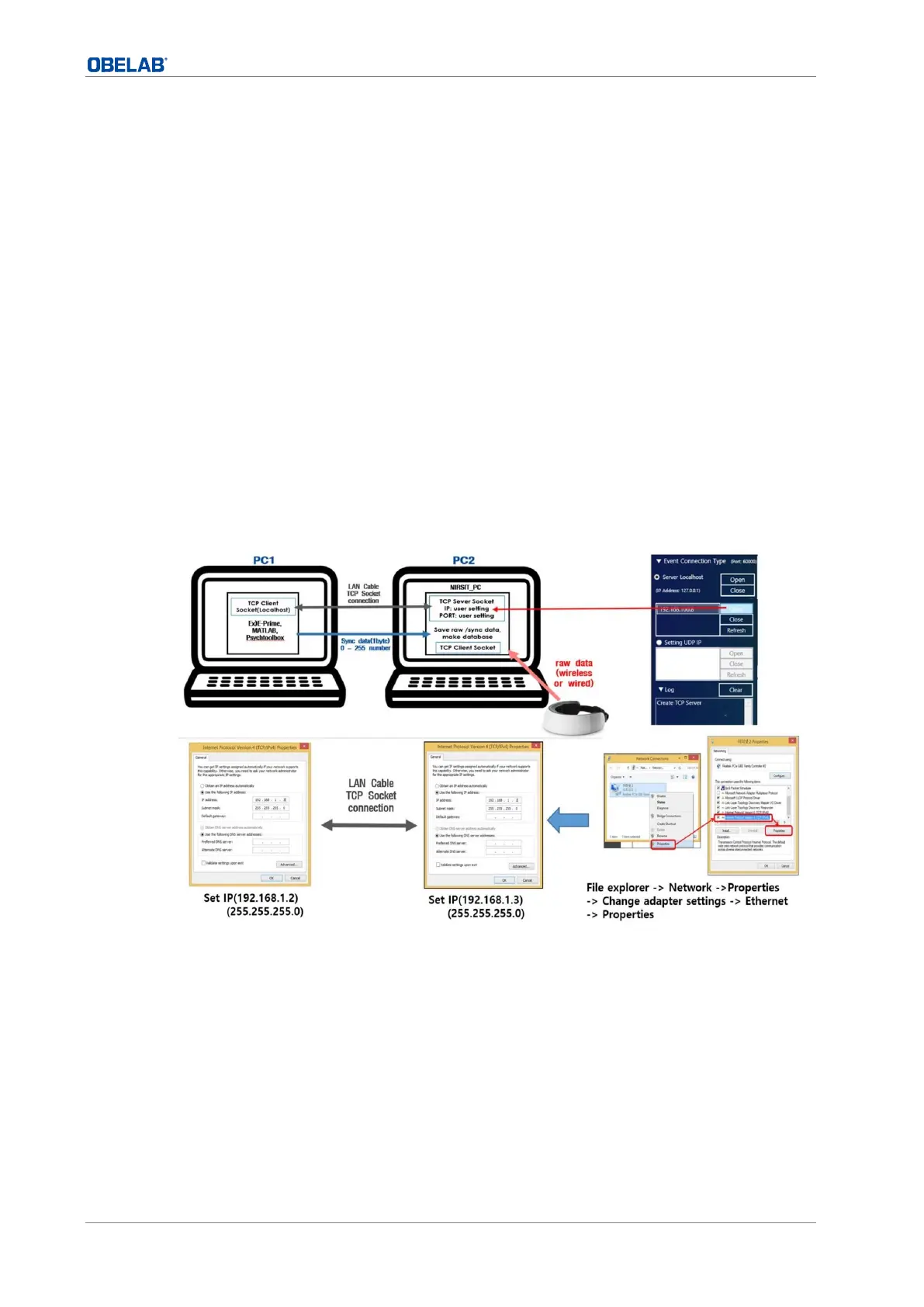
When two PCs are connected, one of both should provide marker information using e-prime
program, and the other should accumulate the data from NIRSIT device using NIRSIT EYE PC
tool program.
1 Click “File explorer > Network > Properties > Change adapter settings >
Ethernet > Properties” in order.
2 Select the ‘Use the following IP address’ checkbox to activate and then input the IP address
to 192.168.1.3. and Sub netmask to 255.255.255.0.
3 Connect the two PCs with LAN cable.
4 Run the NIRSIT EYE PC tool and select the Server IP Address checkbox in the Event
Connection Type panel.
5 Select the Serever IP Address checkbox in Event Connection panel.
6 Click Refresh button to to check the IP then select the correct IP.
7 When Open button is clicked, NIRSIT EYE PC Tool is set to receive external sync data (1 -
255 number, 1 byte or String) from PC1. (PORT 60000)


 To Next Page