Important Unique Buttons
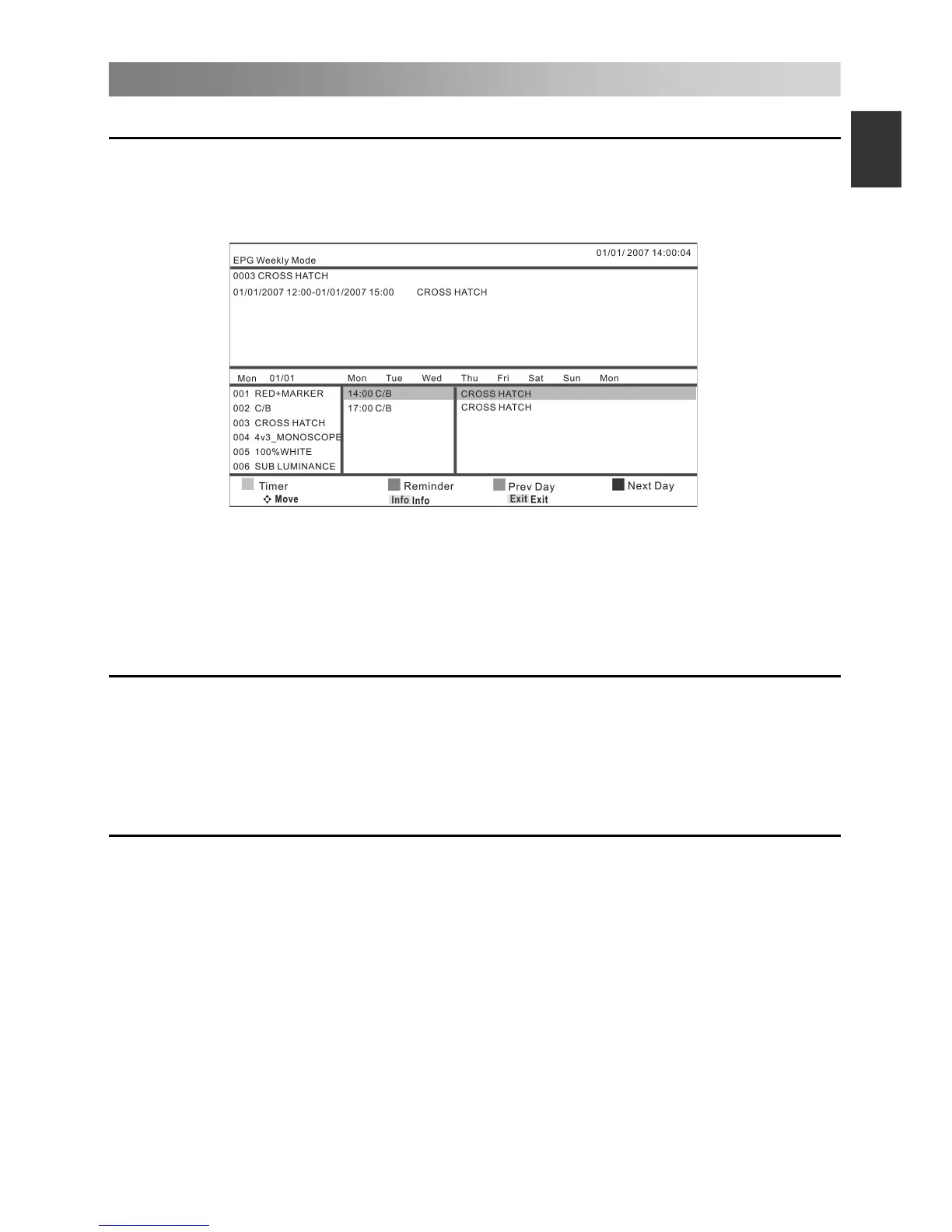
Press EPG button to display the Electronic Program Guide. This function let you know
the detailed information of the channel, indicating the time of the program playing.
Press arrow buttons to cyclically select all options.
Press EXIT button to exit.
Press the red button to access the Timer submenu.
Press the green button to reminder, cancel.
Press the yellow button to view the previous date’s guide.
Press the blue button to view the next date’s guide.
Channel List
Press LIST button to display the Channel List.
Press ◄/► button to select the DTV, Radio, and Others/data.
Press ▲/▼ to select the items. Press the ENTER button to enter the channel.
Press CH+/CH- button to page up or down the Channel list.
Press EXIT button to exit.
Press FAV button to display the favorite list.
Press ◄/► button to select Favorite 1,2,3,4.
Press ▲/▼ to select the items. Press the ENTER button to enter the channel.
Press CH+/CH- button to page up or down the Favorite list.
Press red button to rename favorite type.
Press EXIT button to exit.
EPG Weekly Mode (In DTV mode)


 To Next Page