Need help?
Do you have a question about the OBSBOT Me and is the answer not in the manual?
Steps for installing a phone and balancing the OBSBOT Me for optimal use.
Details the power button functions for checking power, powering on/off, and controlling tracking.
Methods for locking or unlocking tracking targets using gestures or the power button.
Explains the meaning of different status indicator light colors and patterns.
Instructions for charging the OBSBOT Me, battery capacity, and playtime.
Instructions for upgrading the OBSBOT Me device firmware using the tool.
The OBSBOT Me is an AI-powered selfie phone mount designed to provide accurate and stable tracking for users. It leverages deep learning neural networks and brushless motor control technology, inheriting the strong tracking capabilities characteristic of the OBSBOT family of devices. This device is primarily used to enhance the experience of capturing photos and videos, especially for individuals who want to be the subject of their own content without needing a dedicated camera operator.
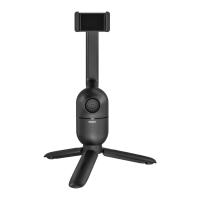
The core function of the OBSBOT Me is its AI-powered tracking. It can automatically follow a designated subject, ensuring they remain in the frame during recording or photography. This is achieved through its integrated lens and sophisticated algorithms that recognize and track human subjects. The device features a phone holder that can accommodate various smartphones, allowing users to mount their device securely for hands-free operation.
The OBSBOT Me offers both vertical and horizontal rotation capabilities. The phone holder arm can be rotated vertically by 180 degrees, allowing the device to be unfolded for use or folded for compact storage. Similarly, the phone holder arm can be rotated horizontally by 180 degrees, making it suitable for shooting with either the selfie camera or the rear camera of the phone. This flexibility ensures that users can capture content from different angles and perspectives.
The device also includes a universal joint that allows for adjustment of the camera angle. This joint can be tightened or loosened using a metal round plate provided in the package, giving users precise control over their shot composition. For extended use or more stable setups, the OBSBOT Me is equipped with a 1/4-inch interface, making it compatible with standard tripods.
Installation and Leveling: Before use, the OBSBOT Me must be unfolded. This involves rotating the phone holder arm vertically by 180 degrees. Once unfolded, the phone can be installed by opening the phone holder and placing the device inside. It is crucial to ensure the OBSBOT Me is turned off during installation. After placing the phone, users need to adjust it to achieve balance, which is essential for optimal tracking performance. The back of the phone should be entirely close to the panel of the phone clip, and the long side of the phone should be fully buckled into the clip. The phone holder is designed to prevent accidental pressing of smartphone buttons.
Camera Angle Adjustment: The universal joint allows users to adjust the camera angle freely. If the joint becomes loose over time, it can be tightened using the provided metal plate, ensuring the phone remains securely positioned at the desired angle.
Tripod Compatibility: The 1/4-inch interface at the base of the OBSBOT Me allows it to be mounted on a tripod. This feature is particularly useful for stable, long-duration shoots or when a higher vantage point is required. The device is compatible with all mainstream tripods.
Tracking Target Lock/Unlock: The OBSBOT Me provides two primary methods for locking and unlocking the tracking target:
Tracking Distance: The optimal tracking distance for the OBSBOT Me ranges from 0.5 meters to 3 meters. The device can track subjects up to a maximum distance of 15 meters, providing flexibility for various shooting environments.
Power Button Instructions: The power button serves multiple functions:
Status Indicator Light: The OBSBOT Me features a status indicator light that uses a combination of yellow, green, and blue colors, along with different blink patterns, to communicate the device's status:
Power Indicator Light: This indicator displays the battery level and charging status:
Charging: To charge the OBSBOT Me, connect it to a power adapter or power bank using a USB Type-C cable. During charging, the power indicator light will flash. Once fully charged, it will turn to solid green.
Firmware Upgrade: The OBSBOT Me's firmware can be upgraded using the OBSBOT Me Tool software. When the device is connected and a new firmware version is available, a prompt will appear. Users can choose between automatic or manual upgrades. It is crucial not to disconnect the OBSBOT Me during a firmware upgrade to prevent issues. Detailed instructions for firmware upgrades are available in the official user guide.
OBSBOT Me Tool Software: This companion software is compatible with Windows and macOS. It allows users to control various functions, such as toggling gesture control on/off and performing firmware upgrades. The software also enables users to export log files for troubleshooting or support purposes. The OBSBOT Me Tool provides information on the current software and firmware versions and notifies users when updates are available.
 General
| Category | Security Camera |
|---|---|
| Manufacturer | OBSBOT |
| Model | Me |
| AI Tracking | Yes |
| Tracking | Auto Tracking |
| Power | USB-C |
| Night Vision | Yes |
| Motion Detection | Yes |
| Audio | Built-in Microphone |
| Resolution | 1080p |
| Connectivity | Wi-Fi |
| Mounting | Wall Mount |
| Compatibility | iOS, Android |

 To Next Page