6
SECTION 2: INSTALLATION
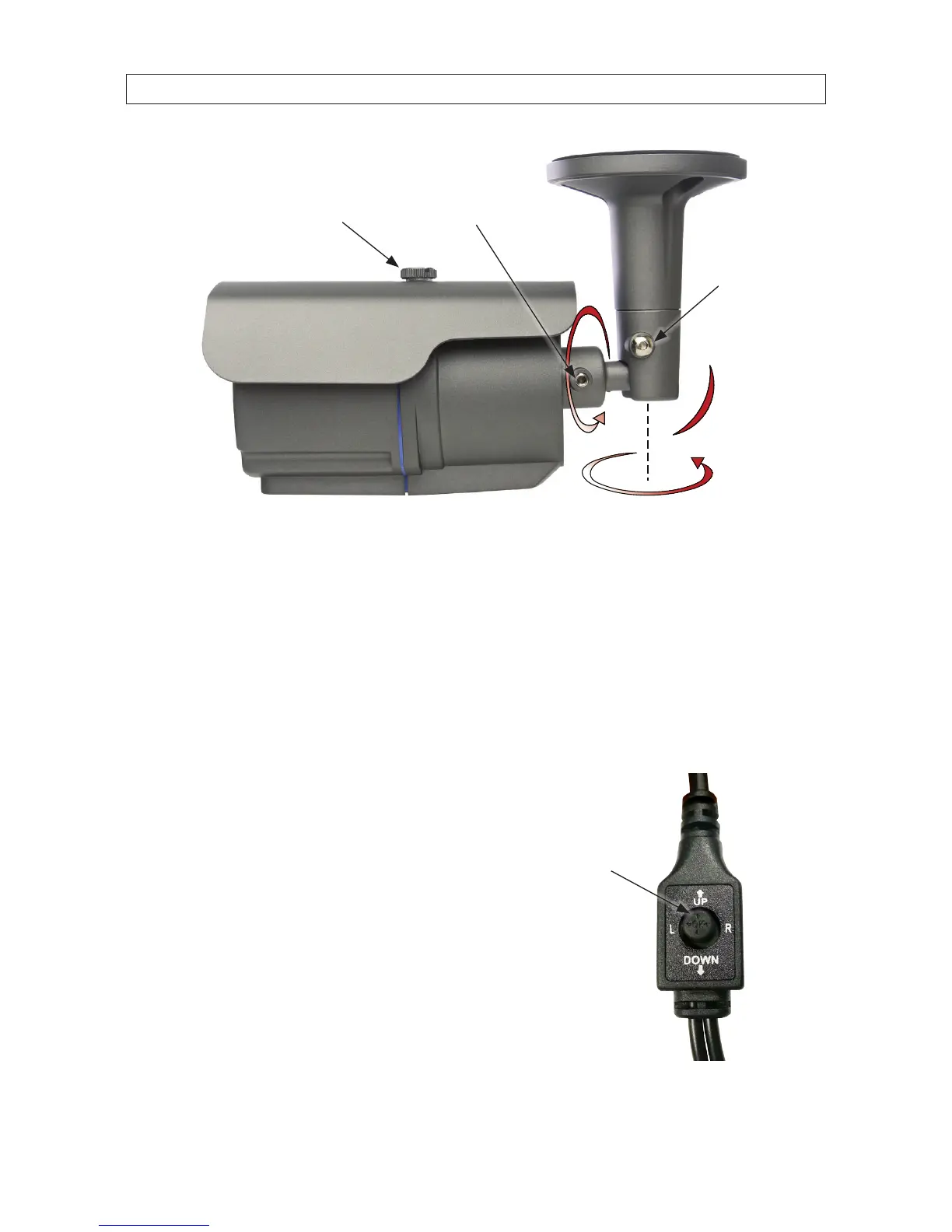
90°
360°
Use for
Direction,
Elevation
Adjustment
Use for
Horizon Line
Adjustment
Sun Shield
Hold Down
Screw
6. Adjust the sun shield (forward or back) to reduce glare, if necessary.
7. If your camera has a varifocal lens ( -VF or -VFE models), use the hex wrench provided to adjust the video zoom and focus.
The adjustment screws are located on the bottom of the camera.
8. If your camera is a BC700 series model, congure your camera using the software menus in the OSD. See OSD Setup in
the following subsection.
2.4 OSD Setup (BC700 series cameras only)
BC700 series cameras include on-screen display (OSD) software for adjusting the
internal camera settings to complement specic environment where it is installed.
These settings are adjusted using the OSD controller attached to the camera drop
cable.
The OSD controller includes a joystick that can be pushed down and rocked UP,
DOWN, left (L) and right (R), or, to open the menu system and navigate the
menus.
To use the OSD controller, press the joy stick in (toward the controller block) to
open the OSD menu. (See the menu chart on the following page.) Rock the joystick
UP or DOWN to highlight a parameter or submenu, then press the joystick in
to select it. Rock the joystick right (R) to highlight an option, UP or DOWN
to identify the option, then press the joystick in to select it. Repeat this method to
navigate the menu system and select options.
Joystick
OSD
Controller


 To Next Page