4
SECTION 2: INSTALLATION
SECTION 2
Installation
2.1 General Guidelines
• Camera Lens: Handle the camera carefully to prevent scratching or soiling the lens. If the lens or IR array shield becomes
soiled, clean it only with approved products. See the Cleaning section later in this manual.
• Monitor impedance: Set the monitor impedance switch to 75 .
• Power supply: To avoid re or shock hazard, use only UL listed power supplies.
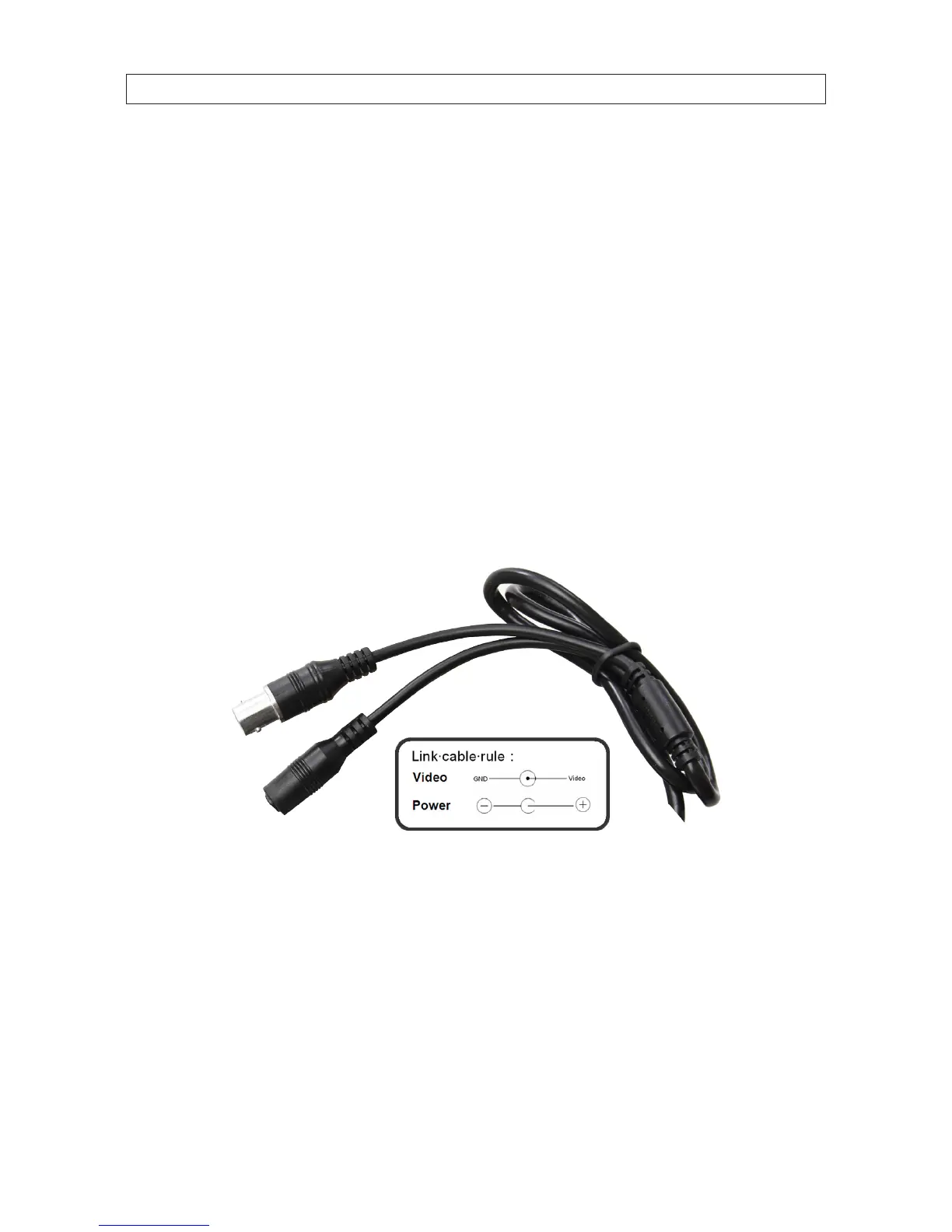
• Camera drop cable: The camera drop cable includes two connectors:
— Video BNC connector – for transmission of the video signal across a coax (75 ) extension cable.
— Power connector – Use 12 Vac power source (see the Specications section for power requirements). When
applying 12 Vdc power, observe the power polarity. See the picture below for the connector polarity conguration.
Power
Connector
Video BNC
Connector
Camera Drop Cable
2.2 Mounting the camera
The camera can be mounted on any surface with sucient strength to support it. The video/power drop cable from the camera can
be routed either through the cable hole in the center of the base plate, or through a cable guide in the mounting bracket.
1. Using the camera base as a guide, mark the location of the screws that anchor the base plate to the mounting surface. If you
are routing the drop cable through base, also mark the position of the hole for the drop cable.


 To Next Page