EasyManua.ls Logo

occiam K23 - Power On; Power Off; Auto Power On; Auto Power Off; Manual Power On

occiam K23
14 pages
Print Icon
To Next Page IconTo Next Page
To Previous Page IconTo Previous Page
Loading...
Power
On
/
Power
Off
Auto
Power
On
Take
out
the
earbuds
from
charging
case,
the
earbuds
will
automatically
power
on
and
start
pairing.
Auto
Power
Off
Put the
earbuds
back
into
the
charging
case,
the
earbuds
will
automatically
power
off
and
enter
charging
mode.
Manual
Power
On
If
the
earbuds
are
not
in
the
charging
case,
press
and
hold
each
earbud
for
3
seconds.
Manual
Power
Off
If
the
earbuds
are
not
in
the
charging
case,
press
and
hold
each
earbud
for
5
seconds.
How
to
wear
the
earbuds
correctly?
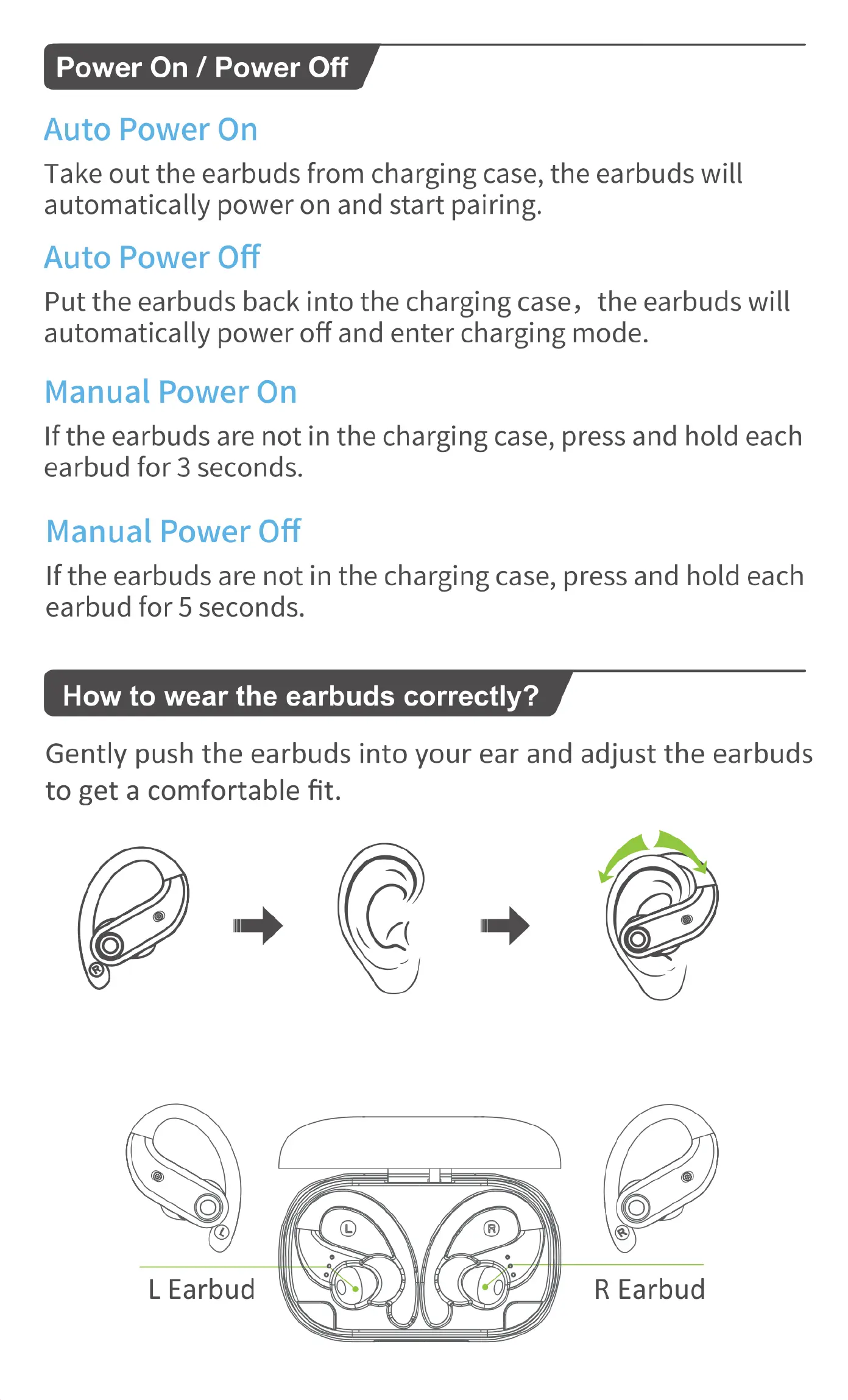
Gently
push
the
earbuds
into
your
ear
and
adjust
the
earbuds
to
get
a
comfortable
fit.

Related product manuals