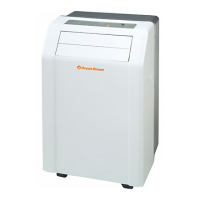
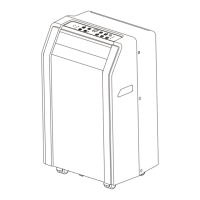
This document is an owner's manual for an Ocean Breeze Portable Air Conditioner, model OBZ-09NPH. It provides comprehensive information on the unit's preparation, safety precautions, installation, operation, maintenance, and troubleshooting.
Function Description:
The Ocean Breeze Portable Air Conditioner is designed to provide cooling, fan, and dehumidification functions for indoor spaces. It utilizes a self-evaporation system in COOL mode, which means that under normal humidity conditions, the collected water will evaporate, eliminating the need for manual draining. In cases of extreme humidity or when operating in DRY mode, the unit may require manual draining. The appliance is equipped with wheels for easy movement and includes an exhaust hose assembly to vent hot air outside.
Important Technical Specifications:
- Model: OBZ-09NPH
- Refrigerant: R290/R32 (flammable refrigerant, specific type indicated on the unit's label)
- Temperature Range (Cool Mode): 17-35°C (62-95°F)
- Temperature Range (Dry Mode): 13-35°C (55-95°F)
- Power Cord: Equipped with a three-prong grounding plug. The length of the power cord should not be modified, and an extension cord should not be used.
- Installation Clearance: Requires at least 19.7 inches (50 cm) from the nearest wall to ensure proper air conditioning.
- Drainage: Features a bottom drain for general use and a top drain specifically for DRY mode.
- Error Codes:
- E1: Room temperature sensor error
- E2: Evaporator temperature sensor error
- E3: Condenser temperature sensor error (on some models)
- E4: Display panel communication error
- E7: Zero-crossing malfunction
- P1: Bottom tray is full (requires draining)
Usage Features:
- Control Panel: Located on the front of the unit, featuring buttons for MODE, Up (+), Down (-), and Power.
- Modes of Operation:
- COOL Mode: Selectable via the MODE button. Allows adjustment of desired room temperature between 17°C/62°F and 30°C/86°F using the Up (+) and Down (-) buttons. Fan speed can be chosen via the remote control. The self-evaporation system is active in this mode.
- FAN Mode: Selectable via the MODE button. Allows selection of fan speed via the remote control; temperature cannot be adjusted. The exhaust hose should not be connected to a window in this mode.
- DRY Mode (Dehumidification): Selectable via the MODE button. Operates at LOW fan speed; temperature and fan speed cannot be adjusted. Windows and doors should be kept closed for optimal dehumidifying effect. The exhaust hose should not be connected to a window. Requires manual draining from the top drain.
- AUTO Mode: Activated only via the remote control. Automatically selects cooling or fan-only operation based on the set temperature and current room temperature. Fan speed cannot be selected in this mode.
- SLEEP/ECO Mode: Activated only via the remote control. Gradually increases the selected temperature by 1°C/1°F after 30 minutes, and again after another 30 minutes. This new temperature is maintained for 7 hours before returning to the original setting. Unavailable in FAN or DRY modes.
- Constant Fan Function: In COOL or DRY mode, pressing the MODE button for 3 seconds turns this function on or off. When on, the fan runs continuously for cooling, indicated by an illuminated light.
- Temperature Display: The LED display shows the set temperature in °C or °F, or room temperature in DRY and FAN modes. It can be switched between Fahrenheit and Celsius by pressing and holding the Up and Down buttons simultaneously for 3 seconds.
- Auto-Restart: If the unit unexpectedly shuts off due to a power outage, it will restart with the previous function settings automatically when power resumes.
- Wait 3 Minutes Before Resuming Operation: After the unit stops, it cannot be restarted for 3 minutes to protect the unit.
- Air Flow Direction Adjustment: The horizontal and vertical louvers can be manually adjusted. Users are cautioned not to place heavy objects on the louver and to keep it fully opened during operation.
- Remote Control: Included with remote control models for convenient operation.
Maintenance Features:
- Air Filter Cleaning: The air filter should be cleaned every 2 weeks for optimal performance. It can be gently washed with water and/or diluted liquid dishwashing detergent, rinsed thoroughly, and dried before reinstalling. A vacuum cleaner can also be used to remove dust.
- Unit Cleaning: The unit can be cleaned with a damp, lint-free cloth and mild detergent, then dried with a dry, lint-free cloth.
- Water Collection Tray Drainage: The water collection tray should be drained immediately after a P1 error occurs and before storage to prevent mold.
- Storage (when not in use):
- Drain the unit's water collection tray.
- Run the appliance in FAN mode for 12 hours in a warm room to dry it and prevent mold.
- Turn off and unplug the unit.
- Clean and reinstall the air filter.
- Remove batteries from the remote control.
- Store the unit in a cool, dark place, away from direct sunlight or extreme heat to prolong its lifespan.
- Troubleshooting Tips: The manual includes a comprehensive troubleshooting guide for common issues such as the unit not turning on, not cooling well, being noisy, making gurgling sounds, or persistent P1 error codes. It advises users to check for obstructions, clean filters, ensure proper hose connection, and in some cases, contact a service technician. For a persistent P1 error, a detailed drying procedure involving draining, removing plugs, and running in FAN mode for several hours is provided.
Safety Precautions:
The manual emphasizes numerous safety precautions, especially concerning the use of flammable refrigerants (R290/R32). Key safety points include:
- Proper installation by qualified personnel according to instructions.
- Use of only included accessories and specified tools.
- Ensuring the outlet is grounded and has appropriate voltage.
- Installation on a flat, sturdy surface, free from obstructions.
- No modification of the power cord or use of extension cords.
- Avoiding sharing outlets with other electrical appliances.
- Not installing in wet rooms or locations exposed to combustible gas.
- Careful movement of the unit due to wheels, avoiding thick carpets or objects.
- Not operating a dropped or damaged unit.
- Supervision of children around the unit.
- Unplugging immediately if the unit is knocked over during use.
- Disconnecting power during thunderstorms.
- For flammable refrigerants:
- Do not use means to accelerate defrosting or cleaning other than recommended by the manufacturer.
- Store in a room without continuously operating ignition sources (e.g., open flames, operating gas appliances, electric heaters).
- Do not pierce or burn.
- Be aware that refrigerants may not contain an odor.
- Observe national gas regulations.
- Keep ventilation openings clear.
- Store to prevent mechanical damage.
- Store in a well-ventilated area corresponding to the room size specified for operation.
- Servicing must be performed by industry-accredited personnel competent in handling flammable refrigerants.
- Proper recovery of refrigerant during maintenance or disposal.
- No open fire or spark-generating devices near the air conditioner.
- Careful storage and maintenance to prevent mechanical damage.
- General Cautions:
- Not for use by persons with reduced physical, sensory, or mental capabilities, or lack of experience/knowledge, unless supervised or instructed.
- Disconnect before cleaning or maintenance.
- Do not run the cord under carpeting or furniture, and keep it away from traffic areas.
- Do not operate if damaged, malfunctioning, or with missing/broken parts.
- Do not use with solid-state speed control devices.
- Installation must comply with national wiring regulations.
- Contact authorized service technicians for repair/maintenance and authorized installers for installation.


 To Next Page
 General