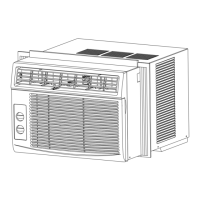
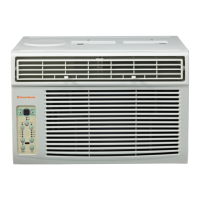
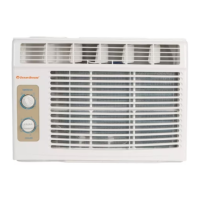
This document is an owner's manual for an Ocean Breeze Window/Wall-Type Room Air Conditioner, specifically for models OBZ-06CR and OBZ-08CR. It provides comprehensive instructions for safe operation, installation, usage, and maintenance of the appliance.
Function Description:
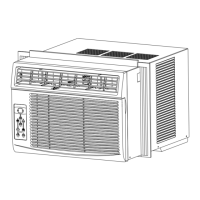
The Ocean Breeze air conditioner is designed to cool and dehumidify a room. It can be installed in standard double-hung windows or through a wall. The unit offers various operating modes including Auto, Cool, Dry, and Fan Only, allowing users to select the desired function based on room conditions and personal preference. Some models also feature a "Clean Air" mode with an ion generator to remove pollen and impurities from the air. The unit can be controlled via an electronic control panel on the unit itself or with a remote control.
Important Technical Specifications:
- Models Covered: OBZ-06CR, OBZ-08CR
- Installation Type: Window/Wall-Type Room Air Conditioner
- Power Cord: Equipped with a current detection device to reduce fire risk. It has a 3-prong grounding plug.
- Operating Temperature Ranges (Cooling):
- Outdoor Temp: 18-43°C (64-109°F)
- Outdoor Temp (Special Tropical Models): 18-52°C (64-125°F)
- Indoor Temp: 17-32°C (62-90°F)
- Window Opening Widths for Installation: 23 to 36 inches (58.4cm to 91.4cm)
- Minimum Vertical Opening (for window installation):
- 5000-8000 Btu/h models: 14 inches (35.6cm)
- 10000-12000 Btu/h models: 15-1/2 inches (39.4cm)
- Power Cord Replacement: If damaged, it must be replaced by the manufacturer, its service agent, or similarly qualified persons.
- Grounding: Requires proper grounding with a three-prong grounding plug and a properly grounded wall receptacle.
- Circuit Protection: Requires a circuit breaker and a dedicated power circuit.
- Temperature Display: Can show temperature in Fahrenheit (°F) or Celsius (°C).
- Timer Function: Auto Start/Stop feature allows setting the unit to turn on or off after a specified duration (up to 24 hours).
- Fan Speeds: Auto, Low, Med, High. In DRY mode, fan speed is automatically set to LOW. In AUTO mode, fan speed cannot be adjusted.
- Compressor Delay: The Cool circuit has an automatic 3-minute time-delayed start to prevent overheating and circuit breaker tripping.
Usage Features:
- Electronic Control Panel & Remote Control: The unit can be operated using either the buttons on the unit's control panel or the provided remote control.
- Temperature Adjustment: Users can set the desired temperature between 62°F (17°C) and 86°F (30°C).
- Operating Modes:
- AUTO Mode: The air conditioner automatically selects cooling, heating (not available in Cooling-only models), or fan only operation based on the selected temperature and current room temperature. Fan speed is automatically controlled.
- COOL Mode: Provides cooling to the set temperature.
- DRY Mode: Operates as a dehumidifier. Some degree of cooling will continue in a closed space. Fan speed is automatically set to LOW.
- FAN Only Mode: Circulates room air without cooling. Useful for ventilation or exhausting stale air (if vent is open). Users can choose any fan speed.
- Energy Saver Feature: Available in COOL mode. The fan runs for 3 minutes after the compressor shuts off, then cycles on for 2 minutes at 10-minute intervals until the room temperature rises above the set temperature, at which point cooling restarts.
- Sleep Feature: Increases the selected temperature by one degree 30 minutes after activation, and again after another 30 minutes. This new temperature is maintained for 6 hours before returning to the original setting. This mode can be canceled at any time.
- Timer (Auto Start/Stop): Allows users to program the unit to turn on or off automatically after a set period (30-minute increments up to 10 hours, then 1-hour increments up to 24 hours).
- Clean Air Feature (on some models): Activates an ion generator to help remove pollen and impurities from the air.
- Follow Me Feature (on some models, remote control only): The remote control acts as a remote thermostat, allowing for precise temperature control at its location. The remote sends signals to the AC every 3 minutes.
- Air Directional Louvers: Allow users to direct airflow UP/DOWN and LEFT/RIGHT as needed.
Maintenance Features:
- Air Filter Cleaning: The air filter should be checked and cleaned at least once a month. It can be washed with liquid dishwashing detergent and warm water, or vacuumed. Never use hot water over 40°C (104°F) or operate the unit without the filter.
- Check Filter Feature: An LED light illuminates after 250 hours of operation as a reminder to clean the air filter. Pressing the Check Filter button after cleaning resets the light.
- Cabinet Cleaning: The cabinet and front can be dusted with an oil-free cloth or washed with a cloth dampened in a solution of warm water and mild liquid dishwashing detergent. Avoid harsh cleaners, wax, or polish. Ensure excess water is wrung from the cloth to prevent damage to controls.
- Winter Storage: If storing for winter, remove the unit from the window according to installation instructions, cover it with plastic, or return it to its original carton.
- Troubleshooting Tips: The manual includes a section to help diagnose and resolve common issues such as the unit not starting, not cooling sufficiently, forming ice, or making unusual noises.
Safety Precautions:
The manual emphasizes several safety precautions, categorized as WARNING (possibility of death or serious injury) and CAUTION (possibility of injury or damage to property).
- Electrical Safety: Always plug the power plug in properly, do not modify cord length or share outlets, do not operate/stop by inserting/pulling plug, do not damage or use unspecified power cords, ensure effective grounding, install a circuit breaker and dedicated power circuit.
- Operation Safety: Do not operate with wet hands or in damp environments, do not allow water into electric parts, do not point airflow directly at occupants, unplug if strange sounds/smell/smoke are detected, do not open the unit during operation, keep firearms away, ventilate room if gas leakage from another appliance, do not disassemble or modify the unit.
- Maintenance Safety: Unplug the unit before cleaning, do not touch exposed metal parts when the filter is removed, do not clean with water, do not clean when power is on.
- Installation Safety: Use caution when unpacking and installing due to sharp edges, ensure the installation bracket is not damaged.
- General Safety: Do not store or use flammable vapors/liquids near the appliance, do not use extension cords or adapter plugs, do not put pets or plants in direct airflow, do not use for special purposes (e.g., preserving precision devices, food, pets, plants, art objects), turn off the main power switch when not using for a long time, always insert filters securely, do not drink drained water.
- Children Safety: Not intended for use by children or persons with reduced physical/sensory/mental capabilities unless supervised by a responsible adult. Children should be supervised to ensure they do not play with the appliance.

 Need help?
 General

 To Next Page