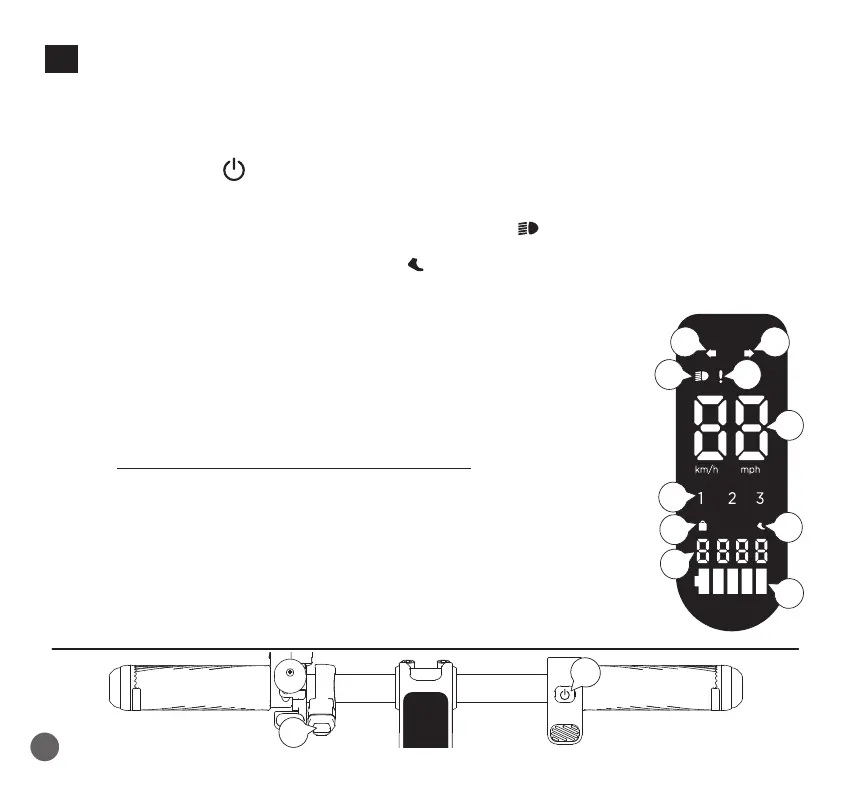
10. DISPLAY AND FUNCTION KEYS
24•
Direction indicator buttons
Short press the left or right button to turn the respective direction indicator on/off; press and hold the
left or right button for 3 seconds to activate the ash function. Press it again to deactivate the ash
function.
25• ON/OFF key / Function selection
- Short press to turn on;
- Long press to turn off;
- Press the button once to turn on the lights (the indicator turns on);
- Double press the button to shift the gear mode:
• WALK : speed of 6 km/h (the indicator turns on)
On WALK mode, the tail light is always on and ashing slowly
• 1 : speed of 10 km/h
• 2 : speed of 15 km/h
• 3 : speed of 20 km/h
- Press the button three times continuously to switch the unit of measurement;
- Press the button four times to display the accumulated mileage.
26• Directional indicators
27• Lights indicator
28• Anomaly report indicator
Please contact an authorized assistance centre
29• Speed indicator
30• Selected speed indicator
31• LOCK function indicator
32• WALK function indicator
33• Odometer
34• Charge level of the battery
25
26 26
27 28
29
30
31
32
33
34
24
102
EN



 To Next Page