LA715
4 User ManualP2640300
2 – GENERAL FUNCTIONS
2.1 – Auto-tare
The Auto-tare function permits to cancel the weight of an empty connector placed on the plate
of the scale.
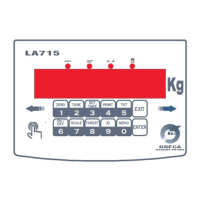
By pressing the key TARE/2 the weight screen resets and the signal led “NET” turns on.
From this moment, each value shown on the screen has to be meant as Net Weight.
The auto-tare operation can be done more than one time and the maximum value that can be
reached while resetting corresponds to the Full-Scale deflection.
If you unload the scale, if the tare is blocked, a negative value is shown; whereas, if the tare
hasn’t been blocked, it is cancelled and the screen shows the zero scale.
2.2 – Numerical Tare
The Numerical Tare function, instead, permits to cancel a known tare value; thus, it is possible
to extract the tare from a full container placed on the scale. Thus, it is possible to see the Net
Weight in the container.
Press the key SET TARE / 3 and key the desiderd numerical value of the tare; confirm
through the key ENTER.
The keyed value is automatically rounded up to the division unity currently active.
If you insert a value that is superior than the Full-Scale, the value is refused.
2.3 – Cancellation of a tare value
In order to cancel the memorized tare, press the key SET TARE / 3 for 3 sec.
The Gross is shown once again and the signal led of the net weight turns off, in order to
confirm that the memorized tare has actually been cancelled.
2.4 – Visualization in High Res mode
This function allows to visualize the current weight in a 10 times higher resolution.
This visualization mode can be activated pressing the key SCALE / 7; the last digit flashes, in
order to highlight that the display is in High Res mode.
It is possible to go back to the standard visualization mode, pressing the key SCALE / 7 once
more.
2.5 – Set-point values setting
If the optional card relè has been installed, the device LA715 allows to manage due
interruption values that can be programmed. These values are associated with 2 relè.
It is possible to connect engines or charging valves with the relè, in order to manage a small
dosage. (The card implies the suppression of a serial port).
It is, then, possible to access the phase for the programming of the interruption values
described before, pressing the key TARGET / 8.
Thus, the display shows SETP 1; make the keyboard slide in order to move to the following
relè.
Press ENTER in order to confirm the relè.
In order to modify the desired intervention value of the relè, key the desired value and confirm
through ENTER (a briefly prolonged pressure of the key EXIT cancels the value)
Prolonging the pressure of the key EXIT for some time, it is possible to exit from the relè
setting phase.


 To Next Page
 Loading...