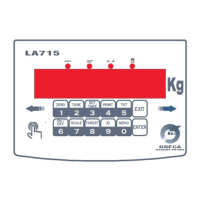
LA715
7 User ManualP2640300
5 SCALE MENU ( BILANC)
Through a prolonged pressure of the key MENU, it is possible to access the menu voices.
Referred to all the metrological settings of the device (ex.: capacity, calibration, ecc.)
5.1 CAPAC
LEGAL
MC
DIVIS
5.2 CAL
5.3 FILTRO
5.4 STABIL
5.5 0-TRAC
5.6 AUTO-0
5.7 G-CAL
5.8 G-USE
5.9 SIGNAL
5.10 ACCESS
5.1 CAPAC : Scale Capacity
In this phase, the metrological features of the weighing system are set.
The capacity expressed in Kg is shown on the screen; key, then, through keyboard the value of the
maximum capacity of the scale, without considering the possible digit that belong to the decimal part.
Confirming through ENTER it is possible to move to
LEGAL : Selection of the legalized weighing system
OIML : Weighing system legalized according to OIML laws
FREE : Weighing system not subject to legalization
The selection is made through the keys SLIDE of the keyboard.
Confirming through ENTER it is possible to move to
MC : Multifield enabling
The Multifield operation allows to divide the weighing range of the scale into two or three 3000 div. Each
weighing subsets or into two 6000 div. Each subsets. It allows, if the loading cell permits that, to get a
higher precision.
OFF : a single weighing field
2 : automatic division into two weighing fields
3 : automatic division into three weighing fields
2/6 : automatic division into two 6000 div. weighing fields.
3/6 : automatic division into two 3000 div. weighing fields
( Default : OFF )
DIV : Division of the scale
The screen shows the division values in kg as a sequence, through the keyboard slide; if the option
“OIML” has been selected, setting a division value that is not legally accepted, the message “INVALID” is
shown.
Accepted values: from 0,000001 kg to 50 kg .
Confirm through ENTER .
5.2 CAL : Zero calibration and Full-Scale
In this step the complete calibration of the weighing system is done.
After confirming through the key ENTER, the display shows “CAL-0” interchanged with the weight.
If the scale is unloaded, confirm through ENTER.
The display shows the number of the points read by the loading cell, “FATTO” and then “CAL-FS”
interchanged with the weight.


 To Next Page
 Loading...