EasyManua.ls Logo

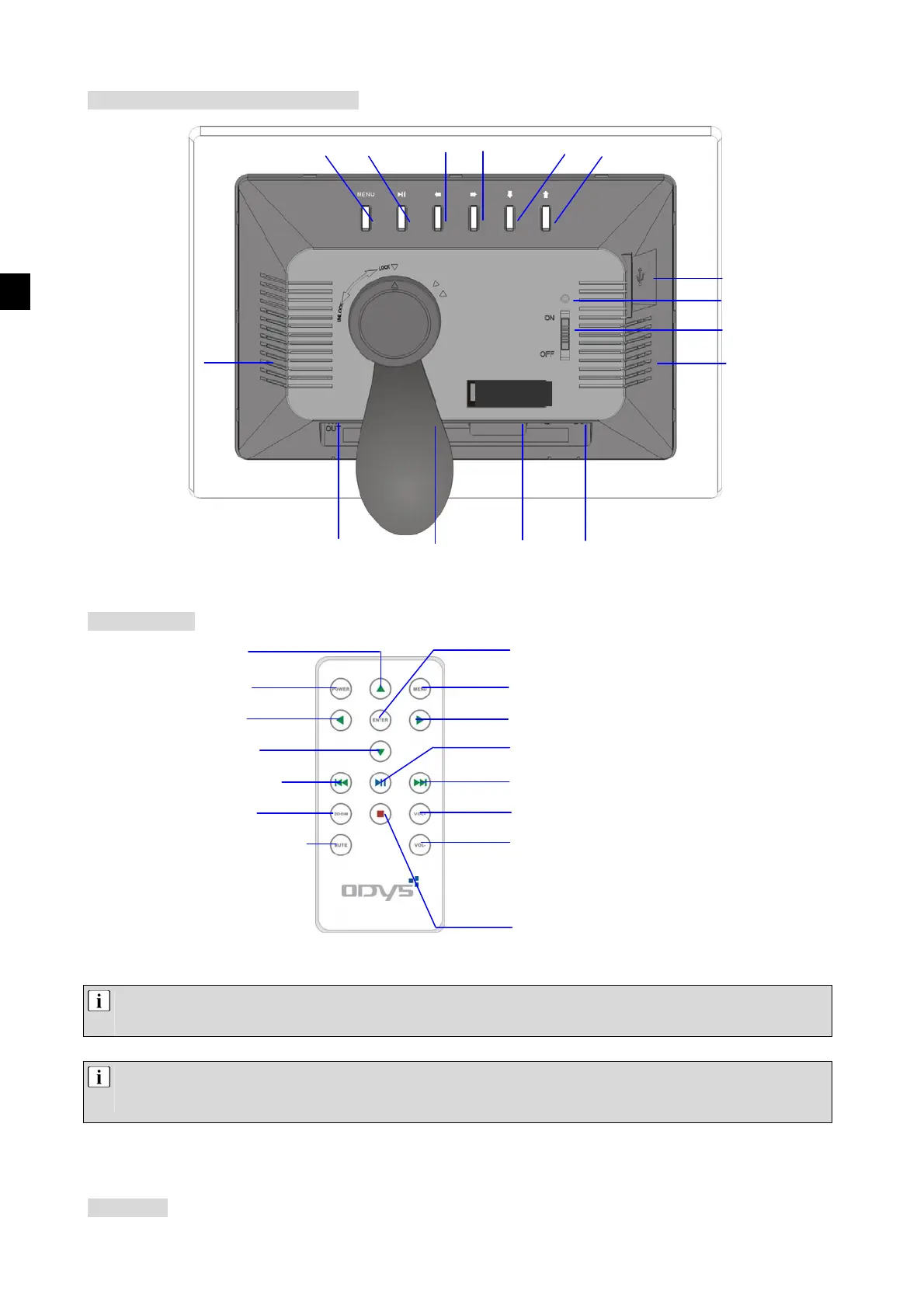
Odys DPF 710 - Device Description; Front and Rear Overview; Remote Control Functions

Odys DPF 710
Print Icon
To Next Page IconTo Next Page
To Previous Page IconTo Previous Page
Loading...
EN
D
D
e
e
s
s
c
c
r
r
i
i
p
p
t
t
i
i
o
o
n
n
o
o
f
f
t
t
h
h
e
e
D
D
i
i
g
g
i
i
t
t
a
a
l
l
P
P
h
h
o
o
t
t
o
o
F
F
r
r
a
a
m
m
e
e
R
R
e
e
m
m
o
o
t
t
e
e
c
c
o
o
n
n
t
t
r
r
o
o
l
l
U
U
s
s
e
e
t
t
h
h
e
e
f
f
o
o
r
r
w
w
a
a
r
r
d
d
a
a
n
n
d
d
b
b
a
a
c
c
k
k
w
w
a
a
r
r
d
d
b
b
u
u
t
t
t
t
o
o
n
n
s
s
t
t
o
o
m
m
o
o
v
v
e
e
t
t
o
o
t
t
h
h
e
e
n
n
e
e
x
x
t
t
f
f
i
i
l
l
e
e
o
o
r
r
p
p
r
r
e
e
v
v
i
i
o
o
u
u
s
s
f
f
i
i
l
l
e
e
.
.
U
U
s
s
e
e
t
t
h
h
e
e
z
z
o
o
o
o
m
m
b
b
u
u
t
t
t
t
o
o
n
n
t
t
o
o
e
e
n
n
l
l
a
a
r
r
g
g
e
e
t
t
h
h
e
e
d
d
i
i
s
s
p
p
l
l
a
a
y
y
e
e
d
d
i
i
m
m
a
a
g
g
e
e
(
(
t
t
h
h
r
r
e
e
e
e
l
l
e
e
v
v
e
e
l
l
s
s
)
)
.
.
I
I
f
f
y
y
o
o
u
u
a
a
r
r
e
e
n
n
o
o
t
t
u
u
s
s
i
i
n
n
g
g
t
t
h
h
e
e
P
P
h
h
o
o
t
t
o
o
F
F
r
r
a
a
m
m
e
e
f
f
o
o
r
r
a
a
s
s
h
h
o
o
r
r
t
t
p
p
e
e
r
r
i
i
o
o
d
d
o
o
f
f
t
t
i
i
m
m
e
e
,
,
y
y
o
o
u
u
s
s
h
h
o
o
u
u
l
l
d
d
s
s
w
w
i
i
t
t
c
c
h
h
o
o
f
f
f
f
t
t
h
h
e
e
p
p
r
r
o
o
d
d
u
u
c
c
t
t
u
u
s
s
i
i
n
n
g
g
t
t
h
h
e
e
P
P
o
o
w
w
e
e
r
r
b
b
u
u
t
t
t
t
o
o
n
n
.
.
T
T
h
h
i
i
s
s
s
s
a
a
v
v
e
e
s
s
e
e
l
l
e
e
c
c
t
t
r
r
i
i
c
c
i
i
t
t
y
y
a
a
n
n
d
d
e
e
x
x
t
t
e
e
n
n
d
d
s
s
t
t
h
h
e
e
l
l
i
i
f
f
e
e
o
o
f
f
t
t
h
h
e
e
s
s
c
c
r
r
e
e
e
e
n
n
.
.
I
I
f
f
y
y
o
o
u
u
p
p
u
u
l
l
l
l
o
o
u
u
t
t
t
t
h
h
e
e
p
p
o
o
w
w
e
e
r
r
s
s
u
u
p
p
p
p
l
l
y
y
a
a
d
d
a
a
p
p
t
t
e
e
r
r
o
o
r
r
u
u
s
s
e
e
t
t
h
h
e
e
o
o
n
n
/
/
o
o
f
f
f
f
s
s
w
w
i
i
t
t
c
c
h
h
o
o
n
n
t
t
h
h
e
e
b
b
a
a
c
c
k
k
o
o
f
f
t
t
h
h
e
e
d
d
e
e
v
v
i
i
c
c
e
e
,
,
t
t
h
h
e
e
d
d
e
e
v
v
i
i
c
c
e
e
w
w
i
i
l
l
l
l
s
s
w
w
i
i
t
t
c
c
h
h
o
o
f
f
f
f
c
c
o
o
m
m
p
p
l
l
e
e
t
t
e
e
l
l
y
y
.
.
T
T
h
h
i
i
s
s
i
i
s
s
r
r
e
e
c
c
o
o
m
m
m
m
e
e
n
n
d
d
e
e
d
d
i
i
f
f
t
t
h
h
e
e
D
D
i
i
g
g
i
i
t
t
a
a
l
l
P
P
h
h
o
o
t
t
o
o
F
F
r
r
a
a
m
m
e
e
i
i
s
s
n
n
o
o
t
t
b
b
e
e
i
i
n
n
g
g
u
u
s
s
e
e
d
d
f
f
o
o
r
r
a
a
n
n
e
e
x
x
t
t
e
e
n
n
d
d
e
e
d
d
p
p
e
e
r
r
i
i
o
o
d
d
o
o
f
f
t
t
i
i
m
m
e
e
.
.
A
A
c
c
c
c
e
e
s
s
s
s
o
o
r
r
i
i
e
e
s
s
USB PORT
ON/OFF SWITCH
ON LAMP
MENU PLAY/PAUSE RIGHT
LEFT DOWN
UP
LOUDSPEAKER
LOUDSPEAKER
POWER CONNECTION MS/SD/MMC/XD
SLOT
CF SLOT
AV OUTPUT
MENU
ON/OFF
RIGHT
LEFT
FORWARD
BAC
K
◄◄
VOLUME +
ZOOM
VOLUME -
MUTE
DOWN
PLAY/PAUSE
ENTER
UP
STOP