EN-4
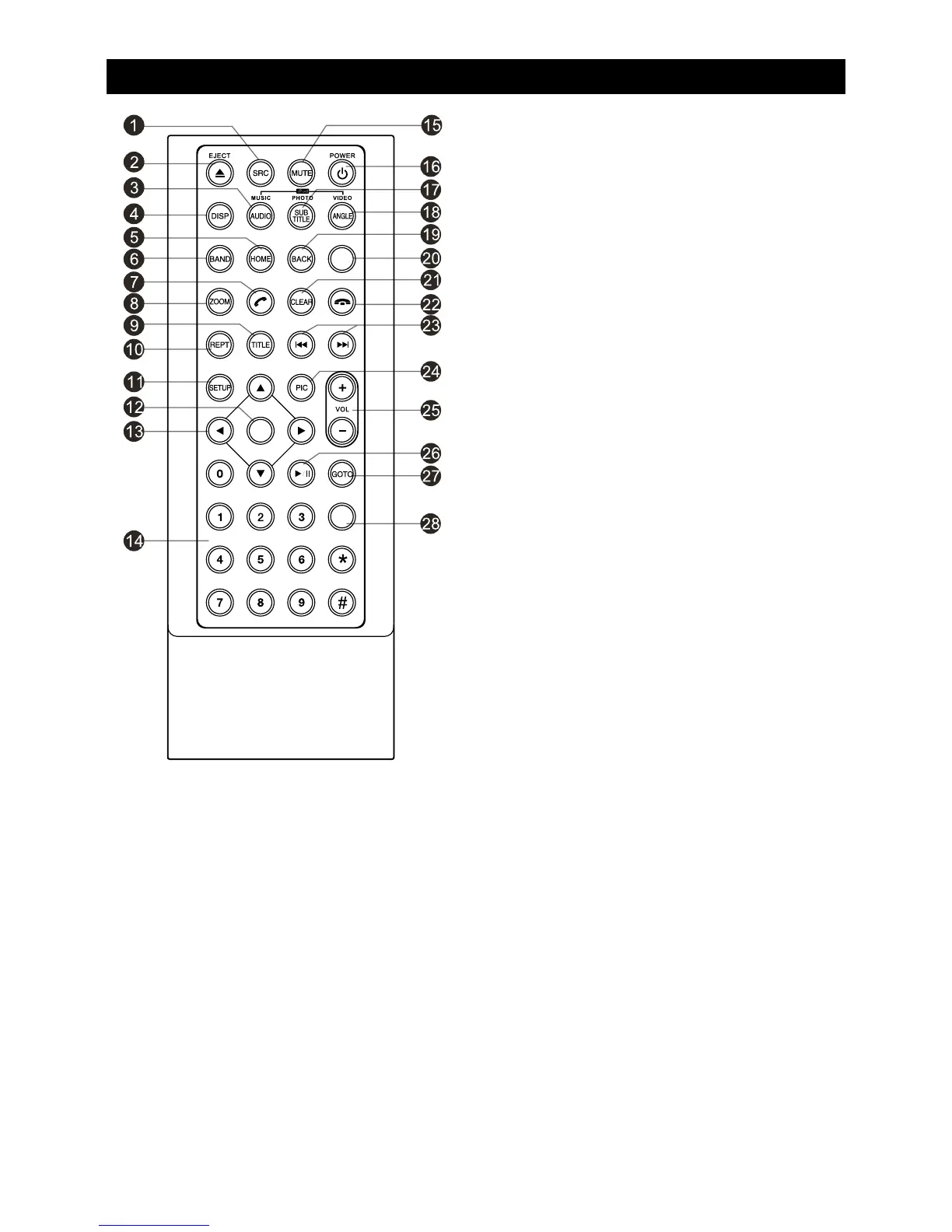
Remote Control
1. Change playing source in sequence
2. Eject the disc
3. Select audio language
Show music catalog
4. Display playback information
5. Show home menu
6. Select radio band
7. Call out - Outgoing call
8. Zoom
9. DVD title
10. Repeat playback
11. Setup menu
12. Enter( OK key)
13. Move the cursor up/down/left/right.
Up/down: Manual tuning
14. Numeric keys
15. Mute the volume
16. Unit power
17. Select DVD subtitle language
18. Select DVD angle
19. Return to previous display
20. Main menu
21. Clear information
22. Hang up
23. Previous/Next
Auto tuning (long press)
Fast backward/forward (long press)
24. Display settings
25. Adjust volume
26. Play / Pause
27. Go-to search
28. Enter the EQ setting
MENU
EQ
OK


 To Next Page