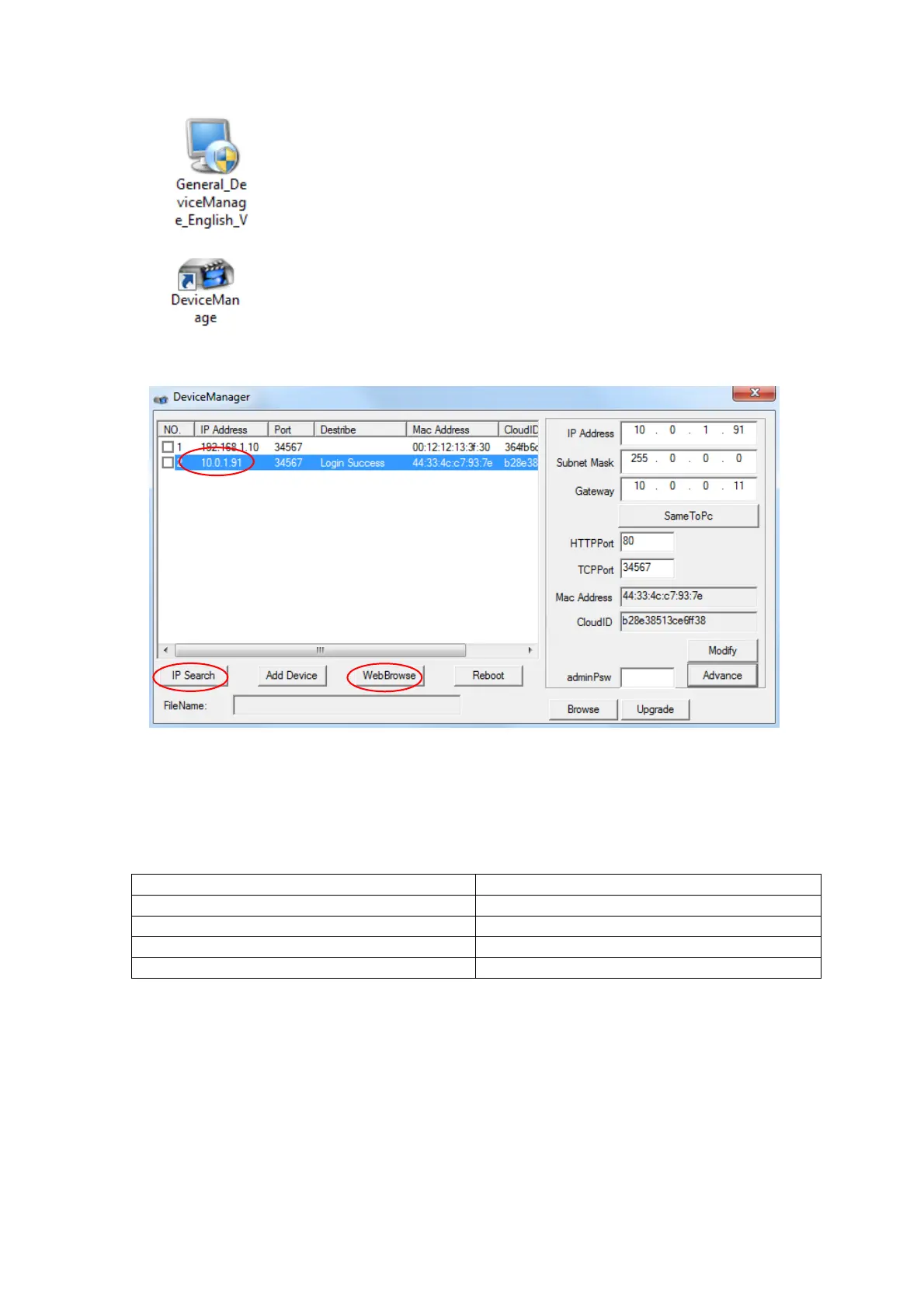
4. Launch‘DeviceManager’.
5. Clickon‘IPsearch’tofindouttheIPaddressandportnumberofthecamera.
6. Selectacamerainthelisttoseethenetworksettingsofthecamera.
7. Confirmthatyourcamera’sSubnetMask,Gateway,DNSServersettingsarethesameasyour
computer’ssettings.Alsoconfirmyourcamera’sIPandcomputer’sIPareinthesamerange.If
thesettingsaredifferent,modifythesettingsandclickon‘Apply’.
NOTE:ThefactorydefaultnetworksettingsofSC10IP
IPAddress 192.168.1.10
SubnetMask 255.255.255.0
Gateway 192.168.1.1
Username admin
Password <blank>
8. Clickon‘WebBrowse’toconnecttothecameraintheinternetbrowser.
NOTE:Allowtheinternetbrowser(IE,Chrome,etc.)toinstalloruseActiveXorplug‐inifawindow
prompts.
Loggingintothecamera
1. Log‐inwindowwillappearwhenconnectingtothecameraintheinternetbrowser.



 To Next Page