EasyManua.ls Logo

OHM-Stat CT-8900 User Manual

OHM-Stat CT-8900
76 pages
To Next Page IconTo Next Page
Page #1 background imageLoading...
Page #1 background image
Static Solutions CT-8900 Combo Tester Instructions 7/22/2009
1
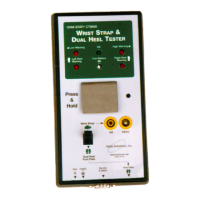
DATA LOGGING WRIST AND FOOT STRAP COMBO TESTER KIT
Includes software, calibration data, bar code,
magnetic stripe and proximity card reader instructions
(For OHM-STAT
CT-8700 Wrist and Foot Strap Combo Tester Kit,
disregard references to data logging, software, and card readers)
SOFTWARE VERSION: __________
SERIAL NUMBER: __________
COMPANY: ______________
MANUAL PRICE: $25.00 US
OHM-STAT
CT-8900
OWNERS MANUAL
& OPERATION GUIDE
Ver 7/22/2009/s
For software Ver 9.33 or higher, and Testers manufactured after 3/12/2002

Table of Contents

Question and Answer IconNeed help?

Do you have a question about the OHM-Stat CT-8900 and is the answer not in the manual?

OHM-Stat CT-8900 Specifications

General IconGeneral
BrandOHM-Stat
ModelCT-8900
CategoryTest Equipment
LanguageEnglish

Summary

Terminology and Calibration Verification

Calibration Verification Process

Details on calibrating the CT-8900 meter to NIST traceable standards and self-calibration.

Wrist Strap and Footwear Testing Procedures

Hardware Installation Guide

Meter Assembly and Connections

Detailed steps for assembling the meter, foot stand, and connecting various readers and cables.

Meter Adjustments and Dip Switch Settings

Guidance on adjusting meter settings using dip switches for different resistance ranges (100M and 1000M units).

Software Installation and Configuration

Installing New Software and Upgrades

Instructions for installing the EsdTest software for the first time or upgrading existing versions.

Card Reader Installation Instructions

Keyboard Wedge/USB Bar Code/Magnetic Stripe Reader Setup

Detailed steps for installing and configuring keyboard wedge and USB barcode/magnetic stripe readers.

Specific RS232 Reader Installations

Instructions for specific RS232 readers like CASI-RUSCO, HID, AWID, and RW-400.

Program Settings and Configuration

General Configuration Settings

Configuring company name, ports, fonts, and general program behavior.

Limit Settings, Passwords, and Unknown IDs

Setting resistance limits, administrator/employee passwords, and handling unknown IDs.

User Information Management

Entering and managing employee data, including strap requirements and leave status.

Certification and Remote Database Setup

Configuring certification expiration warnings and setting up remote databases for employee data.

Multi-Station Configuration and Operation

Setting up and operating multiple test stations connected to one computer.

Operation and Testing Procedures

Operator Testing Instructions (With Computer)

Steps for performing tests when using the software for data logging.

Test Result Examples and Troubleshooting

Examples of test results (good, low, high) and common operator errors with their solutions.

Report Generation and Management

Advanced Feature Setup

Interfacing with Other Databases

Maintenance and Calibration Procedures

Troubleshooting and Frequently Asked Questions (FAQ)

Scanner and Card Reader Problems

Troubleshooting tips for barcode, magnetic stripe, and proximity card readers not functioning correctly.

Test Result and Data Integrity Issues

Addressing discrepancies in test results, time synchronization, and data storage.