Static Solutions CT-8900 Combo Tester Instructions 7/22/2009
40
optional* - Their should either be a STATUS or a RESISTANCE (or both) fields
EsdTest Remote Test Results Data Base setup parameters
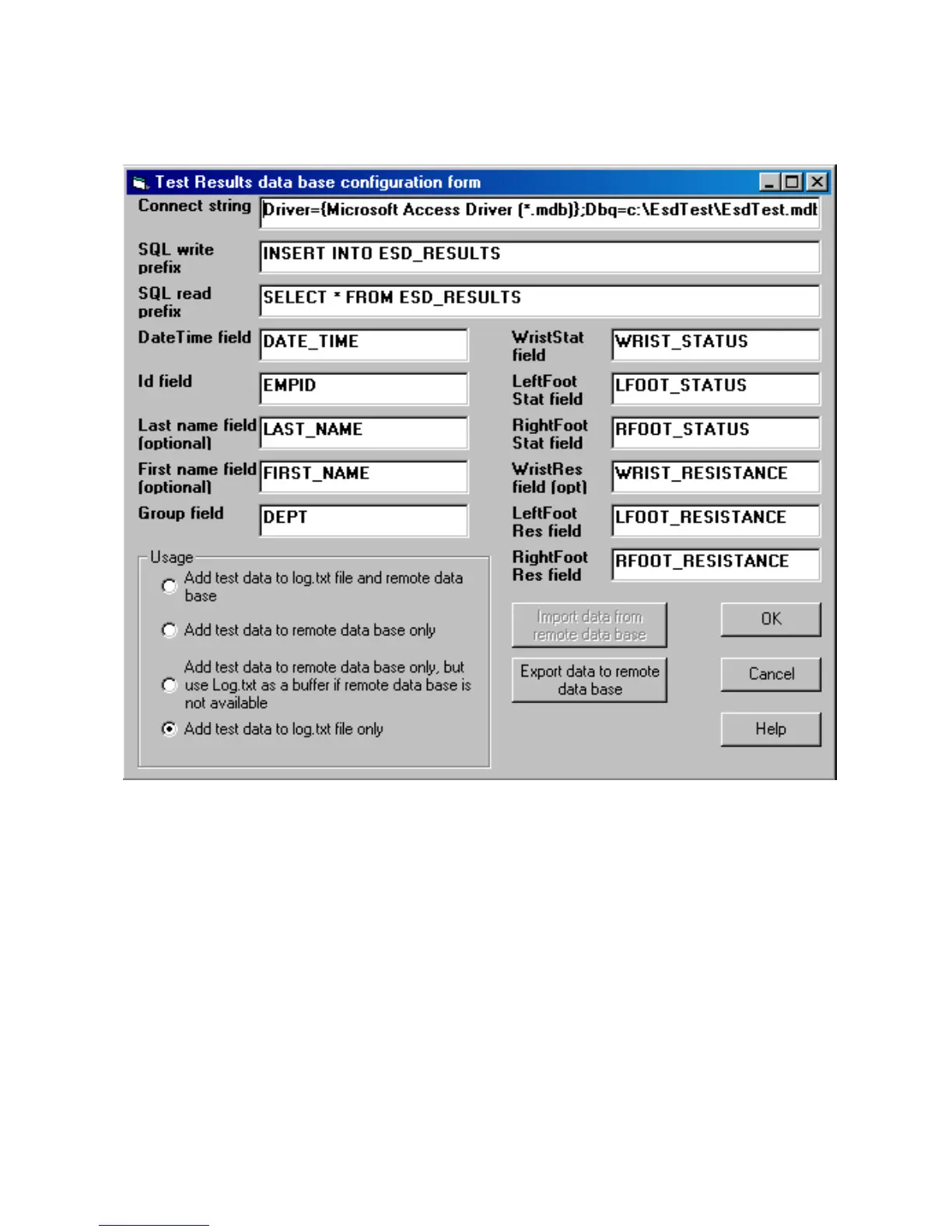
Click Setup, Remote results database to open the setup window and enter the following items:
For Oracle create an ODBC driver instance and a DSN name such as ESD.
Connect String: Enter the data base connection string which for Oracle might look something like:
Server=WPRPROD;DSN=ESD;UID=user1;PWD=pword1
And for SQL2000 might look something like:
UID=;PWD=;Database=ESD_EMP_BADGE;Server=MYSERVER;Driver={SQL Server};DSN=;
And for Access .mdb might look something like:
Driver={Microsoft Access Driver (*.mdb)};Dbq=c:\EsdTest\EsdTest.mdb;Uid=Admin;Pwd=
SQL prefix: To insert the data into a table named ESD_RESULTS, the SQL prefix string would look like:
INSERT INTO ESD_RESULTS (if using an Access table)
If using the “Import measurements from the remote data base” feature to overwrite the log.txt file with the data from the remote data
base, then add the following read prefix strings
SQL read prefix: Select the fields from the view by entering something like:
SELECT * TRANSFER.FROM ESD_RESULTS (if using Oracle)


 To Next Page