EasyManua.ls Logo

OilGear PVM-011 - User Manual

OilGear PVM-011
64 pages
Print Icon
To Next Page IconTo Next Page
Loading...
Bulletin 947070-B THE OILGEAR COMPANY 1
OILGEAR TYPE “PVM” PUMPS -
-011/-014/-022/-025/-034/-046/
-064/-065/-075/-076/-098/-130
SERVICE INSTRUCTIONS
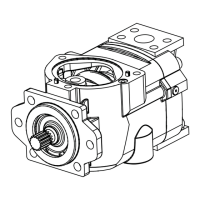
Figure 1. Typical Oilgear “PVM” Open Loop Pump
PURPOSE OF INSTRUCTIONS
These instructions will simplify the installation,
operation, maintenance and troubleshooting of
Oilgear type “PVM” pumps.
Become familiar with the construction, principle of
operation and characteristics of your pump to help
you attain satisfactory performance, reduce shut-
down and increase the pump's service life. Some
pumps have been modified from those described in
this bulletin and other changes may be made
without notice.
REFERENCE MATERIAL
Fluid Recommendations .....................................................................................Bulletin 90000
Contamination Evaluation Guide.........................................................................Bulletin 90004
Filtration Recommendations ...............................................................................Bulletin 90007
Piping Information...............................................................................................Bulletin 90011
Installation of Vertically Mounted Axial Piston Units ...........................................Bulletin 90014
PVM Open Loop Pumps Sales Brochure........................................................Bulletin 47070-B
OILG0173
Bulletin 947070-B
Revised November, 2004
THE OILGEAR COMPANY
2300 South 51st Street
Milwaukee, Wisconsin 53219
Bulletin 947070-B

Questions and Answers

  • L
    Lisa ShermanAug 7, 2025
    Why is my OilGear PVM-011 making excessive noise?
    • K
      Kimberly MeltonAug 7, 2025
      Excessive noise in your OilGear Water Pump can stem from several issues. It might be due to incorrect start/stop procedures under load, so verify the pump's operational procedure. Check the fluid level in the reservoir and supercharge to address potential cavitation. Inspect the system for leaks that could allow air to enter. Ensure the fluid isn't too cold or viscous; check its temperature and type. Examine the suction line for obstructions, excessive length, small diameter, or too many bends. Also, confirm the pump is rotating in the correct direction.
  • J
    Jorge HamiltonAug 12, 2025
    Why is my OilGear Water Pump excessively heating up?
    • D
      Duane JohnsonAug 12, 2025
      If your OilGear Water Pump is overheating, several factors could be responsible. First, ensure the pump isn't operating above its rated or peak pressure by verifying its limitations. Check the fluid level in the reservoir and supercharge. Inspect the system for air leaks. A worn piston pump could also be the cause, so inspect and replace components if necessary. Ensure there's sufficient cooling and that coolers aren't clogged. Use the highest drain port to maintain proper case fluid level. If the OP2 is too large or missing, causing excessive case drain, decrease its size. Finally, inspect the sequence spool; replace it and the valve plate if necessary.
  • K
    Kyle MartinezAug 16, 2025
    How to fix insufficient pump volume in OilGear Water Pump?
    • T
      troyhallAug 16, 2025
      If your OilGear Water Pump isn't delivering enough volume, start by verifying that the load sense differential pressure is less than the pump control setting. Inspect the PC control cartridge for damage or obstructions; clean or replace it as needed. Adjust the stroke limiter screw (70) counter-clockwise. Check for obstructions in the suction circuit and verify supercharge. Ensure the drive motor speed is sufficient. Finally, inspect the cylinder barrel (38) and port plate (43) for wear or grooves, and replace components if necessary.
  • U
    uhooverAug 20, 2025
    What to do if OilGear PVM-011 Water Pump operation is irregular?
    • K
      Kevin MitchellAug 20, 2025
      Irregular operation of your OilGear Water Pump can be caused by several factors. Check the system flow control valve/orifice for fluctuating load sense differential pressure. Inspect the control piston (19), sequence valve (54), or PC control cartridge (55) for faults and replace if necessary. Verify the fluid level and supercharge. Inspect the system for air leaks. If low viscosity fluid is used, increase the size of OP2. If the remote PC setting is close to the pump PC setting, increase the pump PC setting. Inspect for worn axial piston pump components. Finally, inspect the output circuit components (cylinder, motors, valves) and replace if faulty.
  • B
    Barbara DixonAug 25, 2025
    How to troubleshoot unresponsive control on OilGear PVM-011 Water Pump?
    • C
      Christopher MckeeAug 25, 2025
      If your OilGear Water Pump control is unresponsive, start by inspecting the stability orifice (OP2) for any blockage and clean it if contaminated. Also, inspect the PC control cartridge (55) for damage and replace if necessary.
  • G
    Gabriella BentonAug 29, 2025
    What causes excessive pressure in OilGear PVM-011 Water Pump?
    • B
      Brian MyersAug 29, 2025
      Excessive pressure in your OilGear Water Pump can arise from faulty output circuit components, so check the relief valves. Also, inspect the PC control cartridge (55) for faulty operation and replace components if needed. Lastly, inspect the saddle bearing (30) for wear or breakage and replace components if necessary.
  • J
    jperkinsSep 1, 2025
    Why is my OilGear Water Pump losing pressure?
    • D
      David MillerSep 1, 2025
      A loss of pressure in your OilGear Water Pump can be due to a worn piston pump. Inspect the components and replace them as necessary.

OilGear PVM-011 Specifications

General IconGeneral
BrandOilGear
ModelPVM-011
CategoryWater Pump
LanguageEnglish

Related product manuals