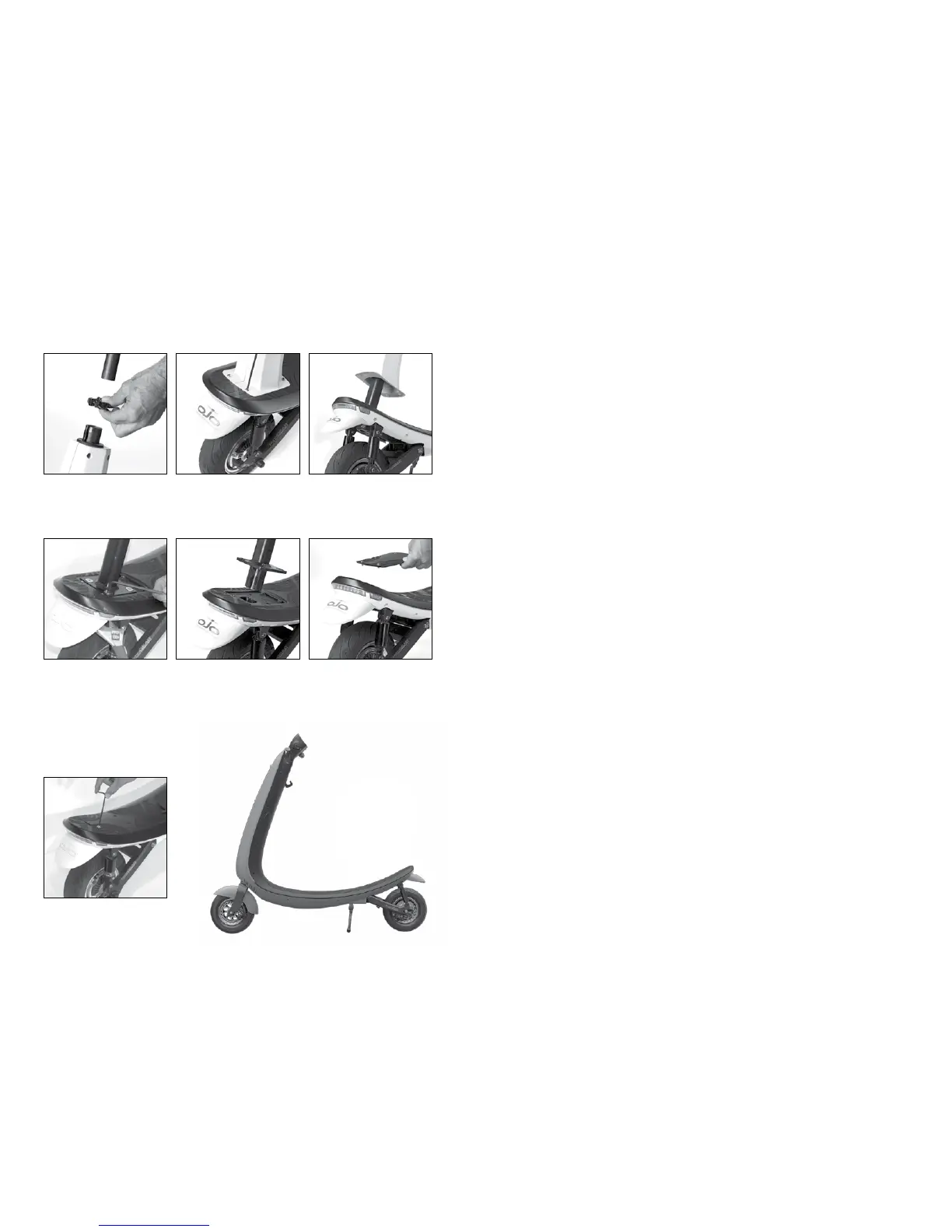
Converting to a stand up only scooter
Some riders may prefer to remove the entire seat assembly for standing,
and a more versatile riding experience.
How to remove seat post assembly:
Speakers
Dual Bluetooh speakers are integrated into the OjO and are tuned for your
enjoyment. Volume can be controlled on the display. Do NOT wear
headphones while riding the OjO.
Storage
The OjO should be stored in a clean dry space. Extreme moisture and
dampness should be avoided. Remove the battery pack and store it in
a climate controlled area. Note: Failure to recharge battery every two months
may result in a battery that will not accept a charge.
Suspension
Your OjO is equipped with full front and rear suspension. It is NOT
intended for off road use. Jumping, wheelies, and stunt riding is not
recommended and can result in injury or death. While it is designed to
be maintenance free, periodic inspection is necessary.
Throttle
To accelerate, using your thumb, carefully press the thumb throttle
(located on the right side of handlebars) downwards. To decelerate, simply
release pressure from the thumb throttle.
Tires
Routinely inspect tires for excessive wear and cracks in the sidewall.
Replace tires when necessary. The front and rear tires on the OjO have
a recommended pressure of 30 PSI. Replacement tires are available at
ojoscooter.com or at your authorized OjO dealer.
WARNING: Over or Under inflation may seriously affect safety and rideability.
WARNING: RIDING ON EXCESSIVELY WORN OR DAMAGED TIRES CAN AFFECT
THE MANEUVERABILITY AND STOPPING OF YOUR OjO, WHICH COULD RESULT
IN SERIOUS INJURY OR EVEN DEATH.
TROUBLESHOOTING
OjO won’t turn on
Make sure OjO battery has a charge (See ”charging your battery” page #10);
Make sure battery is properly connected (See “Battery Removal” page #11);
Make sure key fob battery is good. (See “Replacing key fob battery” page #15)
OjO won’t charge
Make sure OjO medallion is illuminated. If not, make sure GFI/breaker
on power outlet is on. Make sure battery is properly connected.
(See “Battery Removal” page 6)
OjO steering is heavy
Check tire pressure is between 25 and 30 Psi. Low tire pressure causes
difficult steering and reduced maneuverability.
Loss of acceleration
Battery may be within last 20% of capacity. (See Charging page#10) or,
brake lever is held while throttle is applied. Must release brake lever.
Need Help?
Visit our website at www.ojoscooter.com or call us Toll Free at 1 877 557 1053.
20 21
1. Release seat clamp and
remove seat and post.
4. Remove four Allen head
bolts and lock nuts (tools
not included).
To perform this operation
you will need a six
millimeter Allen wrench
and a 17 millimeter open
end wrench.
7. Keep all removed seat
components in a safe place
for future use.
2. Remove four Allen screws
that are located at the
base of the seat tower.
5. Remove seat tower.
3. Slide up and remove
plastic seat tower cover.
6. Install seat cover plate
(included in carton)
using the four Allen
screws removed in step
number two above.
www.ojoscooter.com www.ojoscooter.com


 To Next Page
 Loading...