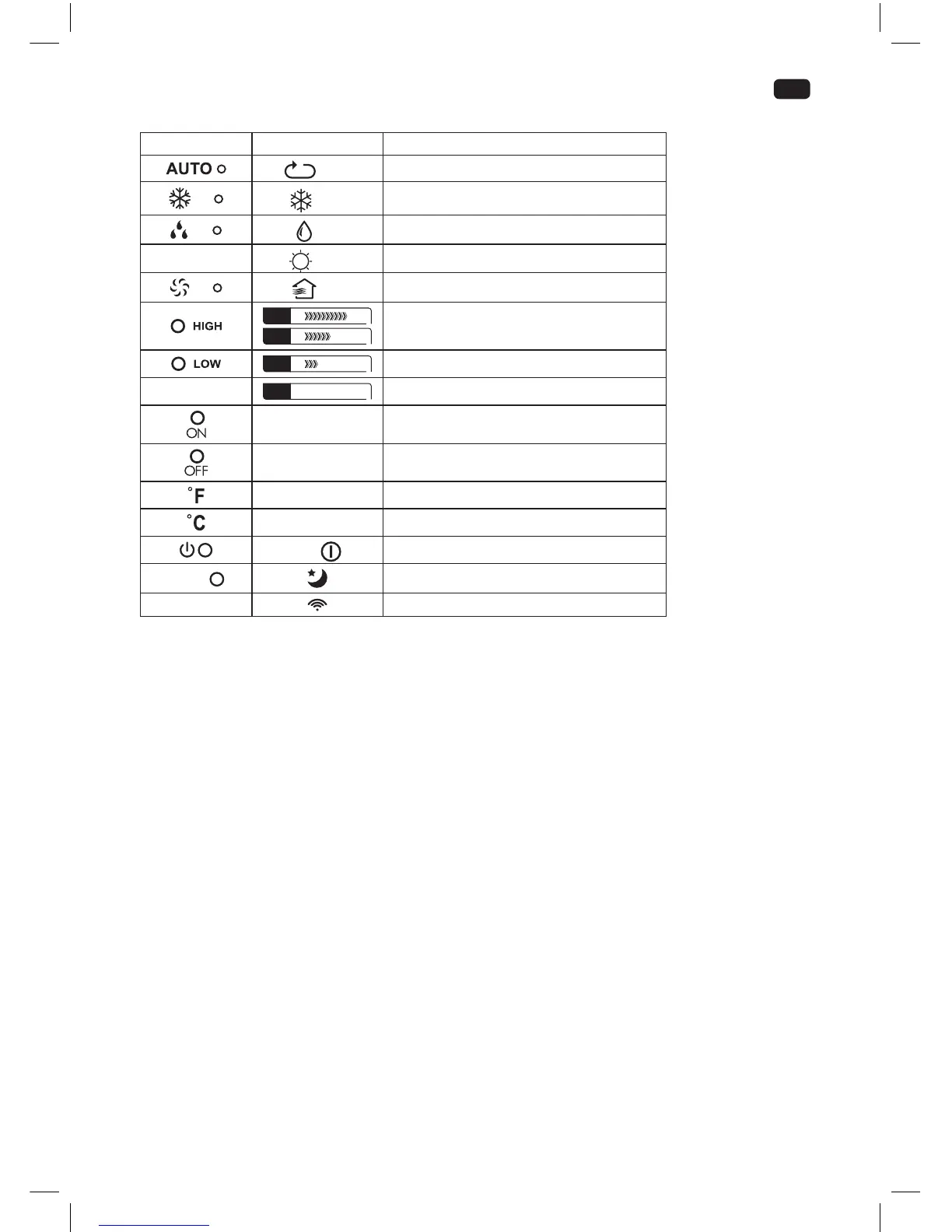
Indicators
Control panel Remote control Function
Auto
product in automatic mode
Cool
product in cooling mode
Dry
product in dehumidifying mode
-
Heat
function not provided
Fan
product in fan mode
FAN
FAN
fan speed set to high
FAN
fan speed set to low
-
FAN Auto
fan speed set to Auto
Timer On auto-on timer set
Timer O auto-o timer set
- temperature displayed in Fahrenheit (°F)
- temperature displayed in Celsius (°C)
— /
product in standby / on
SLEEP
sleep mode active
-
transmitting signal
Notes:
• Every press of a button on the control panel and every successfully transmitted signal from the remote
control is conrmed by an audible signal.
• All function of the product can be controlled via the control panel or the remote control, with
exception of the display illumination LED and SHORTCUT buttons, which are to be found exclusively
on the remote control.
IM_OAC2221_161201_V04_HR.indb 25 1/12/16 4:31 PM


 To Next Page