26
EN
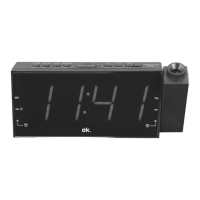
PROJECTOR FUNCTION
WARNING! Do not look directly into the projection beam.
6
This function makes it possible to project the set time onto
a wall or ceiling.
1. Press the button PROJECTION MODE, to switch the
projector function on or o.
2. Press again the button PROJECTION MODE, to rotate
the projected time by 180 degree.
3. Rotate the adjustment ring clockwise or anti-clockwise,
to focus the projected time.
4. Move the projector lense, to adjust the position of the
projected time on the wall / ceiling.
Note: The projector function works best in darkened
rooms. The used wall / ceiling can be between 90 cm and
275 cm away.
IM_OCR160PR_170810_V04_HR.indb 26 10/8/17 2:58 pm


 To Next Page