26
EN
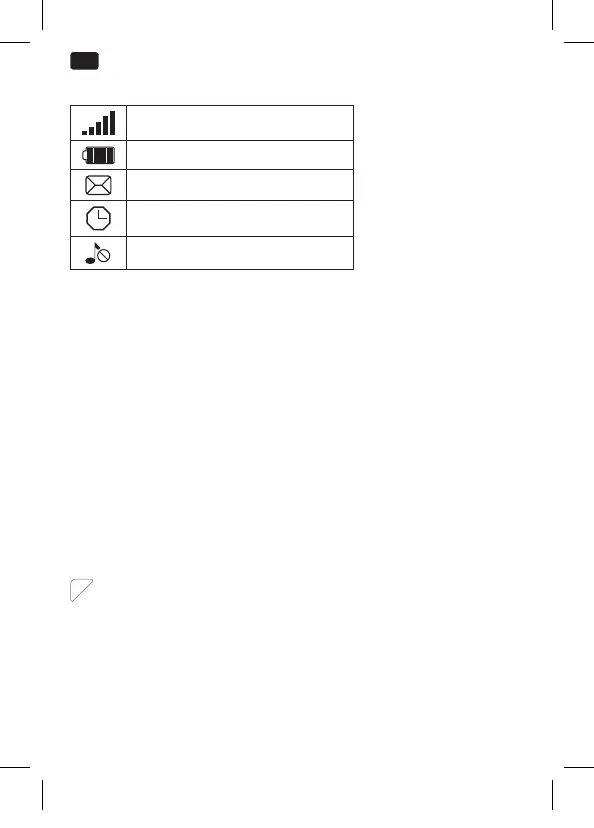
DISPLAYED SYMBOLS
Network’s signal strength
Battery’s charging status
New SMS
Alarm set and activated
Ringtone deactivated
BEFORE FIRST TIME USE
Remove the product and accessories carefully from the original
packaging. It is recommended to keep the original packaging for
storage. If you wish to dispose of the original packaging, please
observe applicable legal provisions. Should you have any questions
regarding proper disposal, contact your local waste management
center.
Inspect the delivery contents for completeness and damages.
Should the delivery contents be incomplete or damaged, contact
your sales outlet immediately.
Before it is used for the rst time your mobile phone must be
assembled and the battery must be fully charged. Follow the
directions in the following section in that regard.
INSERTING THE SIM CARD AND THE BATTERY
1
Remove the cover from the back. Slide a SIM card (A1, A2) into
the appropriate slot. If you wish, insert a memory card (B) into
the appropriate slot (lift the clasp, insert Micro SD card, close
the clasp and lock by sliding it). Insert the battery provided.
Make sure that the contacts are located on the correct side. Put
on the cover.
Note: This mobile phone can be used with 2 SIM cards.
IM_OMP10_180530_V04_A_HR.indb 26 30/5/18 9:07 am


 To Next Page