OKILAN 6020E PLUS INSTALLATION GUIDE
HARDWARE TROUBLESHOOTING
5
H
ARDWARE
T
ROUBLESHOOTING
S
TATUS
I
NDICATOR
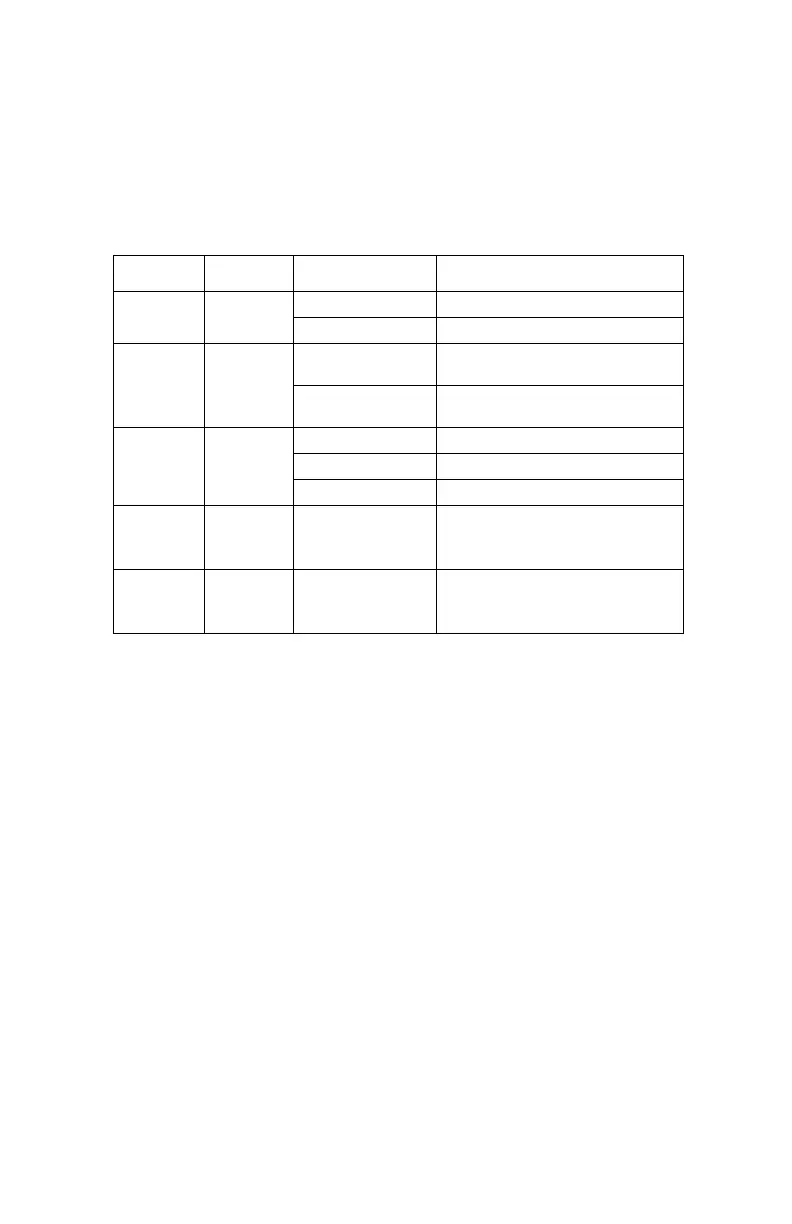
The back of the print server provides lights for easy monitoring.The
following table defines the function of each light.
LABEL COLOR STATE STATUS
Power Orange ON The unit is receiving power.
OFF The unit is not receiving power.
100
Base-T
Green ON The unit is transmitting at 100
megabits per second.
OFF The unit is transmitting at 10
megabits per second
Link Yellow ON There is an Ethernet link
OFF There is no Ethernet link.
Blinking There is network activity.
100
Base-T
+Link
Yellow,
Green
Blinking
Alternately
A fatal error or exception has
occurred.
100
Base-T
+Link
Yellow,
Green
Blinking
Simultaneously
The firmware is being updated.



 To Next Page