OkiLAN 8100e Configuration 26
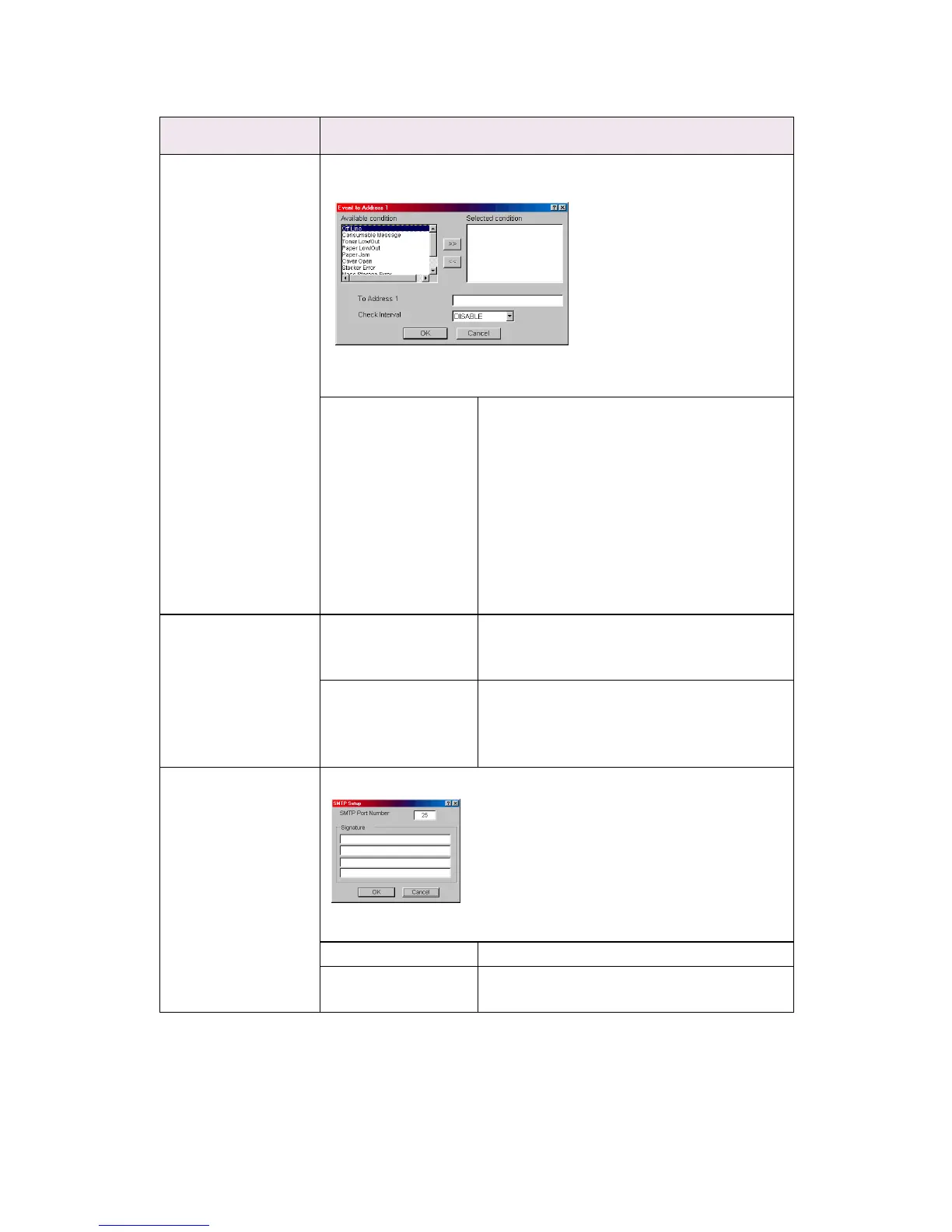
1—5 By selecting each button, the following dialogue box is displayed:
In the dialogue box, the following items can be configured:
Available condition
and Selected
condition
Select each E-Mail alert condition.
Select a condition from Available Condition
list and click >> button. The selected
condition is copied to Selected condition
list. Available conditions are:
Off line, Consumable Message, Toner Low/
Out, Paper Low/Out, Paper Jam, Cover
Open, Stacker Error, Mass Storage Error,
Recoverable Error, Service Call Request and
Finisher Error.
1-5 To Address 1—5 Set E-Mail addresses to that E-Mail should
be send. Up to five E-Mail addresses can be
set.
Check Interval Set interval that the OkiLAN 8100e checks
specified event(s). An E-Mail is sent when
specified event(s) occurs when DISABLE is
selected.
Advanced . . . By selecting the button, the following dialogue box is displayed:
In the dialogue box, the following items can be configured:
SMTP Port Number Set port number of SMTP.
Signature Set up to four signature lines. Signatures
added to the bottom of an E-Mail.
Location Comments



 To Next Page