This document describes the OKIN Refined Electric Technology Co., Ltd remote control system, which is designed for adjustable beds. The system includes a remote control handset, a control box, and various actuators and accessories.
Function Description
The remote control system allows users to adjust the position of an adjustable bed, control massage functions, and manage under-bed lighting. It supports both wired and wireless operation, with options for synchronizing two control boxes for larger bed setups.
Important Technical Specifications
- Power Supply: The control box operates on 29VDC at approximately 2A, powered by an SMPS (Switch Mode Power Supply).
- Backup Power: In case of AC power failure, 18VDC batteries (9V each, new) can be used for backup power, primarily for flattening the bed plate without load. Massage motors are not recommended for use with battery power.
- Wireless Pairing: The system uses a wireless pairing operation between the remote control and the control box. Each control box should be paired with a different remote control, especially in close proximity (e.g., within the same house), to avoid interference. DIP switch settings on the remote control differentiate between systems.
- Synchronous Operation: Two control boxes can be connected via a synchro cable to work synchronously, allowing for unified control of a larger bed system. Even when synchronized, each control box must be paired with a different remote control with distinct DIP switch positions.
- FCC Compliance: The device complies with Part 15 of the FCC Rules, indicating it is designed to operate without causing harmful interference and to accept any interference received.
Usage Features
The remote control handset features a variety of buttons for different functions:
Position Adjustments
- HEAD UP/DN: Controls the head actuator. Press and hold to move up or down; release to stop.
- FOOT UP/DN: Controls the foot actuator. Press and hold to move up or down; release to stop.
- HEAD & FOOT UP/DN: Simultaneously moves both head and foot actuators up or down. Press and hold; release to stop.
- ZG (Zero Gravity): A single click moves the bed to a preset zero gravity position. Can be stopped by clicking any button.
- ANTI SNORE: A single click moves the bed to a preset anti-snore position. Can be stopped by clicking any button.
- FLAT: A single click moves the bed to a flat position. Can be stopped by clicking any button.
- MEMORY A/B: These buttons recall user-preset positions. A single click moves the bed to the stored Memory A or B position. Can be stopped by clicking any button.
Massage Functions
- INTENSITY (+/-): Adjusts the vibrating intensity. There are 3 levels:
- Level 1: 20% PWM duty cycle (weakest)
- Level 2: 35% PWM duty cycle
- Level 3: 50% PWM duty cycle (strongest)
Clicking '+' increases intensity; clicking '-' decreases intensity.
- SPEED (+/-): Adjusts the vibrating speed/mode. There are 4 levels:
- Level 0: 500ms ON, 500ms OFF
- Level 1: 350ms ON, 350ms OFF
- Level 2: 200ms ON, 200ms OFF
- Level 3: Continuous vibration
Clicking '+' increases speed; clicking '-' decreases speed. If the vibrator is stopped, pressing any of the four intensity/speed buttons will start it at intensity level one and the previous speed.
- TIMER/ALL OFF: This button has multiple functions:
- Stop All Moves: A single press stops all actuators and vibrators.
- Massage Timer: Changes the vibrating time circularly through 3 levels:
- 10 minutes (LED flashes once)
- 20 minutes (LED flashes once)
- 30 minutes (LED flashes once)
The vibrator will run for the set time and then automatically stop if no other vibrating-related button is pressed.
Lighting and Other Features
- FLASHLIGHT: Toggles the flashlight on the remote control. If turned on by pressing the button, it stays on as long as the button is held. After release, it remains on for several seconds before turning off with the backlight.
- UNDERLIGHT: Toggles the under-bed light. If turned on by pressing the button, it stays on for 5 minutes and then automatically turns off if no other button is pressed.
- Backlight: Blue LEDs for backlight are on as long as any button is pressed and turn off three seconds after all buttons are released. A blue LED for power is always on when the device is powered.
Maintenance Features
Setting Special Positions
The user can change or set the Zero Gravity, Memory A, and Memory B positions:
- Click the FLAT button to flatten the bed.
- Adjust the Head and Foot positions to the desired setting using the HEAD UP/DN or FOOT UP/DN buttons.
- Press and hold the TIMER/ALL OFF button for 3 seconds until the backlight LED starts flashing.
- Release the TIMER/ALL OFF button, then click one of the ZG, MEMORY A, or MEMORY B buttons before the LED stops flashing. The flashing will stop, indicating successful storage.
Restoring Default Positions
All Zero Gravity, Memory A, and Memory B positions can be restored to their default settings:
- Press and hold the TIMER/ALL OFF button for approximately six seconds.
- The backlight LEDs will flash and then stop, indicating the restoration is complete.
Wireless Pairing Operation
- Set the DIP Switch on the remote control to a unique position and insert batteries.
- Power on the control box.
- Press and hold the pairing Tact Switch on the control box until its pairing LED turns off, then release. The LED will flash, indicating it's ready to pair.
- Simultaneously press and hold the Head-Up and Foot-Up buttons on the remote control until its backlight LED flashes. Release the buttons. The remote will search for the control box.
- Once both the remote's backlight and the control box's pairing LED stop flashing, pairing is complete. Test by pressing actuator buttons; a click sound from the control box relays confirms success. If unsuccessful, repeat the steps.
Configuring for Synch
To synchronize two control boxes:
- Connect the two control boxes with the provided synchro cable.
- Ensure each control box is paired with a different remote control, each having a different DIP-Switch position. This is crucial to avoid interference and ensure proper synchronous operation.

 Need help?
 General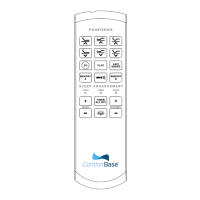

 To Next Page
