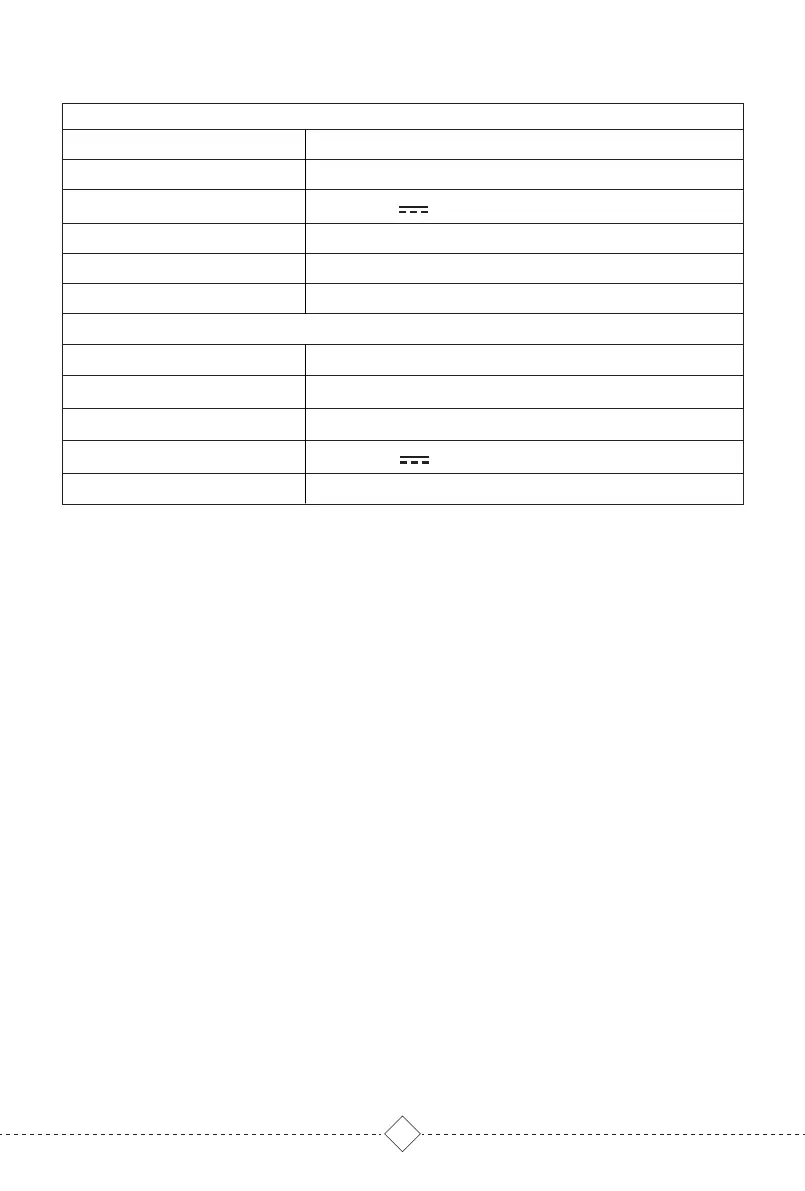
8. Product Parameter
Robot Vacuum Cleaner
14.8V/3200mAh Li-ion battery
4-5 Hours
19V 0.6A 11.4W
33*32.5*10CM
L3
3.0KG
9. Factory Default Reset
10. Environmental Protection Instructions
This equipment should be operated with a minimum distance of 20cm between the
radiator and your body.
Long press RESET button on the side of the Robot for 10 seconds until hearing "Start
factory default reset" and power on music, Robot will automatically restart, and
related settings such as regular cleaning, map and WIFI will be restored to the
default.
Due to chemical substances contained in the built-in lithium-ion battery of the robot
may pollute the environment, please take out the battery before discarding product,
and discard the lithiumion battery in accordance with relevant local laws and
regulations.
1. Remove the product from self-empty base and turn off the power switch.
2. Remove the battery cover screw and remove the battery cover.
3. Press the buckle to pull out the battery cable plug and remove the battery.
Warm Tips:
*Please make sure to remove the battery when the power switch is turned off.
*Please disassemble the entire battery pack together, do not damage the battery
pack shell, so as to avoid short circuit or material leakage. If accidentally contact
with battery exudate, please rinse with plenty of water and seek medical advice in
time.
30*20*26.2CM
19V 0.6A
24
3.65KG
1000W
Model No
Robot Size
Robot Rated Input
Battery
Charging Time
Net Weight
Self-empty Base
Size
Output
Net Weight
Power
Dust Bag
5L


 To Next Page
 Loading...


