SETTING
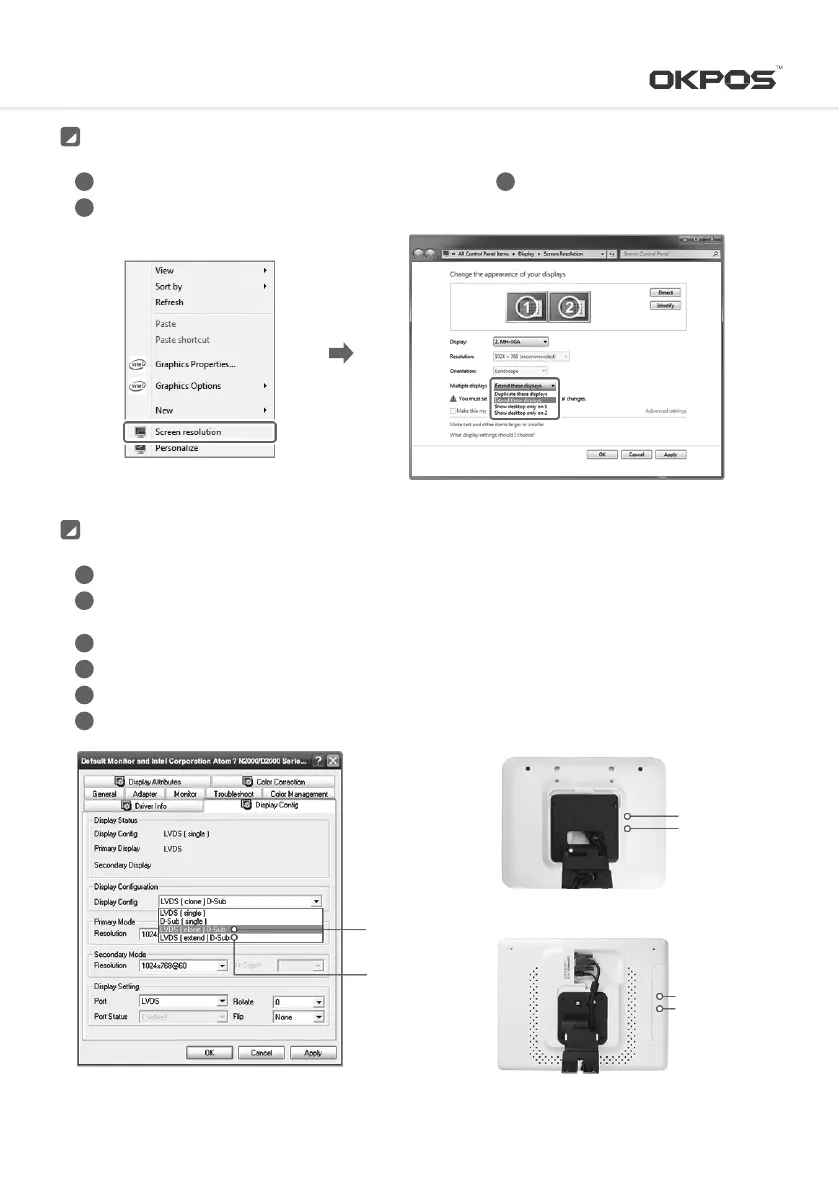
After connecting dual monitor, turn on power and boot by OS
Select “Screen resolution”
1
2
3
Installation (WINDOWS 7)
Select one among multi display
3
Turn on power and boot it using OS
After click the Windows start button, select ‘Setting’ ▶ ‘Control Panel’ in order and click the
‘Display’ icon on the ‘Control Panel’ screen
After ‘Display Registered Information’ screen appeared, click the ‘Advanced’ button on ‘Setting’ tab
After select <Display Config> tab, select ‘Display Configuration’
Choose Resolution of Primary Mode and Secondary Mode (default 1054X768@60)
Press the ‘Auto Detection’ button
1
2
3
4
5
6
Installation (WINDOWS XP)
<15inch Dual Monitor>
Power Button
Auto Detection
<9.7inch Dual Monitor>
Power Button
Auto Detection
Extended Mode:
LVDS [extend] VGA
Clone Mode:
LVDS [clone] VGA
15
Service Manual



 To Next Page